

Last verified: October 7, 2026
DeepSeek API error codes tell you whether a failed request is caused by request formatting, authentication, billing, invalid parameters, rate limits, server errors, or server overload. The most important rule is simple: do not retry every error the same way.
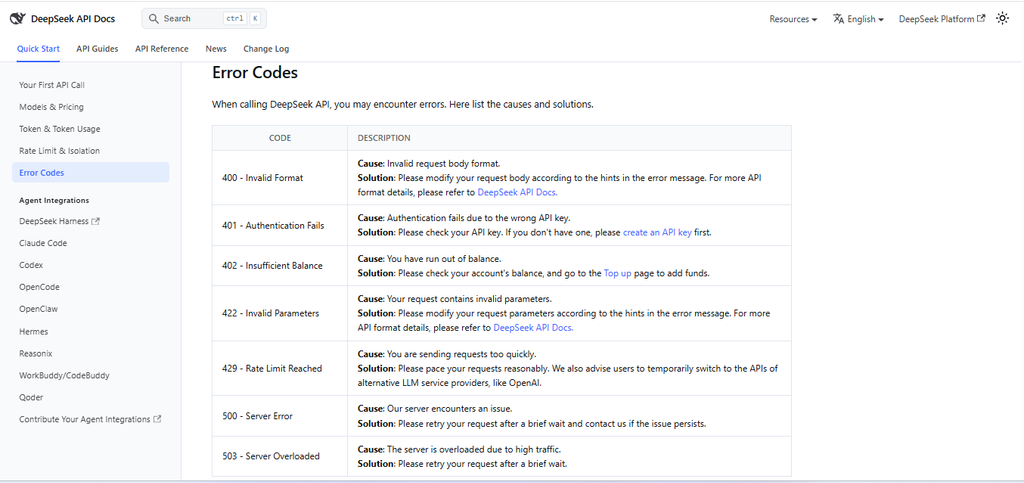
According to DeepSeek’s official error-code documentation, the main API errors are 400, 401, 402, 422, 429, 500, and 503. Some require fixing your request or account state. Others can be retried carefully after a short wait. DeepSeek Error Codes
In practice, 400, 401, 402, and 422 usually mean you should fix something before retrying. 429 means your request rate or concurrency is too high and needs throttling or queueing. 500 and 503 may be retried cautiously with backoff, but they should still be monitored.
Also check your model names. Current DeepSeek API documentation lists deepseek-flash and deepseek-v4-pro. DeepSeek says deepseek-flash is the model name for DeepSeek-V4.1-Flash, while legacy names such as deepseek-v4-flash and deepseek-v4-flash-vision-exp are accepted only as compatibility aliases. DeepSeek Models & Pricing
Quick table: DeepSeek API error codes and fixes
Use this table first when a DeepSeek API request fails.
| Code | Official meaning | Likely cause | Should you retry? | Practical fix | Production alert severity |
|---|---|---|---|---|---|
400 | Invalid Format | The request body format is invalid. | No blind retry. | Fix JSON shape, endpoint format, headers, SDK serialization, or malformed request body. | Medium if isolated; high if a deployment causes many 400s. |
401 | Authentication Fails | The API key is wrong, missing, expired, deleted, or not sent correctly. | No blind retry. | Check the DeepSeek API key and the Authorization: Bearer header. | High, because production traffic cannot authenticate. |
402 | Insufficient Balance | The account has run out of balance. | No aggressive retry. | Check account balance, billing, top-up status, and current token pricing. | High, because service may stop until billing is fixed. |
422 | Invalid Parameters | The request contains invalid parameters. | No blind retry. | Fix model name, unsupported fields, bad parameter values, bad tool schema, or invalid request options. | Medium to high, depending on traffic impact. |
429 | Rate Limit Reached | Requests are being sent too quickly, or account-level concurrency is exceeded. | Retry only after throttling and backoff. | Queue requests, reduce parallelism, add backoff with jitter, and monitor in-flight requests. | High if sustained, because users may see failed or delayed requests. |
500 | Server Error | DeepSeek’s server encountered an issue. | Yes, cautiously. | Retry after a brief wait, monitor recurrence, and contact DeepSeek if it persists. | High if widespread or persistent. |
503 | Server Overloaded | The server is overloaded due to high traffic. | Yes, cautiously. | Retry after a short wait, use graceful degradation, and avoid retry storms. | High if sustained during production traffic. |
How to decide: fix, retry, check balance, or throttle?
The fastest way to debug DeepSeek API errors is to classify the error before taking action.
| Error type | Codes | What it usually means | Best first action |
|---|---|---|---|
| Request bug | 400, 422 | Your request body or parameters are wrong. | Fix the payload, model name, endpoint, or unsupported field. |
| Authentication issue | 401 | The API key is missing or invalid. | Check your DeepSeek key, environment variable, and Bearer Auth header. |
| Billing issue | 402 | Your account does not have enough balance. | Check topped-up or granted balance and current usage. |
| Traffic pressure | 429 | Your account is sending too much traffic or exceeding concurrency. | Throttle, queue, and retry with backoff. |
| Provider-side issue | 500, 503 | Server error or server overload. | Retry cautiously, monitor, and degrade gracefully if needed. |
Do not treat all errors as transient. Retrying a malformed request, a wrong API key, or an account with no balance can turn one problem into a noisy production incident.
400 Invalid Format: how to fix request-body issues
DeepSeek documents 400 - Invalid Format as an invalid request-body format. The official fix is to modify the request body according to the hints in the error message and refer to the API documentation for the correct format. DeepSeek Error Codes
Common causes include:
- Malformed JSON.
- Wrong
Content-Type. - Sending an object where the API expects an array.
- Sending malformed
messages. - Using the wrong endpoint format.
- SDK serialization problems.
- Mixing OpenAI-format and Anthropic-format request shapes.
- Passing a body that your HTTP client changed unexpectedly.
Do not automatically assume a 400 is a DeepSeek outage. First validate the JSON and compare your request with the current DeepSeek API reference.
401 Authentication Fails: how to fix API key issues
DeepSeek documents 401 - Authentication Fails as authentication failure due to the wrong API key. The official API reference says you must create a DeepSeek API key first, and the authentication scheme is HTTP Bearer Auth. DeepSeek API reference
The safe header pattern is:
Authorization: Bearer ${DEEPSEEK_API_KEY}Common causes of 401 include:
- You used an OpenAI API key instead of a DeepSeek API key.
- Your
DEEPSEEK_API_KEYenvironment variable is missing in the process that sends the request. - The key has extra whitespace or was copied incorrectly.
- The key was deleted, rotated, or revoked.
- Your deployment environment did not receive the secret.
- The request is missing the
Bearerprefix. - Your code is calling the wrong base URL.
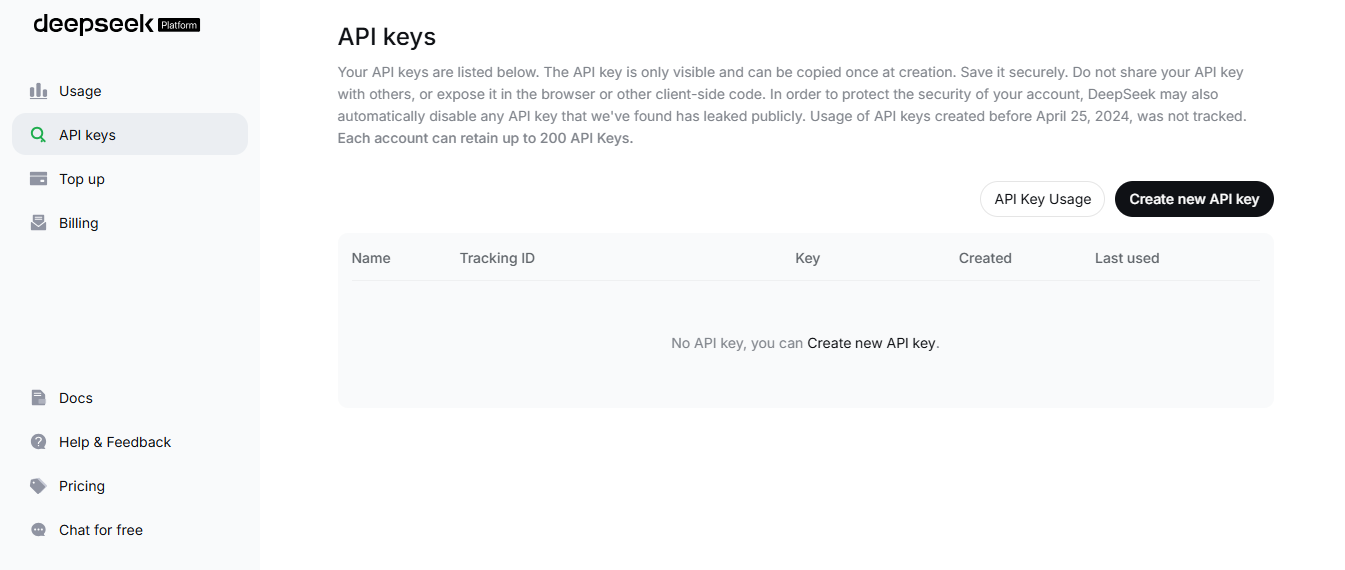
A 401 is not a model-quality issue or a prompt issue. It is an authentication issue. Fix the key, header, or environment before retrying.
402 Insufficient Balance: how to fix billing issues
DeepSeek documents 402 - Insufficient Balance as an account balance problem. The official solution is to check your account balance and top up if needed. DeepSeek Error Codes
This is not a rate-limit error. Reducing concurrency does not fix an account with insufficient balance.
DeepSeek’s Models & Pricing page says API expenses are calculated as tokens multiplied by price, then deducted from topped-up balance or granted balance, with granted balance used first when both are available. DeepSeek Models & Pricing
When you see 402, check:
- Current topped-up balance.
- Current granted balance.
- Whether the account used by your production service is the same one you topped up.
- Whether retries or background jobs consumed balance faster than expected.
- Current model pricing for input, cached input, and output tokens.
- Whether your workload runs during peak or off-peak pricing hours.
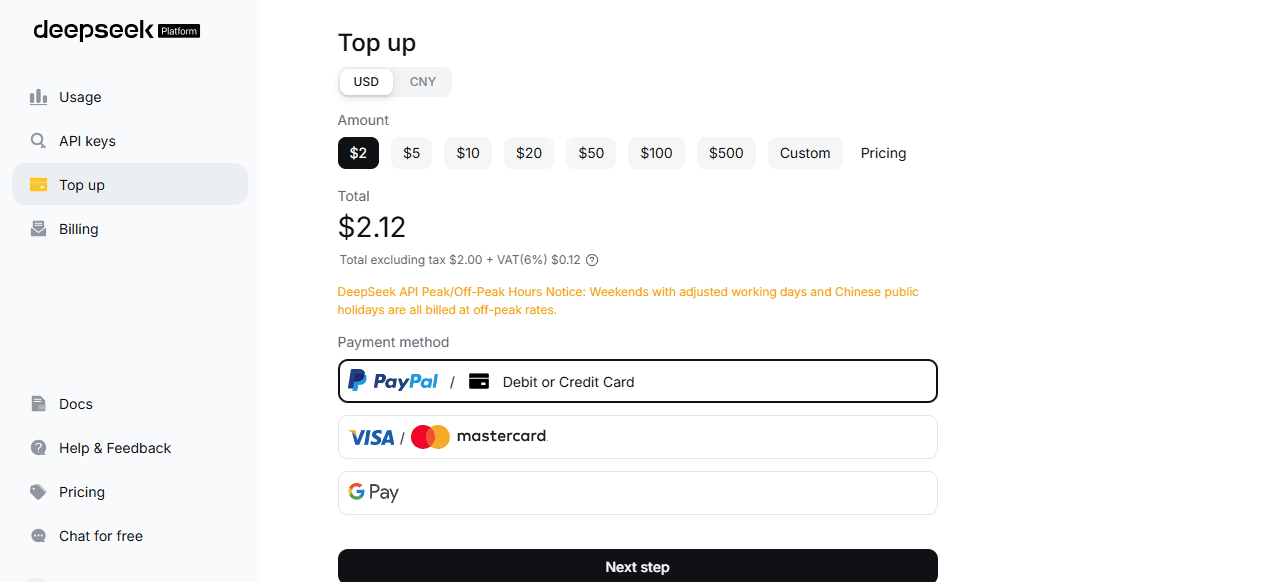
Do not keep retrying a 402 in a tight loop. It will not fix billing and may create avoidable noise in logs.
422 Invalid Parameters: how to fix invalid request fields
DeepSeek documents 422 - Invalid Parameters as a request that contains invalid parameters. The official fix is to modify your request parameters according to the hints in the error message and refer to the API documentation for the correct format. DeepSeek Error Codes
Common causes include:
- Wrong model name.
- Using an OpenAI model name with the DeepSeek endpoint.
- Using an old DeepSeek model name copied from an outdated tutorial.
- Unsupported parameter for the selected endpoint or model.
- Invalid
response_format. - Malformed tool schema.
- Invalid
user_idformat. - Mixing Anthropic-format and OpenAI-format fields.
- Passing DeepSeek-specific fields in the wrong place when using an SDK wrapper.
For model names, check the current Models & Pricing page. At the time this article was verified, DeepSeek lists deepseek-flash and deepseek-v4-pro. It also says legacy names deepseek-v4-flash and deepseek-v4-flash-vision-exp are accepted only as compatibility aliases, while their old underlying models are retired. DeepSeek Models & Pricing
429 Rate Limit Reached: how to handle rate and concurrency limits
DeepSeek documents 429 - Rate Limit Reached as sending requests too quickly. DeepSeek’s Rate Limit & Isolation page explains the current operational limit model in more detail: it uses model-specific account-level concurrency limits. DeepSeek Error Codes DeepSeek Rate Limit & Isolation
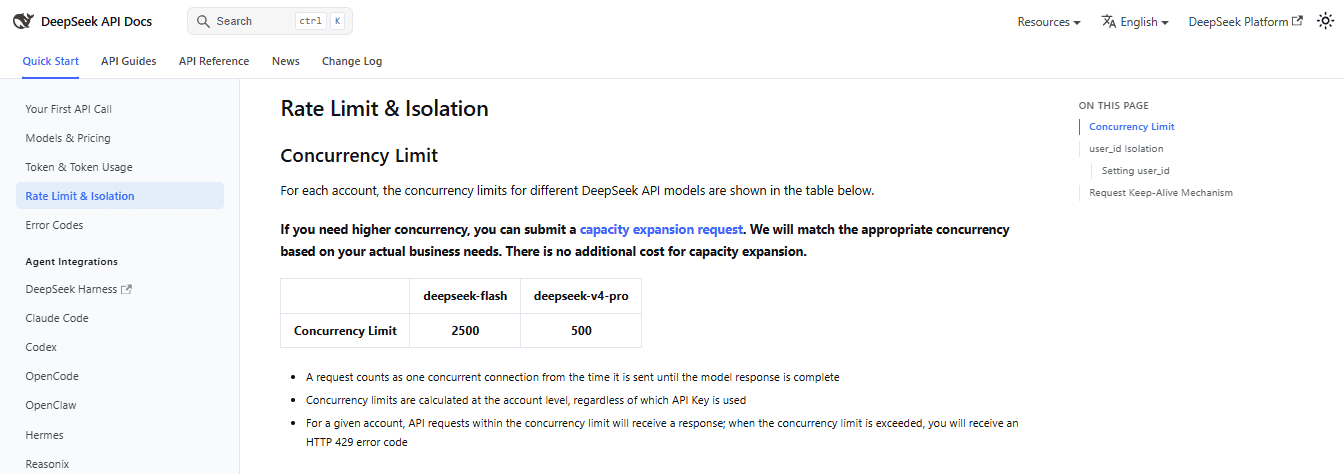
For each account, DeepSeek currently documents these concurrency limits:
| Model | Documented concurrency limit | Scope |
|---|---|---|
deepseek-flash | 2500 | Account-level, regardless of API key. |
deepseek-v4-pro | 500 | Account-level, regardless of API key. |
A request counts as one concurrent connection from the time it is sent until the model response is complete. DeepSeek says that when the account concurrency limit is exceeded, the API returns HTTP 429. DeepSeek Rate Limit & Isolation
This means creating more API keys under the same account does not create separate limit pools. Multiple keys can help with security, rotation, and environment separation, but they do not bypass account-level concurrency.
To fix 429 in production:
- Limit in-flight requests per model.
- Queue excess requests before sending them to DeepSeek.
- Add exponential backoff with jitter.
- Cap retries to avoid retry storms.
- Track 429 rate separately from 500 and 503.
- Monitor queue depth and request duration.
- Reduce unnecessary long outputs when possible.
- Request capacity expansion if sustained production traffic needs higher concurrency.
500 Server Error: when to retry
DeepSeek documents 500 - Server Error as a DeepSeek server-side issue. The official guidance is to retry after a brief wait and contact DeepSeek if the issue persists. DeepSeek Error Codes
A 500 is usually retryable, but not infinitely. In production, use a limited retry budget, exponential backoff, and monitoring. If 500 errors spike across many requests, alert your on-call team and check whether the issue is isolated to one model, endpoint, region, or workload.
503 Server Overloaded: how it differs from 429
DeepSeek documents 503 - Server Overloaded as the server being overloaded due to high traffic. The official solution is to retry after a brief wait. DeepSeek Error Codes
Do not treat 503 as the same as 429:
| Code | Meaning | Primary fix | What not to do |
|---|---|---|---|
429 | Your traffic pattern exceeded a rate or concurrency limit. | Throttle, queue, reduce in-flight requests, and back off. | Do not create more API keys to bypass the limit. |
503 | DeepSeek’s server is overloaded due to high traffic. | Retry after a brief wait and degrade gracefully if needed. | Do not assume your account balance or API key is the cause. |
402 | Your account has insufficient balance. | Fix billing or top up. | Do not treat it as rate limiting. |
For 503, retry cautiously. If your application retries thousands of failed requests at once, you can make the situation worse. Use jitter, caps, and circuit breakers.
Current model-name mistakes that cause API errors
Many DeepSeek API errors come from copying old examples. Old tutorials may use model names that are no longer the recommended path for new code.
| Model name or alias | Current guidance | Why it matters for errors |
|---|---|---|
deepseek-flash | Use for current DeepSeek-V4.1-Flash examples. | This is the current Flash model name in DeepSeek’s pricing table. |
deepseek-v4-pro | Use only after checking current docs for your workload. | It is listed in the current model table, but production code should still verify model status and pricing. |
deepseek-v4-flash | Avoid in new code. | DeepSeek says it is a legacy name accepted for compatibility, served by V4.1 Flash. |
deepseek-v4-flash-vision-exp | Avoid in new code. | DeepSeek says the old model is retired and compatibility requests route to V4.1 Flash. |
deepseek-chat | Do not use as a default current V4.1 troubleshooting example unless current docs explicitly support your use case. | Old examples can cause model or parameter confusion. |
deepseek-reasoner | Do not use as the default current model in new troubleshooting examples unless current docs explicitly support it. | Many R1-era examples are outdated for current API work. |
If an old tutorial fails, do not assume DeepSeek is down. First check model name, base URL, request format, and current API documentation.
Authentication and API key troubleshooting
DeepSeek’s API reference says you must create a DeepSeek API key first and use Bearer Auth. DeepSeek API reference
Use this checklist when a request fails with 401:
- Confirm you created a DeepSeek API key in the official DeepSeek Platform.
- Confirm you are not using an OpenAI API key.
- Confirm your environment variable is available in the runtime that sends the request.
- Confirm the header uses
Authorization: Bearer ${DEEPSEEK_API_KEY}. - Remove extra whitespace around the key.
- Check whether the key was rotated, deleted, or copied incorrectly.
- Do not log the full header in production logs.
- If the key leaked, delete or rotate it immediately.
Balance and billing troubleshooting
Use this checklist when a request fails with 402:
- Check whether the correct DeepSeek account is being billed.
- Check current topped-up balance.
- Check current granted balance.
- Review token usage from recent requests.
- Check whether retries or background jobs consumed more tokens than expected.
- Check current prices for the model you are using.
- Remember that output tokens are billed separately from input tokens.
- Remember that cache-hit and cache-miss input tokens may have different prices.
A 402 should trigger billing investigation, not request spam.
Safe retry, backoff, and queueing strategy
Use retry only when it matches the error type. This table is a safe starting point for production behavior.
| Code | Retry? | Production behavior |
|---|---|---|
400 | No blind retry | Fix request format. |
401 | No blind retry | Fix key, secret injection, or Bearer Auth. |
402 | No aggressive retry | Fix balance or billing. |
422 | No blind retry | Fix request parameters or model name. |
429 | Yes, after throttling | Queue, reduce concurrency, add exponential backoff with jitter. |
500 | Yes, cautiously | Backoff, monitor, cap retries. |
503 | Yes, cautiously | Short wait, backoff, graceful degradation. |
A simple retry classifier can help prevent retry storms:
# Pattern only. Adapt it to your HTTP client and error classes.

DO_NOT_RETRY = {400, 401, 402, 422}
RETRY_WITH_BACKOFF = {429, 500, 503}

def classify_deepseek_error(status_code: int) -> str:
    if status_code in DO_NOT_RETRY:
        return "fix_request_or_account_state"
    if status_code in RETRY_WITH_BACKOFF:
        return "retry_carefully_with_backoff"
    return "inspect_before_retrying"
For retryable failures, use capped exponential backoff with jitter. For 429, do not retry without reducing request pressure. For 503, avoid synchronized retries that hit the server again at the same time.
Rate-limit and concurrency troubleshooting for 429
DeepSeek’s Error Codes page describes 429 as sending requests too quickly. Its Rate Limit & Isolation page explains the current limit model as account-level concurrency, with deepseek-flash at 2500 and deepseek-v4-pro at 500. DeepSeek Error Codes DeepSeek Rate Limit & Isolation
When 429 appears, check these metrics:
- In-flight requests by model.
- Queue depth.
- Queue wait time.
- Streaming duration.
- Average request duration.
- Long-output requests.
- Retry count.
- Traffic by tenant or customer.
- 429 rate by service.
- Whether multiple services share one DeepSeek account.
Long-running requests matter because DeepSeek counts each request as a concurrent connection until the model response is complete.
user_id, isolation, and error handling
DeepSeek’s Rate Limit & Isolation page says user_id can be used for content-safety isolation, KVCache isolation, and scheduling isolation. It also says that for regular API users, all user_id values are combined for concurrency-limit calculation. DeepSeek Rate Limit & Isolation
Do not use user_id as a rate-limit bypass. Also do not put private information in it. DeepSeek says user_id must match [a-zA-Z0-9\-_]+, has a maximum length of 512, and should not include user privacy information.
If you pass user_id with the OpenAI SDK, DeepSeek’s documentation says it should go under extra_body:
response = client.chat.completions.create(
    model="deepseek-flash",
    messages=[{"role": "user", "content": "Hello!"}],
    extra_body={"user_id": "customer_123"}
)
Use a pseudonymous internal identifier, not an email address, phone number, full name, or sensitive account identifier.
Request keep-alive and timeouts
DeepSeek documents a request keep-alive mechanism. After a request is sent, the HTTP request can remain connected while the model response is pending. During that time, non-streaming requests may return empty lines, and streaming requests may return Server-Sent Events comments such as : keep-alive. DeepSeek Rate Limit & Isolation
These keep-alive contents should not break JSON or SSE parsing. If you parse responses manually, handle empty lines and comments correctly.
DeepSeek also says that if a request has not started inference after 10 minutes, the server will close the connection. That is not the same thing as a 429, 500, or 503, but it matters for timeout settings, user-facing progress messages, and retry behavior.
Production logging and monitoring checklist
Good error handling requires useful logs, but logs should not expose secrets or sensitive prompt data.
- Log HTTP status code.
- Log model ID.
- Log endpoint path.
- Log request duration.
- Log retry count.
- Log whether the error was request, auth, billing, rate-limit, or server-side.
- Track 401, 402, 429, 500, and 503 separately.
- Track in-flight requests by model.
- Track queue depth and queue wait time.
- Track token usage and output length.
- Alert on spikes in 401, 402, 429, 500, or 503.
- Redact API keys and authorization headers.
- Avoid logging full prompts, outputs, user data, or sensitive documents by default.
- Do not log private
user_idvalues if they identify real people.
Common mistakes from old tutorials
Old tutorials are a common source of DeepSeek API failures. If your code was copied from an old R1-era or V4-era guide, review it before assuming DeepSeek is down.
| Old mistake | Why it breaks | What to do |
|---|---|---|
| Using an old model name as the default. | Current DeepSeek model names may have changed. | Check Models & Pricing before deployment. |
Using deepseek-reasoner because an old R1 tutorial used it. | Old R1-era examples may not reflect current hosted API guidance. | Use current documented model IDs and current Thinking Mode docs if relevant. |
Using deepseek-v4-flash in new code. | DeepSeek says this is a compatibility alias now served by V4.1 Flash. | Use deepseek-flash. |
| Using an OpenAI key with DeepSeek. | DeepSeek requires a DeepSeek API key. | Create and use a DeepSeek key. |
| Forgetting DeepSeek’s base URL when using OpenAI-compatible SDKs. | Your request may go to the wrong provider. | Set the DeepSeek OpenAI-format base URL from the current docs. |
| Retrying every error. | Non-retryable errors become production noise. | Classify errors before retrying. |
| Creating extra keys to bypass 429. | Concurrency is account-level, not per key. | Use queueing and capacity planning. |
Production checklist
- Use current model IDs from DeepSeek’s current docs.
- Use a DeepSeek API key, not an OpenAI key.
- Store API keys in environment variables or a secrets manager.
- Do not expose keys in frontend JavaScript, screenshots, notebooks, or logs.
- Validate request JSON before deployment.
- Classify errors before retrying.
- Do not retry 400, 401, 402, or 422 blindly.
- Handle 429 with throttling, queueing, and backoff.
- Handle 500 and 503 with capped retries and monitoring.
- Separate 402 billing alerts from 429 rate-limit alerts.
- Track in-flight requests by model.
- Respect account-level concurrency limits.
- Handle keep-alive empty lines and SSE comments.
- Monitor queue depth, retry counts, request duration, and token usage.
- Review old tutorials before copying model names or parameters.
Frequently asked questions
What are DeepSeek API error codes?
They are HTTP status codes returned by the DeepSeek API to explain why a request failed. The main documented codes are 400, 401, 402, 422, 429, 500, and 503.
What does DeepSeek 400 mean?
400 means invalid request-body format. Check JSON validity, request shape, headers, endpoint format, and SDK serialization before retrying.
What does DeepSeek 401 Authentication Fails mean?
401 means authentication failed because the API key is wrong, missing, or not being sent correctly. Check the DeepSeek API key and Authorization: Bearer header.
What does DeepSeek 402 Insufficient Balance mean?
402 means the account has insufficient balance. It is a billing problem, not a rate-limit problem. Check topped-up balance, granted balance, and current token pricing.
What does DeepSeek 422 Invalid Parameters mean?
422 means the request contains invalid parameters. Check model name, unsupported fields, request parameters, tool schema, response format, and whether you copied an outdated example.
What does DeepSeek 429 Rate Limit Reached mean?
429 means the API limit has been reached. It may appear when requests are sent too quickly or when account-level concurrency is exceeded. Fix it with throttling, queueing, and careful retry/backoff.
What does DeepSeek 500 Server Error mean?
500 means DeepSeek’s server encountered an issue. Retry after a brief wait, monitor recurrence, and contact DeepSeek if the issue persists.
What does DeepSeek 503 Server Overloaded mean?
503 means the server is overloaded due to high traffic. Retry after a brief wait, but avoid retry storms and add graceful degradation if the issue persists.
Is 429 the same as 503?
No. 429 means rate limit reached or concurrency exceeded. 503 means the server is overloaded. They require different production responses.
Is 402 a rate-limit error?
No. 402 means insufficient balance. It is a billing issue, not a rate-limit issue.
Should I retry a DeepSeek API error?
Only some errors should be retried. Retry 429 only after throttling and backoff. Retry 500 and 503 cautiously. Do not blindly retry 400, 401, 402, or 422.
Why does my DeepSeek API key fail?
Common causes include using an OpenAI key instead of a DeepSeek key, missing the environment variable, forgetting the Bearer prefix, copying the key incorrectly, or using a key that was deleted or rotated.
Can multiple API keys bypass 429?
No. DeepSeek documents concurrency limits at the account level, regardless of which API key is used. Multiple keys do not create separate concurrency pools.
Can old model names cause DeepSeek API errors?
Yes. Old tutorials may use outdated names such as deepseek-reasoner, deepseek-chat, or old V4 Flash aliases. Check the current Models & Pricing page before assuming an error is caused by the service.
Is deepseek-reasoner still the model to use?
Do not use deepseek-reasoner as the default in new troubleshooting examples unless current DeepSeek docs explicitly support it for your use case. Current API work should start from the current Models & Pricing page.
How do I handle DeepSeek errors in production?
Classify errors by type, avoid blind retries, queue traffic before concurrency limits, monitor status codes separately, redact secrets from logs, and alert on sustained 401, 402, 429, 500, or 503 spikes.
Bottom line
DeepSeek API error codes are useful only if you respond to each one correctly. Fix 400 and 422 by correcting the request. Fix 401 by checking authentication. Fix 402 by checking balance. Handle 429 with throttling, queueing, and concurrency control. Retry 500 and 503 cautiously with backoff.
The most common production mistakes are retrying every error, confusing 429 with 503, treating 402 as a rate-limit issue, using an OpenAI key with DeepSeek, and copying old model names from outdated tutorials. Use the official Error Codes, Rate Limit & Isolation, API reference, and Models & Pricing pages as the source of truth before deployment.