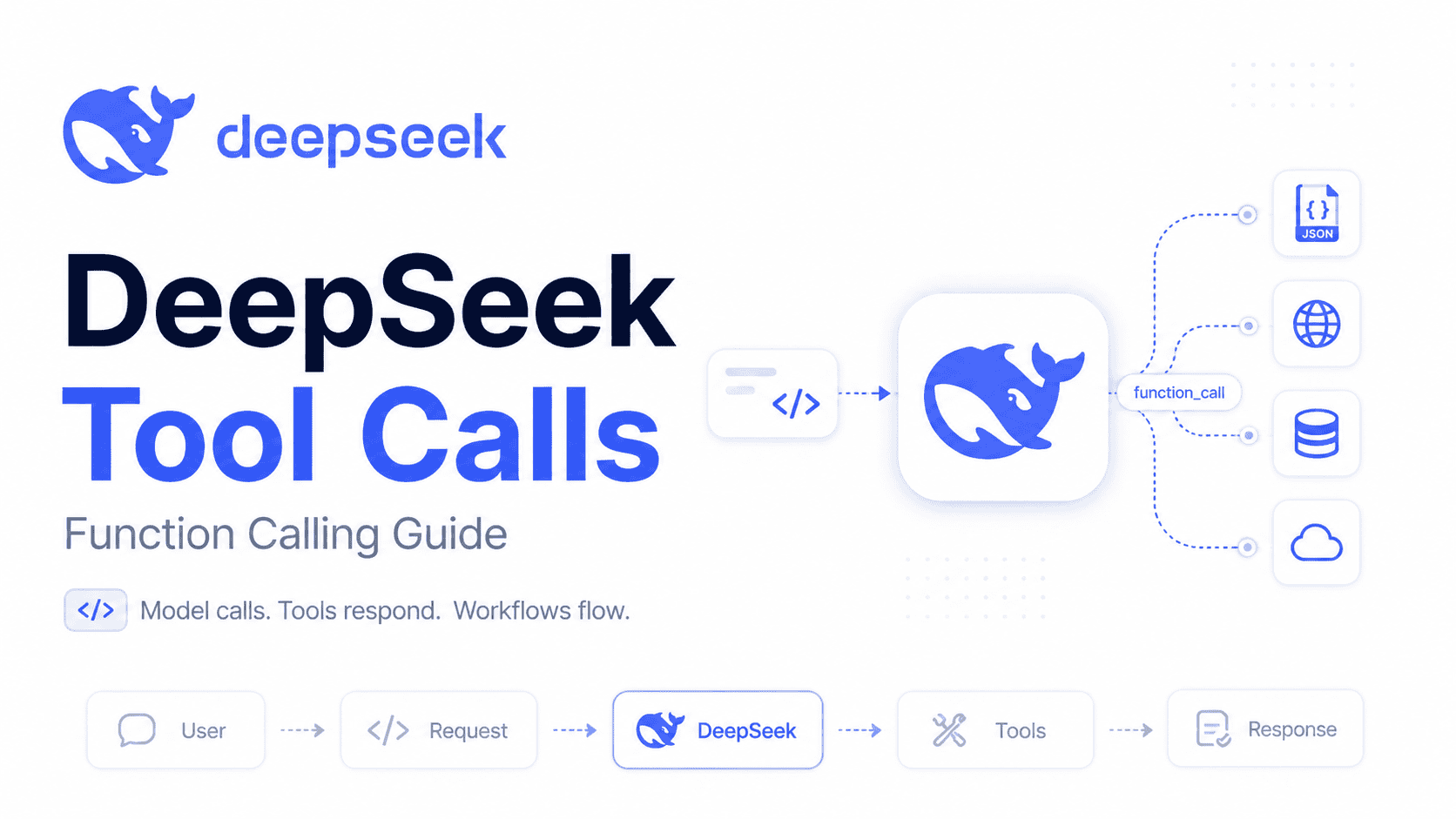

Last reviewed: October 16, 2026
DeepSeek Tool Calls let a DeepSeek model request a structured function call in the Chat Completions API, while your application validates, executes, and returns the real tool result. That separation is the key idea: the model requests an operation, but your application decides whether to allow it and performs the action.
This guide covers the tools parameter, Python and Node.js execution examples, TypeScript validation, strict mode, Thinking Mode, and common integration errors. The examples use a read-only mock order lookup: they demonstrate validation and message handling, not a complete production authorization system.
Scope: This guide covers custom function tools in Chat Completions, not every tool in every DeepSeek product. Server-executed tools, such as Pro’s built-in search through Responses, have different execution rules. See our DeepSeek web search guide for that separate workflow.
The examples use deepseek-flash, the API route for DeepSeek-V4.1-Flash. DeepSeek also lists deepseek-v4-pro as a separate model with Tool Calls support. Older Flash identifiers are compatibility routes, not the default for new integrations. See the current model table.
Primary API references: DeepSeek Chat Completion API, DeepSeek Tool Calls guide, DeepSeek Thinking Mode guide, DeepSeek Models & Pricing, and DeepSeek API Change Log.
What Are DeepSeek Tool Calls?
DeepSeek Tool Calls are a way for the model to request a call to an external function that your application defines. The function might check an order, look up an account, query a database, fetch live weather, update a CRM record, or trigger an internal workflow.
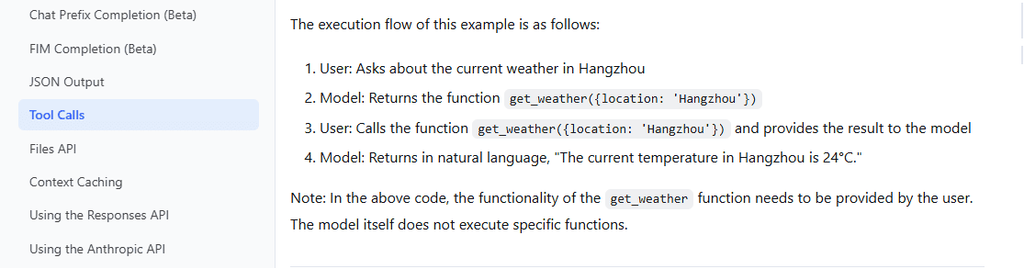
For these custom function calls, the model does not execute your function. DeepSeek’s Tool Calls guide makes that explicit: your application supplies the function’s implementation and decides whether a requested call may run.
A typical DeepSeek tool call flow looks like this:
- The user asks for something that may require external data.
- Your app sends the conversation plus available tools to DeepSeek.
- The model returns a structured
tool_callsrequest when a tool is needed. - Your app parses and validates the tool arguments.
- Your app executes the real function in your own system.
- Your app sends the function result back as a
role="tool"message with the matchingtool_call_id. - The model uses that result to produce the final answer.
This pattern is the foundation for DeepSeek AI agents. An agent is not just a chatbot; it is a controlled loop that can reason, select tools, observe results, and decide what to do next under your application’s rules.
DeepSeek Tool Calls vs DeepSeek Function Calling
In this Chat Completions guide, DeepSeek Tool Calls and DeepSeek function calling refer to the same pattern: the model emits a structured function request, and your application validates and executes it. “Function calling” remains a common developer term; tool_calls is the response field used here.
In this guide, function calling means the Chat Completions function tool type. Function names must be unique and may contain letters, numbers, underscores, and hyphens, up to 128 characters. That is a name-length limit, not evidence of a 128-function limit. See the API reference.
A JSON argument object describes the requested operation; it does not prove that the operation is valid or authorized. Your application must make both decisions before accessing a real system.
How DeepSeek API Tool Calls Work
A DeepSeek API tool call is a structured request, not a direct function execution.
Here is the complete workflow:
- User asks a question or requests an action.
Example: “Where is order US-10001?” - Your app sends
messagesandtools.messagescontains the conversation.toolscontains function schemas the model may call. - The model responds normally or returns
tool_calls.
If a tool is needed, the model response may includefinish_reason: "tool_calls"and atool_callsarray. - Your app parses and validates arguments.
Arguments arrive as a JSON-formatted string. Your code must validate them before calling the function. - Your app executes the real function.
This might call your database, internal API, shipping provider, analytics system, or payment platform. - Your app appends a
role="tool"message.
The tool message must include the matchingtool_call_id. - Your app sends the updated conversation back.
The model now sees the tool result. - The model produces the final answer.
The final answer should be based on the tool result, not invented from memory.
DeepSeek OpenAI SDK Tool Calls Setup
DeepSeek supports OpenAI-compatible access using base_url="https://api.deepseek.com" in Python and baseURL: "https://api.deepseek.com" in Node.js. Keep DEEPSEEK_API_KEY on the server. The client libraries are described in the official SDK documentation; requests sent to DeepSeek use DeepSeek credentials and billing.
Use an API key from DeepSeek, not OpenAI. Running the complete examples makes billable model requests; the local mock function itself does not contact a shipping service. For broader setup help, see using the OpenAI SDK with DeepSeek.
Python setup
Install the package in the Python environment that will run the example. Set the key in the same terminal session; the export command is for macOS or Linux.
pip install openaiexport DEEPSEEK_API_KEY="your_deepseek_api_key"On Windows PowerShell:
$env:DEEPSEEK_API_KEY="your_deepseek_api_key"The tools Parameter in DeepSeek
Within Chat Completions, the tools parameter describes the functions your application makes available for selection. The documented type for this interface is function. A function definition normally includes:
name: the function name the model will reference.description: a concise explanation of when to use the function.parameters: a JSON Schema-style object describing allowed arguments.
Good tool definitions are specific. Avoid vague names like search or do_action. Prefer names like get_order_status, create_refund_request, or lookup_customer_plan.
tools = [{
    "type": "function",
    "function": {
        "name": "get_order_status",
        "description": "Return mock status for a demo order, not live shipping data.",
        "parameters": {
            "type": "object",
            "properties": {
                "order_id": {"type": "string", "description": "Order ID, such as US-10001."}
            },
            "required": ["order_id"],
            "additionalProperties": False,
        },
    },
}]
The schema requires exactly one field, order_id, containing a string. The validators below additionally reject empty or whitespace-only values. That extra condition is an application rule, not a universal DeepSeek order-ID format. Do not invent a length or pattern for real order IDs; use your backend contract. Listing additionalProperties: false also does not replace runtime validation in ordinary, non-strict calls.
DeepSeek tool_choice: auto, none, required, and Forced Functions
tool_choice controls selection, not execution or authorization. With tools present, auto lets the model decide whether a lookup is needed.
| Option | Behavior | Thinking Mode |
|---|---|---|
auto | The model may answer or request tools. | Supported. |
none | Generate a response without tool calls. | Supported; useful for a final response. |
required | Request one or more tools. | Disable Thinking Mode first; otherwise the documented result is HTTP 400. |
| Named function | Force the specified function. | Disable Thinking Mode first; the same restriction applies. |
The current API reference rejects required and named tool choices in Thinking Mode. Forcing a function also does not guarantee valid arguments or a successful lookup.
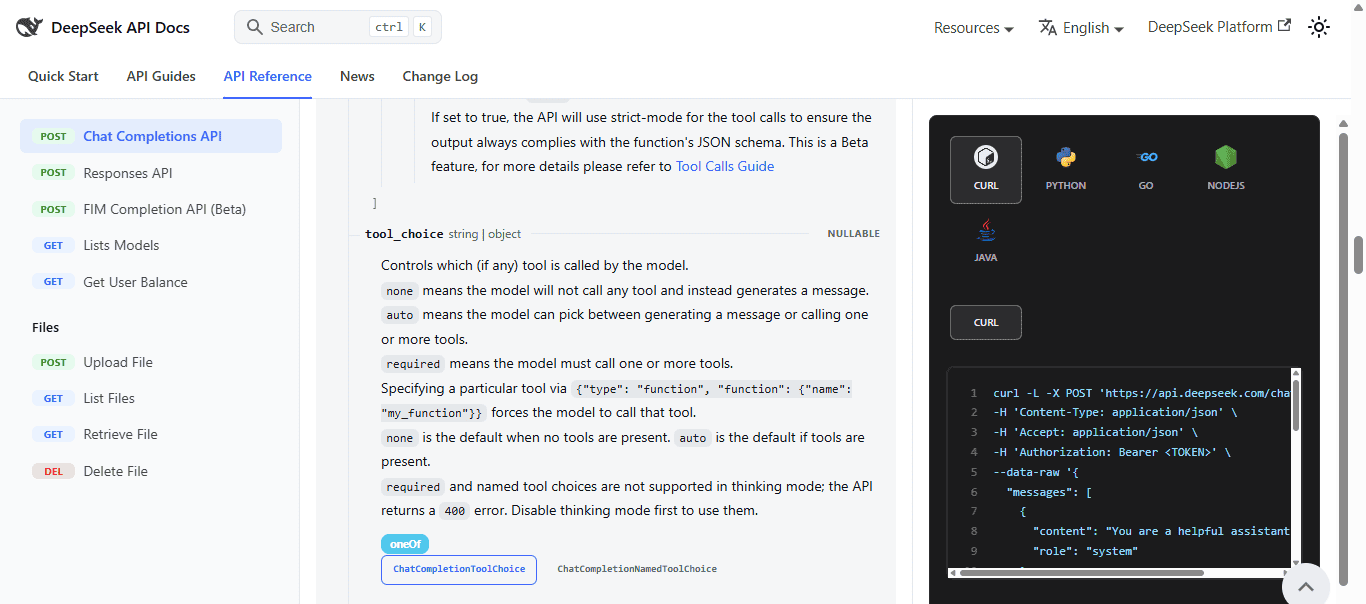
tool_choice parameter controls tool selection. In Thinking Mode, required and named tool choices are not supported, so disable Thinking Mode before using those patterns.A named choice has this request-field shape. Include the matching function in tools and explicitly disable Thinking Mode when sending it:
tool_choice = {
    "type": "function",
    "function": {"name": "get_order_status"},
}
# Python request option:
extra_body = {"thinking": {"type": "disabled"}}
DeepSeek Python Tool Calls Example
Save this complete example as deepseek_tools.py. Its parser checks the decoded object, its exact fields, and the order_id value. The dispatcher calls that parser before the mock lookup. A Python str annotation does not enforce these checks at runtime, as the Python typing documentation explains.
The demo handles one batch of up to four read-only tool calls, then requests a final response with tool_choice="none". The four-call cap and output budgets are example settings, not DeepSeek API limits. Thinking Mode and automatic SDK retries are disabled for the initial demo.
import json
import os
from openai import OpenAI


class ToolValidationError(ValueError):
    pass


def parse_order_status_args(raw: str) -> dict[str, str]:
    if not isinstance(raw, str):
        raise ToolValidationError("Tool arguments must be a JSON string.")
    try:
        data = json.loads(raw)
    except json.JSONDecodeError as exc:
        raise ToolValidationError("Tool arguments are not valid JSON.") from exc

    if not isinstance(data, dict):
        raise ToolValidationError("Arguments must be a JSON object.")
    if set(data) != {"order_id"}:
        raise ToolValidationError("Provide exactly one field: order_id.")

    order_id = data["order_id"]
    if not isinstance(order_id, str) or not order_id.strip():
        raise ToolValidationError("order_id must be a nonempty string.")
    return {"order_id": order_id}


def get_order_status(order_id: str) -> dict:
    # Fixed demonstration data, not a real order or shipping lookup.
    return {
        "is_mock": True,
        "order_id": order_id,
        "status": "shipped" if order_id == "US-10001" else "not_found",
    }


def execute_validated_tool(call) -> dict:
    try:
        if call.type != "function" or call.function.name != "get_order_status":
            raise ToolValidationError("Requested tool is not allowed.")
        args = parse_order_status_args(call.function.arguments)
    except ToolValidationError as exc:
        return {
            "ok": False,
            "error": {"code": "invalid_tool_call", "message": str(exc)},
        }

    # Before a real lookup, authorize the signed-in user for this order.
    return {"ok": True, "data": get_order_status(args["order_id"])}


TOOLS = [{
    "type": "function",
    "function": {
        "name": "get_order_status",
        "description": "Return mock status for a demo order, not live shipping data.",
        "parameters": {
            "type": "object",
            "properties": {
                "order_id": {"type": "string", "description": "Order ID, such as US-10001."}
            },
            "required": ["order_id"],
            "additionalProperties": False,
        },
    },
}]


def checked_message(response):
    if not response.choices:
        raise RuntimeError("The API returned no response choices.")
    choice = response.choices[0]
    if choice.finish_reason not in {"stop", "tool_calls"}:
        raise RuntimeError("Incomplete or interrupted model response; workflow stopped.")
    return choice.message


def run_tool_turn(client, messages, tool_definitions, *, thinking=False) -> str:
    # One tool batch followed by a final answer; not an unbounded agent loop.
    request_options = {
        "model": "deepseek-flash",
        "tools": tool_definitions,
        "max_tokens": 8192 if thinking else 2048,
        "extra_body": {"thinking": {"type": "enabled" if thinking else "disabled"}},
    }
    message = checked_message(client.chat.completions.create(
        messages=messages, tool_choice="auto", **request_options
    ))
    messages.append(message)  # Preserve content, reasoning_content, and tool_calls.
    calls = message.tool_calls or []
    if not calls:
        return message.content or "No final text was returned."

    # Four is an application-level demo cap, not a DeepSeek API limit.
    if len(calls) > 4:
        raise RuntimeError("Too many tool calls for this demo; none were executed.")
    ids = [call.id for call in calls]
    if any(not isinstance(value, str) or not value for value in ids):
        raise RuntimeError("Missing tool call ID; none were executed.")
    if len(set(ids)) != len(ids):
        raise RuntimeError("Duplicate tool call IDs; none were executed.")

    for call in calls:
        result = execute_validated_tool(call)
        messages.append({
            "role": "tool",
            "tool_call_id": call.id,
            "content": json.dumps(result),
        })

    final = checked_message(client.chat.completions.create(
        messages=messages, tool_choice="none", **request_options
    ))
    if final.tool_calls:
        raise RuntimeError("Unexpected additional tool call; workflow stopped.")
    messages.append(final)
    return final.content or "No final text was returned."


if __name__ == "__main__":
    api_key = os.environ.get("DEEPSEEK_API_KEY")
    if not api_key:
        raise RuntimeError("Set DEEPSEEK_API_KEY before running this example.")

    messages = [
        {"role": "system", "content": "Use the tool for order status. Label mock data and report tool errors; do not invent results."},
        {"role": "user", "content": "Where is order US-10001?"},
    ]
    with OpenAI(api_key=api_key, base_url="https://api.deepseek.com", max_retries=0) as client:
        print(run_tool_turn(client, messages, TOOLS))
Run it with python deepseek_tools.py. If auto produces no tool call, the script returns the assistant’s response without a lookup. Invalid arguments produce an ok: false result tied to the original call ID; that rejected call never reaches get_order_status. A different valid call in the same batch can still run. These result fields are the demo’s own format, not DeepSeek HTTP error codes.
Validation cases to keep in your tests
| Incoming arguments | Decision before lookup |
|---|---|
{"order_id": "US-10001"} | Accept the arguments and run the mock lookup. |
{"order_id": 123} or {"order_id": null} | Reject the non-string value. |
Empty or whitespace-only order_id | Reject the blank value. |
{} | Reject the missing field. |
An extra field such as unexpected | Reject the entire argument object; do not silently drop the field. |
| A JSON array, primitive, or malformed JSON | Reject before calling the function. |
| Unknown function name | Reject before any lookup. |
US-10001 has a fixed mock status; other well-formed IDs return not_found. The validator preserves nonblank strings rather than silently changing an identifier. Before replacing the mock with a database lookup, check the signed-in user’s access to that order. Valid syntax is not permission to read someone else’s records.
This is a hand-written validator for one small schema. When adding tools or fields, update the schema and validator together, or adopt a maintained schema-validation layer. Test that rejected inputs do not call the backend, not just that an error message appears.
DeepSeek Node.js Tool Calls Example
The JavaScript version applies the same checks before calling its mock handler. Install openai, set DEEPSEEK_API_KEY as shown above, and save the script as deepseek-tools.mjs.
npm install openaiKeep thinking at the top level of the JavaScript request. Do not copy Python’s extra_body wrapper into Node.js; the Node SDK sends additional fields as supplied.
import OpenAI from "openai";

class ToolValidationError extends Error {}

function parseOrderStatusArgs(raw) {
  if (typeof raw !== "string") {
    throw new ToolValidationError("Tool arguments must be a JSON string.");
  }
  let data;
  try {
    data = JSON.parse(raw);
  } catch {
    throw new ToolValidationError("Tool arguments are not valid JSON.");
  }
  if (data === null || typeof data !== "object" || Array.isArray(data)) {
    throw new ToolValidationError("Arguments must be a JSON object.");
  }
  if (Object.keys(data).length !== 1 || !Object.prototype.hasOwnProperty.call(data, "order_id")) {
    throw new ToolValidationError("Provide exactly one field: order_id.");
  }
  if (typeof data.order_id !== "string" || !data.order_id.trim()) {
    throw new ToolValidationError("order_id must be a nonempty string.");
  }
  return { order_id: data.order_id };
}

function getOrderStatus(orderId) {
  // Fixed demonstration data, not a real order or shipping lookup.
  return {
    is_mock: true,
    order_id: orderId,
    status: orderId === "US-10001" ? "shipped" : "not_found",
  };
}

function executeValidatedTool(call) {
  let args;
  try {
    if (call.type !== "function" || call.function.name !== "get_order_status") {
      throw new ToolValidationError("Requested tool is not allowed.");
    }
    args = parseOrderStatusArgs(call.function.arguments);
  } catch (error) {
    if (!(error instanceof ToolValidationError)) throw error;
    return {
      ok: false,
      error: { code: "invalid_tool_call", message: error.message },
    };
  }
  // Before a real lookup, authorize the signed-in user for this order.
  return { ok: true, data: getOrderStatus(args.order_id) };
}

const tools = [{
  type: "function",
  function: {
    name: "get_order_status",
    description: "Return mock status for a demo order, not live shipping data.",
    parameters: {
      type: "object",
      properties: {
        order_id: { type: "string", description: "Order ID, such as US-10001." },
      },
      required: ["order_id"],
      additionalProperties: false,
    },
  },
}];

function checkedMessage(response) {
  const choice = response.choices?.[0];
  if (!choice || !["stop", "tool_calls"].includes(choice.finish_reason)) {
    throw new Error("Missing, incomplete, or interrupted model response; workflow stopped.");
  }
  return choice.message;
}

async function runToolTurn(client, messages, toolDefinitions) {
  const requestOptions = {
    model: "deepseek-flash",
    tools: toolDefinitions,
    max_tokens: 2048,
    thinking: { type: "disabled" }, // Top-level in JavaScript; no extra_body wrapper.
  };
  const message = checkedMessage(await client.chat.completions.create({
    ...requestOptions, messages, tool_choice: "auto",
  }));
  messages.push(message);
  const calls = message.tool_calls ?? [];
  if (!calls.length) return message.content || "No final text was returned.";

  // Application-level demo cap, not a DeepSeek API limit.
  if (calls.length > 4) throw new Error("Too many tool calls; none were executed.");
  const ids = calls.map((call) => call.id);
  if (ids.some((id) => typeof id !== "string" || !id) || new Set(ids).size !== ids.length) {
    throw new Error("Missing or duplicate tool call IDs; none were executed.");
  }

  for (const call of calls) {
    const result = executeValidatedTool(call);
    messages.push({
      role: "tool", tool_call_id: call.id, content: JSON.stringify(result),
    });
  }

  const final = checkedMessage(await client.chat.completions.create({
    ...requestOptions, messages, tool_choice: "none",
  }));
  if (final.tool_calls?.length) throw new Error("Unexpected additional tool call; workflow stopped.");
  messages.push(final);
  return final.content || "No final text was returned.";
}

async function main() {
  const apiKey = process.env.DEEPSEEK_API_KEY;
  if (!apiKey) throw new Error("Set DEEPSEEK_API_KEY before running this example.");
  const client = new OpenAI({
    apiKey, baseURL: "https://api.deepseek.com", maxRetries: 0,
  });
  const messages = [
    { role: "system", content: "Use the tool for order status. Label mock data and report tool errors; do not invent results." },
    { role: "user", content: "Where is order US-10001?" },
  ];
  console.log(await runToolTurn(client, messages, tools));
}

main().catch((error) => {
  if (error instanceof OpenAI.APIError) {
    console.error(`DeepSeek request failed (HTTP ${error.status ?? "unavailable"}).`);
  } else {
    console.error(error.message);
  }
  process.exitCode = 1;
});
Run node deepseek-tools.mjs. Numbers are not coerced to strings, arrays are not accepted as argument objects, and unexpected fields are rejected. Both scripts send an error result for a rejected call and allow only a final text response afterward; they do not repeatedly retry invalid tool arguments.
DeepSeek TypeScript Tool Calls Example
When porting the Node.js example to TypeScript, replace its validation class and parser with the typed versions below. The dispatcher above already calls parseOrderStatusArgs. Keep the parsed value unknown until runtime checks establish its shape; a type assertion alone would not validate it.
type OrderStatusArgs = { order_id: string };
class ToolValidationError extends Error {}

function parseOrderStatusArgs(raw: string): OrderStatusArgs {
  if (typeof raw !== "string") {
    throw new ToolValidationError("Tool arguments must be a JSON string.");
  }
  let data: unknown;
  try {
    data = JSON.parse(raw);
  } catch {
    throw new ToolValidationError("Tool arguments are not valid JSON.");
  }
  if (data === null || typeof data !== "object" || Array.isArray(data)) {
    throw new ToolValidationError("Arguments must be a JSON object.");
  }
  if (Object.keys(data).length !== 1 || !("order_id" in data)) {
    throw new ToolValidationError("Provide exactly one field: order_id.");
  }
  if (typeof data.order_id !== "string" || !data.order_id.trim()) {
    throw new ToolValidationError("order_id must be a nonempty string.");
  }
  return { order_id: data.order_id };
}
This is the validation component of the preceding Node.js example, not a separate API client. Type the remaining request and message objects using your installed SDK. For provider-specific fields such as thinking, use an explicit request-type extension when needed; do not replace runtime checks with any. See our SDK integration guide.
DeepSeek Strict Mode and Strict Function Calling
DeepSeek documents strict function calling as a beta feature for schema-constrained arguments. It does not authorize an operation or establish that an order exists. Continue using application validation even when generation is constrained.
To enable it, follow the strict-mode guide:
- Use
https://api.deepseek.com/betaas the client’s base URL. - Set
strict: trueinside each tool’sfunctiondefinition. - For every object schema, mark all declared properties as
requiredand setadditionalProperties: false. Use only supported schema keywords.
After saving the full Python example as deepseek_tools.py, run this as a separate script in the same directory. It reuses the defined validator and dispatcher; importing the module does not run its main example.
import os
from copy import deepcopy
from openai import OpenAI
from deepseek_tools import TOOLS, run_tool_turn

strict_tools = deepcopy(TOOLS)
for tool in strict_tools:
    tool["function"]["strict"] = True

messages = [
    {"role": "system", "content": "Use the tool and label its data as mock. Report errors rather than inventing results."},
    {"role": "user", "content": "Where is order US-10001?"},
]
with OpenAI(
    api_key=os.environ["DEEPSEEK_API_KEY"],
    base_url="https://api.deepseek.com/beta",
    max_retries=0,
) as client:
    print(run_tool_turn(client, messages, strict_tools))
The sample deliberately uses a small object/string schema. Its nonempty-string rule remains enforced by the application. For more complex schemas, check the supported subset instead of assuming every JSON Schema keyword works. A rejected schema needs correction, not repeated retries.
Strict mode and tool_choice are different controls. Strict mode constrains arguments; tool_choice governs selection. The Thinking Mode restriction on required and named choices still applies.
DeepSeek Thinking Mode Tool Calls
Thinking Mode is enabled by default with high effort. The examples above deliberately disable it; run_tool_turn(..., thinking=True) enables it using Python’s extra_body option. See the Thinking Mode guide.
When requests include tools, retain reasoning_content from all previous assistant turns, including turns without a tool call. Missing history can cause HTTP 400. The Python helper appends full assistant messages, including the final response, so the same messages list can continue into another user turn.
This separate script imports the fully defined execution helper from deepseek_tools.py. It starts a fresh conversation and then reuses that history:
import os
from openai import OpenAI
from deepseek_tools import TOOLS, run_tool_turn

messages = [
    {"role": "system", "content": "Use the tool for order status. Label mock data and report tool errors."},
    {"role": "user", "content": "Where is order US-10001?"},
]
with OpenAI(
    api_key=os.environ["DEEPSEEK_API_KEY"],
    base_url="https://api.deepseek.com",
    max_retries=0,
) as client:
    print(run_tool_turn(client, messages, TOOLS, thinking=True))
    messages.append({
        "role": "user",
        "content": "Explain what that mock order status means.",
    })
    print(run_tool_turn(client, messages, TOOLS, thinking=True))
Keep required reasoning fields unchanged in API history. What your interface displays is a separate product decision; the example prints final content only. Avoid recording complete reasoning traces in ordinary logs because they can repeat sensitive input.
Thinking Mode parameters: top_p vs temperature and penalties
| Parameter | Thinking Mode | Non-thinking mode |
|---|---|---|
temperature | Accepted without effect. | Sampling control applies. |
presence_penalty | No effect. | Deprecated; no effect. |
frequency_penalty | No effect. | Deprecated; no effect. |
How top_p differs between Flash and Pro
top_p cannot be described as always active or always ignored in Thinking Mode. Its behavior depends on the model and mode:
| Model | Mode | Documented top_p behavior |
|---|---|---|
deepseek-flash | Thinking enabled | Effective range: 0.95–1.0. Lower valid positive values are treated as 0.95. |
deepseek-flash | Thinking disabled | Fixed at 1.0; your supplied value is ignored. |
deepseek-v4-pro | Thinking enabled | Your supplied value is ignored. Fixed at 0.95 when tools is present, otherwise 1.0. |
deepseek-v4-pro | Thinking disabled | Your supplied value takes effect. |
Documentation note: At this review, the generic Chat Completions top_p description still gives the Flash rule without separating Pro. The table above follows the model-specific Thinking Mode guide, also corroborated by the Responses compatibility table. The code in this article still uses Chat Completions, not Responses request syntax.
For Pro with thinking enabled, changing top_p is not a tuning control. Evaluate reasoning_effort instead when adjusting reasoning effort. If you adapt the Python helper to Pro, its final request still retains tools even with tool_choice="none"; disabling selection does not remove that parameter. Sampling settings never replace argument validation or authorization.
DeepSeek JSON Output vs Tool Calls
DeepSeek JSON Output and Tool Calls solve different problems. JSON Output is for structured model responses. Tool Calls are for external reads or actions.
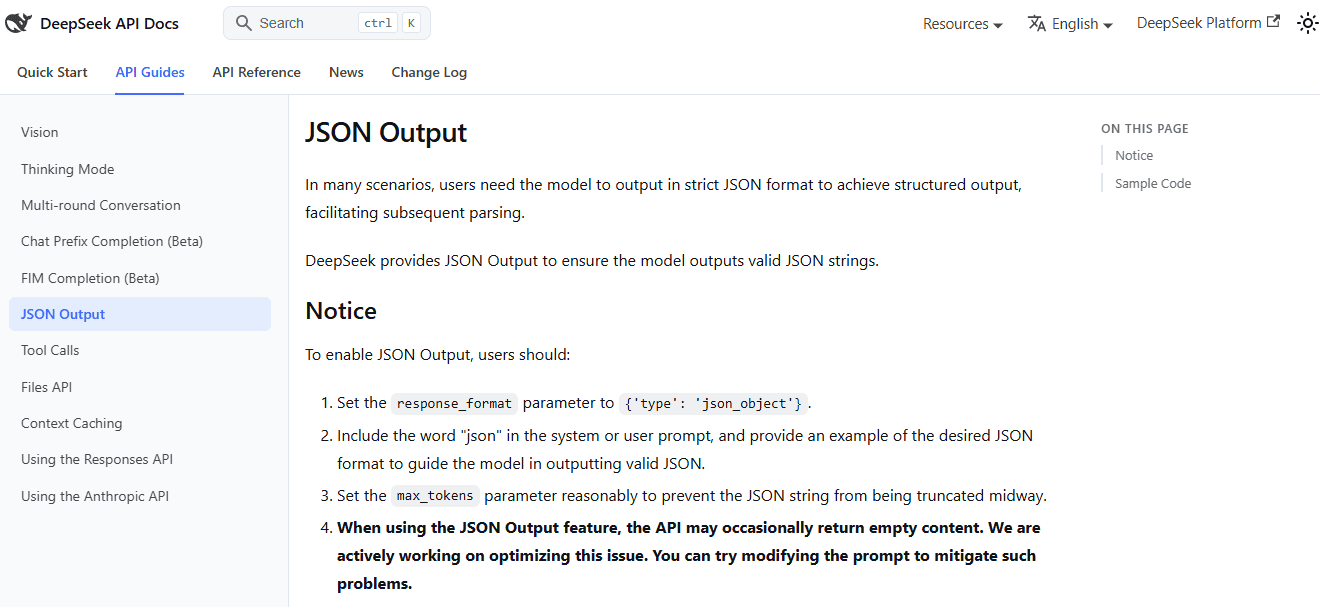
json_object response format and still requires a prompt that explicitly asks for JSON.| Feature | Use it when… | Do not use it for… |
|---|---|---|
| JSON Output | You need the model’s final answer formatted as JSON. | Calling external systems or triggering real actions. |
| Tool Calls | The model needs external data, database lookups, APIs, or actions. | Simple formatting-only tasks where no external action is needed. |
| Strict Tool Calls | You need tighter argument conformance to a function schema. | Replacing authorization, validation, or business rules. |
Use JSON Output to format a classification result, and Tool Calls to request a lookup or action. In Chat Completions, JSON mode uses response_format={"type":"json_object"} plus an explicit JSON instruction. Handle empty or truncated responses and validate the resulting data. See the JSON Output guide.
Building DeepSeek AI Agents with Tool Calls
The examples handle one read-only batch and then stop tool selection. A multi-step agent needs additional execution policy, not merely a while True around the request.
Count every model request in the workflow, not just the first prompt. The final-answer request is a separate API call, and replacing the mock lookup may add external-service costs. For usage records and missing-data handling, see our DeepSeek API billing guide.
- Allow only the tools needed for the task and authorize both reads and writes.
- Set budgets for rounds, calls, tokens, elapsed time, and external requests.
- Separate validation failures from transient service failures; never repair arguments by guessing credentials or identifiers.
- Require verified approval for high-impact actions and prevent duplicate execution on retries.
- Treat retrieved documents and tool results as untrusted data, not permission to override application rules.
These controls follow the principles in the OWASP AI Agent Security guidance. In particular, a model-generated approval flag cannot replace a server-side authorization decision.
Common DeepSeek Tool Call Errors and Fixes
| Problem | Likely cause | Action |
|---|---|---|
Empty tool_calls | auto permits a normal response. | Improve descriptions. Use required only when necessary and after disabling Thinking Mode. |
| Malformed JSON or wrong argument types | The generated arguments fail parsing or validation. | Return a controlled tool error and do not execute that call. Do not coerce numbers, nulls, or arrays into an ID. |
| Missing or extra arguments | The object does not match the permitted fields. | Reject it before execution. The examples require exactly order_id. |
| Unknown function | The requested name is outside the allowlist. | Reject it; never resolve arbitrary names with eval or dynamic imports. |
| Repeated tool calls | The workflow has no stopping policy. | Cap execution and use tool_choice="none" for the final response. Require idempotency for write operations. |
| HTTP 400 with required or named selection | Thinking Mode is enabled. | Disable thinking explicitly before sending required or the named choice. |
| HTTP 400 involving reasoning history | Earlier reasoning fields were dropped while sending tools. | Preserve all required assistant history, even from turns with no tool call. |
| Strict schema rejected | Wrong beta setup or unsupported schema. | Use the beta base URL, strict: true, and supported object-schema rules. |
| Tool result not connected | Wrong or missing tool_call_id. | Return a result for each accepted call ID; reject missing or duplicate IDs before execution. |
| Truncated or interrupted response | Generation did not finish normally. | Do not execute partial arguments. The examples stop on incomplete finish reasons. |
| Model configuration mismatch | An outdated or incorrect model identifier. | Check the current model table instead of assuming every legacy alias is equivalent. |
Changing top_p has no effect | The selected model and mode ignore the supplied setting, notably Pro with thinking enabled or Flash with thinking disabled. | Check the model-specific table above. For Pro thinking, adjust supported reasoning effort rather than assuming top_p is tunable. |
Inspect the response’s actual error details before choosing a fix. Application-level invalid_tool_call results in these examples are not DeepSeek status codes; use the DeepSeek API error-code guide for provider HTTP responses. Never retry an unauthorized action simply because its JSON was valid.
Security Best Practices for DeepSeek Function Calling
Before sending customer records or proprietary data, review DeepSeek’s Privacy Policy and Open Platform Terms. Returning a tool result to the model sends that result to the API provider; keep unnecessary private fields out.
Use three separate checks: schema validation for data shape, business validation for meaningful values, and authorization for access to the target record. The demo checks shape and nonblank identifiers for a mock lookup, not real order ownership or a login/tenant-permission system. See OWASP input-validation guidance alongside the agent authorization guidance above.
- Keep keys server-side and give the execution service only the permissions it needs.
- Use parameterized database queries and bounded external requests; a nonempty string is not a complete injection defense.
- Derive user identity from the authenticated backend, never from a model-supplied
user_idor an approval claim. - Return only authorized fields. Require confirmation tied to the exact operation for destructive or financial actions.
- Log outcome codes and safe request metadata rather than complete prompts, credentials, or unrestricted tool arguments.
Apply size, nesting, and output limits appropriate to the real application before exposing parsers and tools to untrusted traffic. The small validators here are intentionally scoped to the demonstrated schema, not a general security certification.
Production Checklist
- Check the selected model and thinking state before tuning
top_p; Flash and Pro use different rules. - Keep the correct DeepSeek model, endpoint, and server-side API key.
- Test allowed tool names, JSON parsing, exact fields, types, and application-specific value rules.
- Verify with a spy or mock that rejected arguments never reach the backend handler.
- Authorize each real lookup or action using trusted user and tenant state.
- Keep mock results clearly labeled and replace them only with an approved data source.
- Preserve matching call IDs and complete assistant history required by Thinking Mode.
- Disable Thinking Mode before
requiredor a forced named function. - For strict mode, use the beta endpoint and valid strict schemas without removing application checks.
- Bound rounds, calls, time, token usage, and retries; handle partial output without executing it.
- Require verified confirmation and idempotency for high-impact writes.
- Pin and test SDK versions. Python uses
extra_body; JavaScript uses top-level DeepSeek fields. - Review logs and tool results for secrets and unnecessary personal data.
FAQ
What are DeepSeek Tool Calls?
DeepSeek Tool Calls let the model request a structured function call. Your application validates the request, executes the function, and returns the result to the model.
Are Tool Calls the same as function calling?
For the custom Chat Completions functions in this guide, yes. The model requests a function through tool_calls, and your application handles it. Other API interfaces can also expose different built-in tool types, so check their documentation separately.
Does DeepSeek execute tools itself?
Not the custom function tools shown here. Your application executes those functions after validation and authorization, then returns their results. This is not a blanket statement about provider-hosted tools: DeepSeek’s Responses API documents server-side web search with deepseek-v4-pro.
Which model should I use for DeepSeek Tool Calls?
Use deepseek-flash for the Flash example. deepseek-v4-pro is also listed separately with Tool Calls support. Choose using the current model table and your own evaluation rather than treating the identifiers as interchangeable.
Can DeepSeek use Tool Calls in Thinking Mode?
Yes. DeepSeek’s current docs say Thinking Mode supports tool calls. When requests carry the tools parameter, preserve reasoning_content for all previous assistant messages in subsequent requests. Dropping it can produce a 400 error.
Does top_p work in Thinking Mode?
It depends on the model. With deepseek-flash, top_p takes effect in Thinking Mode within 0.95–1.0 and is fixed at 1.0 outside it. With deepseek-v4-pro, your value is ignored during thinking: it is fixed at 0.95 when tools is present, otherwise 1.0. Pro accepts the setting in non-thinking mode. Follow the model-specific rules in the table above.
Should I use JSON Output or Tool Calls?
Use JSON Output when you need the model’s answer formatted as JSON. Use Tool Calls when the model needs to request external data or actions.
Can I use the OpenAI SDK with DeepSeek?
Yes. DeepSeek documents OpenAI-compatible API access. Use the OpenAI SDK with DeepSeek’s base URL and your DEEPSEEK_API_KEY. Remember that using the OpenAI SDK does not mean you are using OpenAI models or OpenAI billing.
What are common production mistakes with DeepSeek Tool Calls?
Common mistakes include parsing JSON without checking its shape, executing unknown tools, skipping record-level authorization, losing call IDs or reasoning history, and using unbounded retries. Strict mode does not remove the need for those application controls.
Does strict mode replace application validation?
No. Schema conformance cannot prove that an order exists, belongs to the signed-in user, or may be changed. Keep business checks and authorization in the execution service.
Does parsing JSON validate order_id?
No. The decoded value still needs checks. In these examples it must be an object with exactly one order_id field containing a nonblank string. Both dispatchers perform those checks before invoking the mock lookup.