
Last verified: October 7, 2026
DeepSeek Harness is DeepSeek’s open-source agent harness for running AI agent workflows over files, code, tools, sessions, workspaces, and plugins. It is not a DeepSeek model, not the same thing as the DeepSeek API, and not just an API feature like Tool Calls. It is a plugin-based agent runtime that can run as a desktop app, a local Web UI, or through a Python SDK-driven runtime.
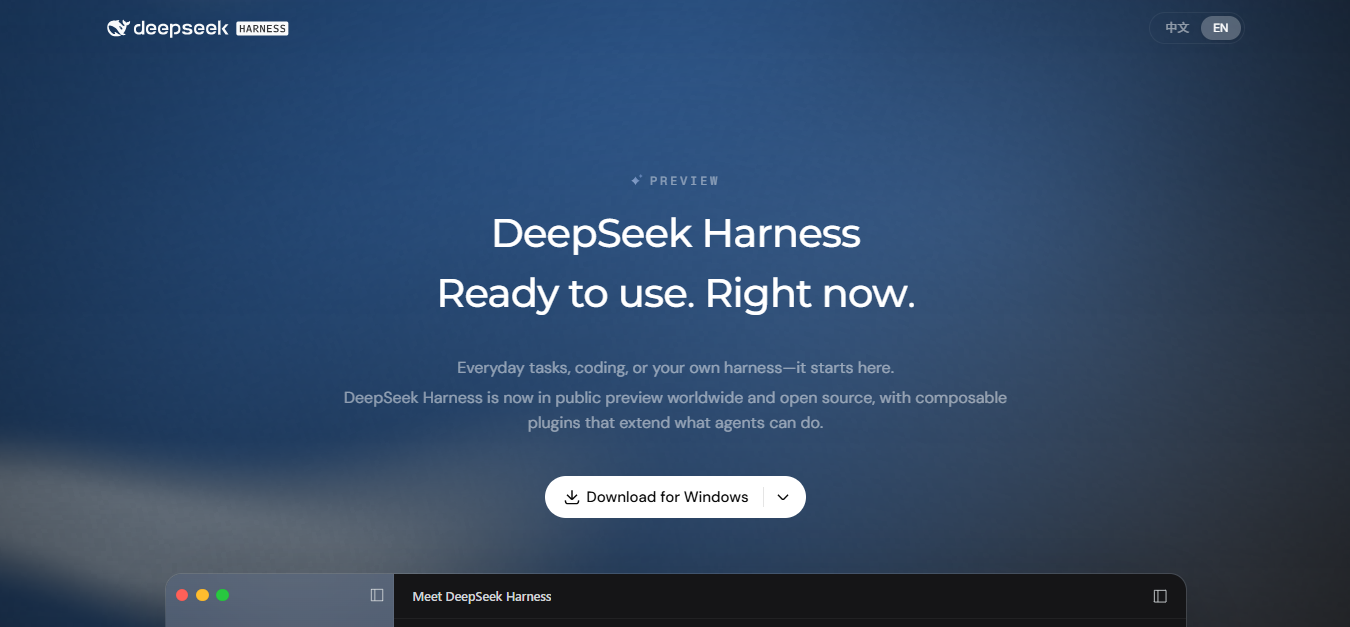
The simplest way to understand it: DeepSeek Harness gives an AI model a working environment. That environment can include a workspace, tools, shell commands, file operations, plugins, scheduled tasks, custom model providers, and session traces. DeepSeek’s official page says Harness is in public preview worldwide and open source, with composable plugins that extend what agents can do. DeepSeek Harness official page
The important safety note is just as direct: DeepSeek’s own SAFETY.md says Harness is experimental developer-preview software, has not undergone a security audit, and must not be treated as secure or production-ready. It can execute model-generated code and commands, load third-party plugins, and access the network, processes, credentials, and files made available to it.
That makes DeepSeek Harness useful for local agent experiments, coding, file work, data analysis, automation, plugin development, and controlled developer workflows. It also means you should run it with least privilege, ideally in a disposable virtual machine, container, or dedicated environment when working on anything risky or sensitive.
DeepSeek Harness at a glance
| Question | Practical answer |
|---|---|
| What is DeepSeek Harness? | An open-source, plugin-based agent harness from DeepSeek for running AI agent workflows over workspaces, tools, files, commands, sessions, and plugins. |
| Is it a model? | No. Models are only one part of the system. Harness can use DeepSeek models or configured custom providers. |
| Is it the DeepSeek API? | No. The API is a model service. Harness is a runtime/workflow environment that can call model APIs. |
| Is it open source? | Yes. The official repository lists an MIT license. DeepSeek Harness GitHub repository |
| Is it production-ready? | No. DeepSeek’s safety notice says it is experimental developer-preview software and not security-audited. |
| How do you start it? | Use the desktop app, run the Web UI with npx @deepseek-ai/dsh web, build from source, or use the Python SDK for programmatic workflows. |
| Can it run commands? | Yes. The Web UI guide says the agent can read and edit workspace files, run commands, delegate work, and maintain a plan. |
| Can it use non-DeepSeek models? | Yes, through third-party providers or custom model APIs, where configured. |
| Should you use it on sensitive files? | Only with caution and isolation. Do not expose sensitive credentials or data unless you accept the risk. |
What DeepSeek Harness is
DeepSeek Harness is an agent harness. In practical terms, that means it gives a model a structured runtime where it can work on tasks with tools, files, plugins, sessions, and workspace context.
The official GitHub README describes DeepSeek Harness as an open-source agent harness developed by DeepSeek AI. It says Harness is built on an “everything-is-a-plugin” architecture and powered by Cordis. DeepSeek Harness GitHub README
That plugin-first design is the core idea. In DeepSeek’s public product page, the agent can work with documents, analyze spreadsheets, write code, preview results, refine output through conversation, create or install plugins, run scheduled tasks, and show execution traces. DeepSeek Harness official page
For a user, Harness looks like an AI workspace. For a developer, it is a composable runtime where model providers, tools, sessions, skills, UI pieces, filesystem access, automation, and plugins can be swapped or extended.
What DeepSeek Harness is not
Most confusion around DeepSeek Harness comes from comparing it to the wrong product layer.
| Misconception | More accurate answer |
|---|---|
| DeepSeek Harness is a new DeepSeek model. | No. It is an agent harness/runtime. It can use DeepSeek models, but it is not itself a model. |
| DeepSeek Harness is the same as DeepSeek API. | No. The API serves model requests. Harness is an environment that can call model APIs and coordinate tools/workflows. |
| DeepSeek Harness is the same as Tool Calls. | No. Tool Calls are an API capability. Harness is a larger runtime that may include tools, plugins, files, sessions, UI, and orchestration. |
| DeepSeek Harness is only a benchmark harness. | No. Older DeepSeek benchmark notes referenced Harness minimal mode, but the current Harness product is a public/developer-preview agent runtime. |
| DeepSeek Harness replaces Claude Code, Codex, or OpenCode. | Not exactly. It overlaps with coding-agent workflows, but it is a separate open-source harness with its own plugin architecture and safety profile. |
| DeepSeek Harness is safe by default. | No. DeepSeek’s own safety notice says not to treat it as secure or production-ready. |
Current status: public preview, developer preview, open source
DeepSeek’s official Harness page says Harness is in public preview worldwide and open source. The GitHub README says the repository is in developer preview, is iterating rapidly, and that compatibility-breaking changes will happen. DeepSeek Harness official page DeepSeek Harness GitHub README
This matters for production decisions. A preview product can be useful and powerful, but it should not be treated like a stable enterprise control plane. If you pilot it in a team, pin versions, isolate workspaces, test upgrades, and do not assume current plugin APIs or configuration formats will remain unchanged.
The repository lists an MIT license, and the product page says “Open source · MIT.” But open source does not mean risk-free. It only means you can inspect, fork, and modify the code under the license. You still need to evaluate operational safety, plugin risk, local permissions, and data exposure.
How DeepSeek Harness works
DeepSeek Harness is built around a plugin architecture. The official product page uses the phrase “Everything is a plugin,” and the README says the architecture is powered by Cordis. DeepSeek Harness GitHub README
In practice, that means the runtime is not just a model chat window. A Harness session can involve:
- A selected model provider.
- A workspace directory.
- Model-facing tools.
- Filesystem access, depending on the profile and plugin configuration.
- Shell or terminal execution.
- Sessions and logs.
- Plugin-provided skills and UI features.
- Automation or scheduled tasks, where enabled.
- Execution traces for debugging tool calls and agent behavior.
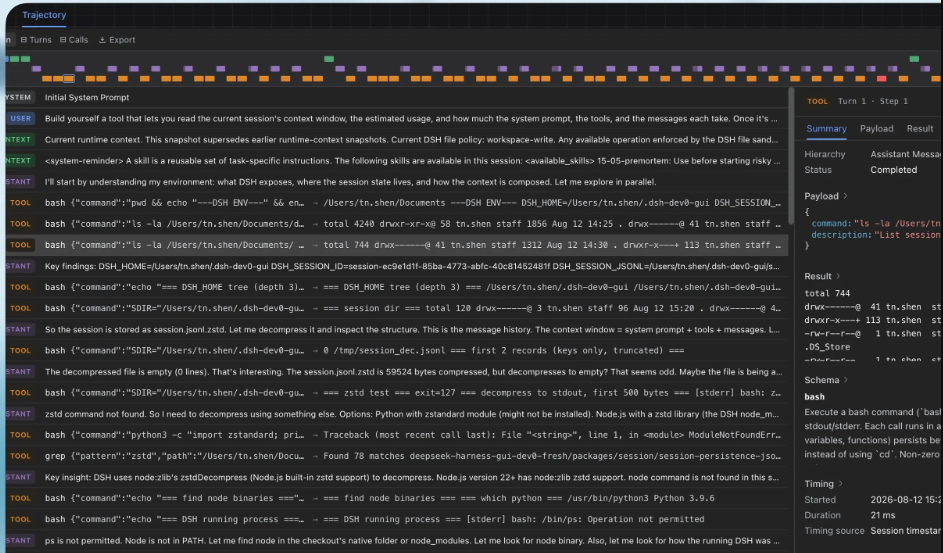
The Web UI guide says a fresh Web UI has no selected workspace until the user adds one. After selecting a workspace, the agent can read and edit files, run commands, delegate work, and maintain a plan; the UI asks before operations that require approval under the active permission policy. DeepSeek Harness Web UI guide
How to start using DeepSeek Harness
DeepSeek currently exposes several ways to start Harness. Use the simplest option that matches your goal.
| Start method | Best for | Verified current path | Important caution |
|---|---|---|---|
| Desktop app | Users who want the easiest interactive UI. | The official product page offers desktop downloads for macOS Apple silicon and Windows 64-bit. | Still preview software; review safety guidance before giving it important files. |
| Web UI from npm | Developers who want a local browser UI. | npx @deepseek-ai/dsh web | Requires Node.js. The README says it starts at http://127.0.0.1:3080 by default. |
| Source install | Developers who want to inspect, build, or contribute to the project. | git clone, pnpm install, pnpm run build, then pnpm dsh web. | Expect compatibility-breaking changes during developer preview. |
| Python SDK | Programmatic workflows that drive Harness as a subprocess. | python -m pip install deepseek-harness-sdk | This is not the same as making a normal DeepSeek API chat request from Python. |
Start the Web UI with npm
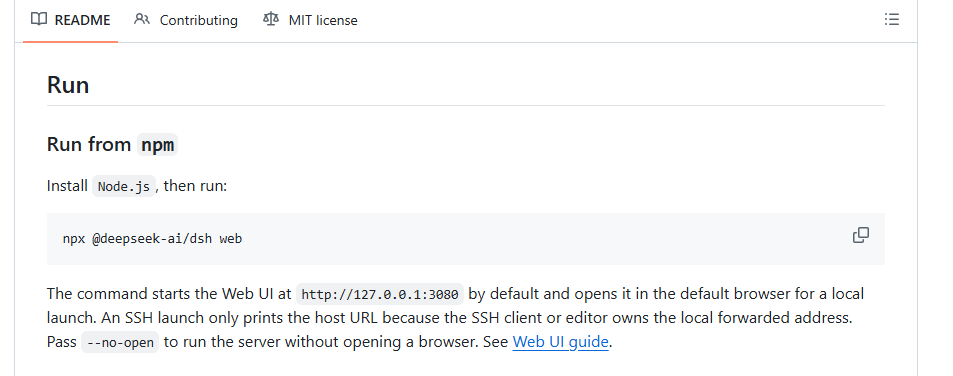
The GitHub README gives this quick start:
npx @deepseek-ai/dsh webAccording to the README, this command starts the Web UI at http://127.0.0.1:3080 by default and opens it in the default browser for a local launch. DeepSeek Harness GitHub README
http://127.0.0.1:3080.Install from source
The README gives this source-install path:
git clone https://github.com/deepseek-ai/deepseek-harness.git
cd deepseek-harness
pnpm install
pnpm run build
pnpm dsh web
Use the source path if you want to inspect the implementation, contribute to the repository, develop plugins, or run the current project build directly.
Use the Python SDK
The Python SDK is for driving DeepSeek Harness as a subprocess over newline-delimited JSON-RPC. The SDK docs say to install:
python -m pip install deepseek-harness-sdkThe Python SDK docs list prerequisites including Python 3.10 or newer, Git, a supported platform, a DeepSeek-compatible API endpoint and credential, an isolated workspace, and an isolated Harness home. They also say the SDK never silently reads ~/.dsh; each launch needs an explicit Harness home through dsh_home or a non-empty DSH_HOME. DeepSeek Harness Python SDK guide
That distinction is important. If you only want to call the DeepSeek API once from Python, you probably want the normal OpenAI-compatible DeepSeek API path. If you want to run Harness workflows programmatically, use the Harness Python SDK.
How to configure models and API keys
After starting the Web UI, configure a model before running real tasks. The Web UI guide says to open Settings → Models, enter a DeepSeek API key, and save it. The model route becomes usable immediately without restarting the server. DeepSeek Harness Web UI guide
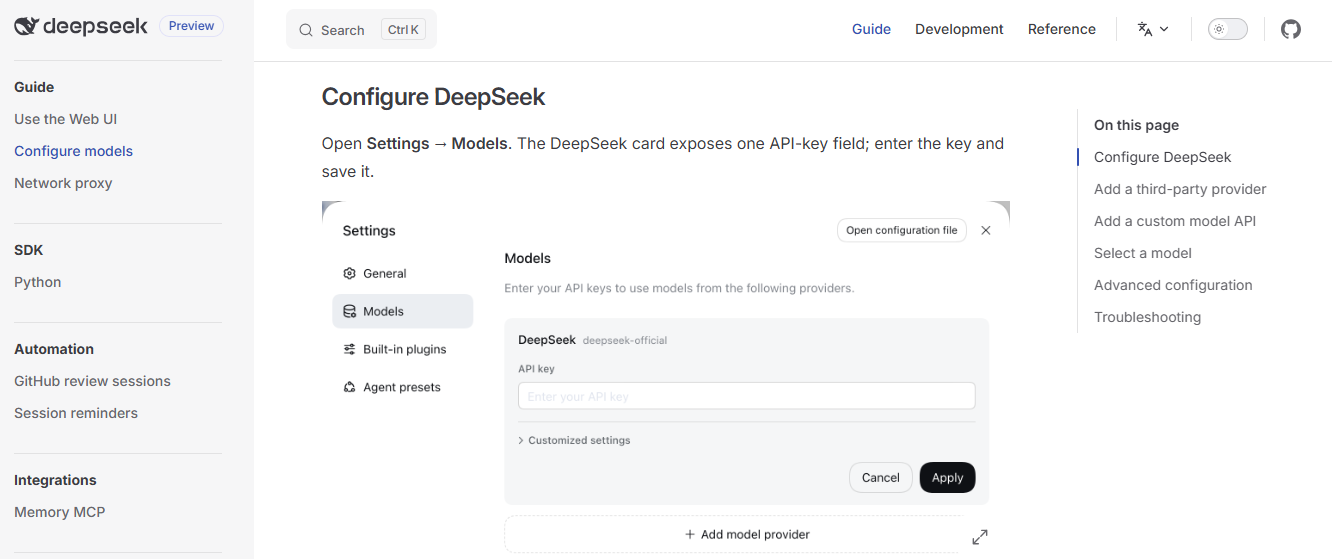
The model configuration guide adds several important details:
- The DeepSeek card exposes one API-key field.
- Keys are write-only in the UI.
- After saving, the page receives a redacted descriptor, not the literal secret.
- The key is stored in
$DSH_HOME/.credentials.yaml, while settings keep only a credential reference. - Model changes take effect on the next request without restarting the server.
DeepSeek Harness can also add third-party providers and custom model APIs. The configuration guide says custom providers can target relays, company gateways, self-hosted servers, or providers not in the installed catalog. The supported protocol picker includes OpenAI Chat Completions, OpenAI Responses, and Anthropic Messages. DeepSeek Harness model configuration guide
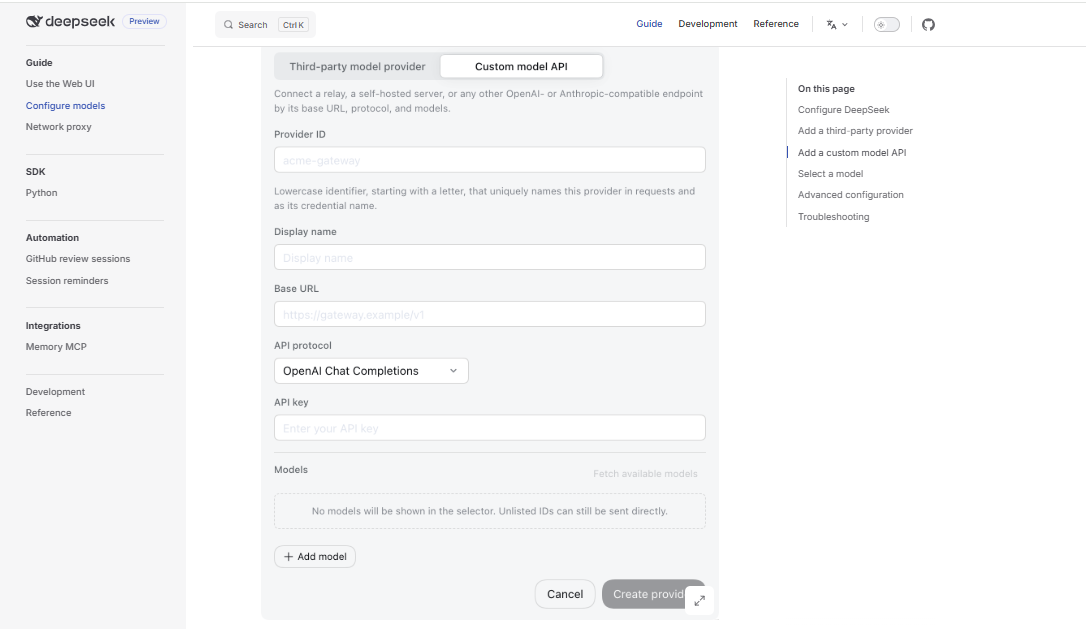
What tasks can DeepSeek Harness do?
DeepSeek’s official product page presents Harness as useful for everyday work, coding, research, background tasks, and plugins. It shows examples such as organizing documents, analyzing spreadsheets, writing code, creating slides, reviewing repos, fixing bugs, building features, running tests, finding information, verifying facts, citing sources, running scripts, batch-processing files, tracking progress, and building plugins. DeepSeek Harness official page
| Use case | What Harness can help with | Access needed | Safety note |
|---|---|---|---|
| Document work | Organize files, summarize documents, draft reports, create slides. | Workspace file access. | Do not expose confidential files unless you accept the risk. |
| Spreadsheet and data analysis | Analyze spreadsheets or data files, summarize findings, generate reports. | Read access to data files, possible command execution. | Use copies of sensitive data; avoid credentials and personal records. |
| Coding | Explore repositories, fix bugs, build features, run tests. | Repository workspace, shell access, file edit access. | Use Git, backups, disposable branches, and review diffs before merging. |
| Research | Find information, verify facts, cite sources where tooling supports it. | Network/search tools if enabled. | Verify important facts manually before publishing or acting. |
| Background tasks | Run scripts, batch-process files, track progress. | Command execution and workspace access. | Use least privilege and isolate long-running tasks. |
| Plugin development | Create or install plugins, extend tools, skills, and interface. | Plugin installation and execution rights. | Review third-party plugin code and permissions before use. |
| Scheduled tasks | Create recurring or delayed work where the Scheduled tasks plugin is enabled. | Automation plugin and model access. | Use only for low-risk tasks until you trust the configuration. |

Plugins and custom providers
Plugins are not an optional detail in DeepSeek Harness; they are the design center. The official page says users can install plugins or create them through chat in Creator mode to extend tools, skills, and the interface. The page also shows official or experimental plugins such as Agent teams, Auto approval review, Scheduled tasks, Voice input, Terminal, Agent loop, and Subagents. DeepSeek Harness official page
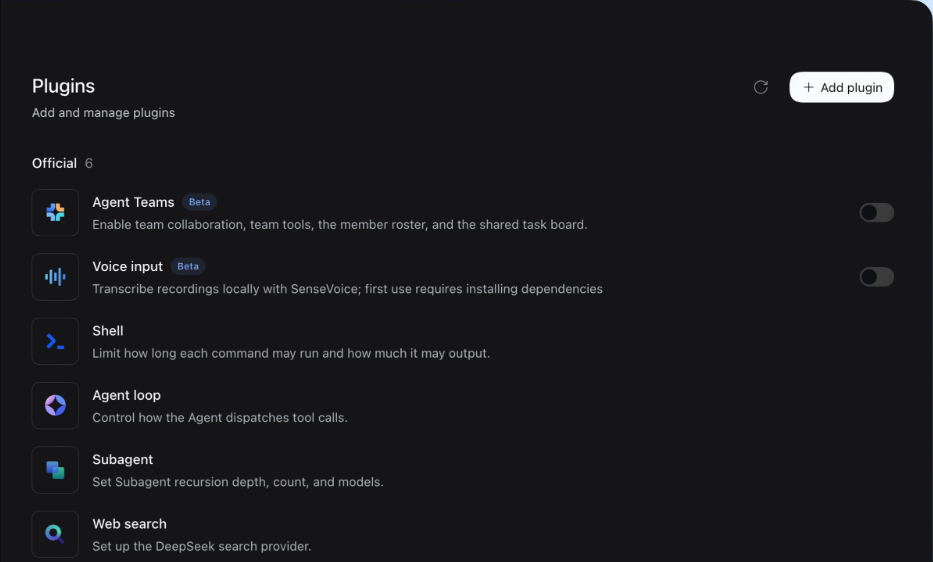
The GitHub README also tells plugin developers to add the dsh-plugin topic to plugin repositories for discoverability. DeepSeek Harness GitHub README
That plugin ecosystem is powerful, but it is also a risk surface. A plugin can influence tools, skills, UI behavior, execution paths, or model context. Treat third-party plugins like code you are installing into an agent that may touch your files and commands. Review source code, permissions, configuration, and maintainers before installing anything you do not trust.
Safety and security warnings
This is the section many short DeepSeek Harness summaries miss. DeepSeek’s own safety file is clear: Harness is experimental developer-preview software, has not undergone a security audit, and must not be treated as secure or production-ready. DeepSeek Harness SAFETY.md
The same safety notice says Harness can execute model-generated code and commands, load third-party plugins, and access the network, processes, credentials, and files made available to it. It warns that incorrect model output, defects, misconfiguration, malicious input, or untrusted plugins may damage the host computer, modify or delete files, disclose data or credentials, or cause other unintended effects.
DeepSeek also warns that sandboxing, approval prompts, and permission controls can reduce risk but do not guarantee isolation. You should not rely on Harness as the only security control for untrusted workloads.

Safety checklist before using DeepSeek Harness
- Run Harness with the least privileges needed for the task.
- Prefer a disposable virtual machine, container, or dedicated environment.
- Use a disposable copy of a repository or workspace for experiments.
- Keep backups of files Harness can access.
- Do not expose sensitive credentials, API keys, customer data, private source code, or confidential files unless you accept the risk.
- Review plugins before installing them.
- Review configuration and proposed commands before allowing them to run.
- Use Git branches and inspect diffs before accepting code changes.
- Do not use Harness as your only sandbox or security boundary.
- Do not treat preview software as production infrastructure without testing and risk review.
DeepSeek Harness vs DeepSeek API, Tool Calls, and Responses API
DeepSeek Harness sits above the model/API layer. It can use model APIs, but it is not the API itself.
| Layer | What it is | When to use it |
|---|---|---|
| DeepSeek model | The underlying AI model, such as deepseek-flash or another configured model. | Use when choosing model behavior, cost, context length, reasoning, or vision support. |
| DeepSeek API | The hosted model API with OpenAI-compatible and Anthropic-compatible formats. | Use when your application needs direct model calls. |
| Tool Calls | An API feature where the model asks your app to call functions/tools. | Use inside your own app when you control the tool execution layer. |
| Responses API | An API surface for response-style workflows. | Use when building directly against that API format. |
| DeepSeek Harness | A plugin-based agent runtime/workspace that can call models and use tools, files, commands, sessions, and plugins. | Use when you want an agent environment rather than only a raw model call. |
If all you need is one model response in your backend, use the DeepSeek API directly. If you need an agent that can inspect a repository, run commands, edit files, maintain session state, and use plugins, Harness is the relevant layer.
DeepSeek Harness vs Claude Code, Codex, and OpenCode
DeepSeek Harness overlaps with coding-agent tools, but it is not just a clone of one specific product. Its main differentiator is that the runtime itself is built around a plugin system where model providers, tools, sessions, UI pieces, and workflow capabilities can be replaced or extended.
Use this comparison carefully. Claude Code, Codex, OpenCode, and similar tools change quickly, and each has its own pricing, security model, integrations, and limitations. The most useful comparison is by product layer: For another coding and research workflow comparison, see DeepSeek vs Kimi.
| Question | DeepSeek Harness angle | What to test in practice |
|---|---|---|
| Do you need a local open-source harness? | Harness is open source and plugin-based. | Can your team operate preview software safely? |
| Do you need model-provider flexibility? | Harness supports DeepSeek and custom providers through configuration. | Does your provider’s protocol, reasoning format, and image support actually work? |
| Do you need repo-level coding tasks? | Harness can read/edit workspace files and run commands. | Does it pass your tests with acceptable token cost and review time? |
| Do you need stable production support? | Harness is still preview/developer-preview software. | Would a more mature managed coding tool be safer for production use? |
| Do you need custom plugins? | Harness is designed around plugin development. | Can your team review, maintain, and secure those plugins? |
What “DeepSeek Harness minimal mode” means
Some readers arrive at this keyword after seeing “DeepSeek Harness minimal mode” in benchmark or model-release notes. That phrase should not be confused with the whole Harness product.
DeepSeek API documentation links Harness under Agent Integrations and says DeepSeek Harness is in developer preview for agent harness developers worldwide. DeepSeek API documentation Earlier benchmark notes may refer to a minimal Harness setup used to evaluate code-agent tasks. That benchmark context does not mean Harness is a model, and it does not mean every local Harness setup will reproduce the same numbers.
If you care about benchmarks, treat them as model-plus-harness measurements. Results depend on model version, reasoning effort, tools, prompt, benchmark suite, harness profile, and environment. For normal users, the practical question is not “what did minimal mode score?” It is “does this Harness configuration solve my task safely, reliably, and at an acceptable cost?”
When to use DeepSeek Harness
DeepSeek Harness is worth testing when you need more than a chatbot and more than a single API call.
- Use it to pilot local coding-agent workflows on disposable repository copies.
- Use it to analyze folders, documents, spreadsheets, and generated reports in a controlled workspace.
- Use it to build or test plugins for custom workflows.
- Use it to evaluate model providers through a consistent agent environment.
- Use it to create internal research or automation prototypes.
- Use it to inspect traces and tool-call behavior for agent workflows.
- Use it to experiment with scheduled tasks and background work where the risk is low.
When not to use DeepSeek Harness
Do not use DeepSeek Harness just because it is new or popular. Avoid it, or use a much more isolated setup, when:
- You need audited, production-ready software.
- You cannot isolate the runtime from sensitive files and credentials.
- Your organization has not approved agentic tools that can run commands.
- You are handling regulated data, client secrets, private keys, or confidential business records.
- You only need a simple DeepSeek API completion.
- You do not want an agent that can edit files or run shell commands.
- You cannot review plugins, commands, or file changes.
- You cannot tolerate compatibility-breaking changes.
- You need guaranteed sandbox isolation.
Common mistakes and fixes
| Mistake | Why it matters | Better approach |
|---|---|---|
| Calling DeepSeek Harness a model. | It leads to wrong comparisons with DeepSeek V4.1 Flash or R1. | Call it an agent harness/runtime. |
| Confusing Harness with Tool Calls. | Tool Calls are an API feature, not a full workspace runtime. | Use Tool Calls for app-level function execution; use Harness for agent workflows. |
| Ignoring the safety notice. | Harness can execute commands and access local resources. | Read SAFETY.md and use least privilege. |
| Running it directly on important folders. | Bad model output or plugin behavior can modify or delete files. | Use disposable copies, backups, Git branches, containers, or VMs. |
| Installing random plugins without review. | Plugins can change agent behavior and tool access. | Review source, maintainer, permissions, and configuration. |
| Using the Python SDK for simple API calls. | The Harness SDK runs Harness workflows, not just ordinary API requests. | Use the normal DeepSeek OpenAI-compatible API path for simple chat completions. |
| Assuming custom providers work because they appear in the UI. | Protocol, model IDs, reasoning, image input, and endpoint behavior still need verification. | Test each provider/model route before relying on it. |
Frequently asked questions
What is DeepSeek Harness?
DeepSeek Harness is an open-source, plugin-based agent harness developed by DeepSeek. It lets AI agents work with workspaces, files, commands, tools, sessions, providers, and plugins. It is not a model.
Is DeepSeek Harness a model?
No. It is an agent runtime. It can use models such as DeepSeek models or configured custom providers, but Harness itself is not the model.
Is DeepSeek Harness the same as the DeepSeek API?
No. The DeepSeek API is a hosted model API. DeepSeek Harness is a runtime/workspace that can call model APIs and coordinate tools, files, plugins, sessions, and commands.
Is DeepSeek Harness open source?
Yes. The official GitHub repository lists an MIT license, and DeepSeek’s product page describes Harness as open source.
Is DeepSeek Harness production-ready?
No. DeepSeek’s SAFETY.md says it is experimental developer-preview software, has not undergone a security audit, and must not be treated as secure or production-ready.
Is DeepSeek Harness safe?
It can be useful in controlled environments, but it should not be treated as safe by default. It can run commands, load plugins, and access files, credentials, processes, and network resources made available to it. Use isolation, least privilege, and backups.
Can DeepSeek Harness run commands?
Yes. The Web UI guide says the agent can run commands, and SAFETY.md warns that it can execute model-generated code and commands.
Can DeepSeek Harness edit files?
Yes, where the active profile, tools, permissions, and workspace allow it. That is why you should use backups, Git branches, disposable folders, or containers for important work.
Does DeepSeek Harness require a DeepSeek API key?
For the standard DeepSeek route, yes, you need a DeepSeek API key. The Web UI guide says to enter a DeepSeek API key in Settings → Models. Custom providers may use their own credentials and endpoints.
Can DeepSeek Harness use non-DeepSeek models?
Yes. The model configuration guide supports third-party providers and custom model APIs. Custom providers can use protocols such as OpenAI Chat Completions, OpenAI Responses, or Anthropic Messages when configured correctly.
What is @deepseek-ai/dsh?
@deepseek-ai/dsh is the npm package used to run the Harness Web UI from npm. The README shows npx @deepseek-ai/dsh web as the quick-start command.
What is deepseek-harness-sdk?
deepseek-harness-sdk is the Python SDK package for driving DeepSeek Harness as a subprocess. It is for Harness workflows, not just ordinary DeepSeek API chat completions.
What is DeepSeek Harness minimal mode?
It is a narrower Harness configuration referenced in benchmark and SDK contexts. Do not confuse minimal mode with the whole Harness product. Benchmarks that use a specific Harness mode are measurements of a model plus a harness configuration, not proof that every user setup behaves the same way.
How is DeepSeek Harness different from Tool Calls?
Tool Calls are a model/API feature for calling functions from an application. DeepSeek Harness is a broader runtime that can include model providers, tools, files, commands, plugins, sessions, and UI.
Should I run DeepSeek Harness in a container or VM?
For risky tasks, yes. DeepSeek’s safety guidance recommends least privilege and prefers a disposable virtual machine, container, or dedicated environment. This is especially important when working with untrusted code, third-party plugins, or valuable files.
Bottom line
DeepSeek Harness is best understood as DeepSeek’s open-source, plugin-based agent runtime and workflow harness. It is useful for local agent experiments, coding, documents, data analysis, automation, plugin development, model-provider testing, and controlled developer workflows.
It is also preview software that can run commands and touch local resources. Treat it like a powerful developer tool, not a harmless chatbot. Start in a disposable workspace, configure only the model providers you need, review plugins and commands, and avoid sensitive files unless your risk controls are ready.
Official sources checked
- DeepSeek Harness official product page
- DeepSeek Harness GitHub repository and README
- DeepSeek Harness SAFETY.md
- DeepSeek Harness Web UI guide
- DeepSeek Harness model configuration guide
- DeepSeek Harness Python SDK guide
- DeepSeek Harness Python SDK README
- DeepSeek API documentation: Your First API Call and Agent Integrations
- DeepSeek Harness scheduled tasks guide