
Last verified: October 8, 2026
Yes, you can use DeepSeek through AWS or Azure, but the details matter. AWS and Azure do not always expose the same DeepSeek model names, pricing model, API surface, deployment type, region, or security controls as the direct DeepSeek API.
If you call DeepSeek directly, you use DeepSeek’s own API platform, base URLs, API key, pricing, model IDs, and terms. DeepSeek’s current API pricing page lists deepseek-flash as DeepSeek-V4.1-Flash and deepseek-v4-pro as DeepSeek-V4-Pro-0813. DeepSeek Models & Pricing
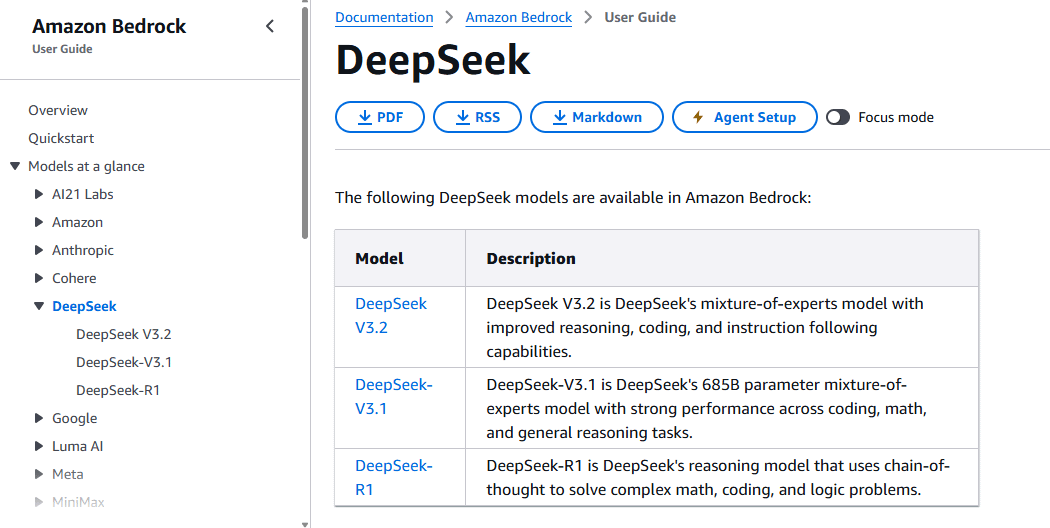
If you use AWS, you are usually working through Amazon Bedrock, Amazon Bedrock Marketplace, Amazon SageMaker JumpStart / SageMaker AI, Custom Model Import, or self-managed infrastructure such as EC2, Trainium, Inferentia, or EKS. AWS currently documents DeepSeek model cards such as DeepSeek-R1, DeepSeek-V3.1, and DeepSeek V3.2 in Amazon Bedrock, and the available model set should be verified in AWS documentation before deployment. AWS DeepSeek model cards
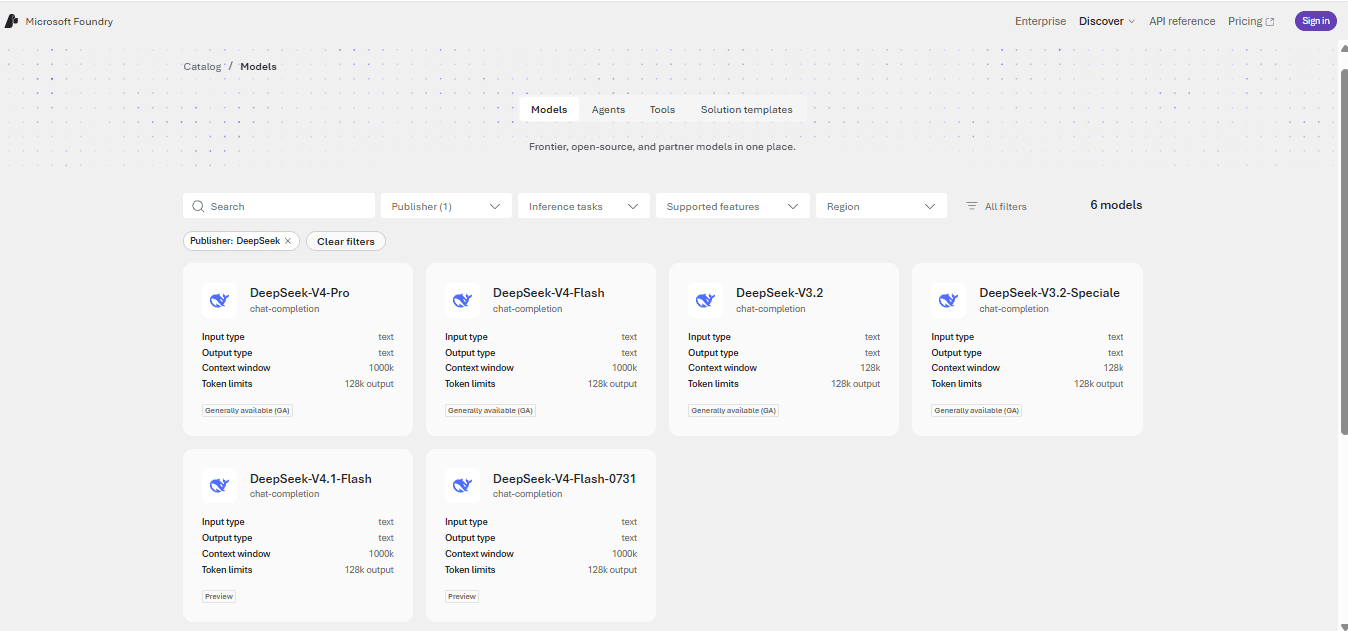
If you use Azure, you are usually working through Microsoft Foundry / Azure AI Foundry, Foundry Models, or GitHub Models. Microsoft’s current Foundry documentation lists DeepSeek models sold by Azure, including DeepSeek-V4-Pro, DeepSeek-V4-Flash-0731, DeepSeek-V4-Flash, DeepSeek-V3.2-Speciale, and DeepSeek-V3.2. Microsoft Foundry Models sold by Azure
The practical rule: use AWS or Azure when you need cloud-platform governance, procurement, identity, networking, monitoring, or managed deployment controls. Use the direct DeepSeek API when you need the current DeepSeek API feature set and model IDs directly from DeepSeek.
Direct DeepSeek API vs AWS vs Azure
| Path | Best for | Model naming | Pricing style | Main caveat |
|---|---|---|---|---|
| Direct DeepSeek API | Developers who want DeepSeek’s current official API, current model IDs, and DeepSeek-specific features. | Uses DeepSeek API names such as deepseek-flash and deepseek-v4-pro. | Token-based DeepSeek billing with cache-hit, cache-miss, output, peak, and off-peak pricing. | Data flow, terms, privacy, billing, and support are through DeepSeek, not AWS or Azure. |
| AWS | AWS teams that want Bedrock, SageMaker, IAM, VPC, CloudWatch, Guardrails, AWS procurement, or self-managed infrastructure. | Uses AWS model IDs such as deepseek.v3.2 where documented, plus marketplace or endpoint-specific identifiers. | Can be token-based, endpoint-hour, instance-hour, model-copy, or infrastructure-based depending on the AWS path. | Not every current DeepSeek API model is necessarily available on AWS. |
| Azure / Microsoft Foundry | Microsoft teams that want Foundry Models, Azure billing, Entra ID, Foundry projects, GitHub Models experimentation, or Azure governance. | Uses Azure model/deployment names such as DeepSeek-V4-Pro, DeepSeek-V4-Flash, and DeepSeek-V3.2 where documented. | Depends on Foundry model pricing and deployment type, such as Global Standard or provisioned deployment where available. | Azure model names and lifecycle can differ from direct DeepSeek API model names. |
Current DeepSeek model availability on AWS
AWS model availability changes by service, region, deployment type, and catalog. Do not assume that a model available in DeepSeek’s direct API is automatically available in Amazon Bedrock or SageMaker.
| DeepSeek model on AWS | Official AWS path | What AWS documents | Best use case | Caveat |
|---|---|---|---|---|
| DeepSeek V3.2 | Amazon Bedrock model card. | AWS describes it as a mixture-of-experts model with improved reasoning, coding, and instruction-following capabilities. The model card lists deepseek.v3.2 for programmatic access. | Managed Bedrock access to a current DeepSeek model through AWS APIs. | Use AWS model IDs and Bedrock endpoints, not direct DeepSeek API model IDs. |
| DeepSeek-V3.1 | Amazon Bedrock model card. | AWS describes it as a 685B-parameter mixture-of-experts model for coding, math, and general reasoning. | Teams that need this specific V3.1 model through AWS. | Check lifecycle and regional availability before production use. |
| DeepSeek-R1 | Amazon Bedrock model card, Bedrock Marketplace, SageMaker JumpStart / SageMaker AI. | AWS describes R1 as a reasoning model for complex math, coding, and logic problems; the AWS launch post also describes Bedrock Marketplace and SageMaker paths. | Reasoning-model experiments or workloads already standardized on AWS. | R1 is not the same as current direct DeepSeek API defaults such as deepseek-flash. |
| DeepSeek-R1-Distill models | Bedrock Custom Model Import, SageMaker, EC2 / Trainium / Inferentia examples in AWS guidance. | AWS describes importing or deploying distill models ranging from smaller Qwen/Llama-based variants through custom/imported or self-managed paths. | Teams that want more infrastructure control or cost/performance tuning. | Operational burden is higher than using a managed catalog model. |
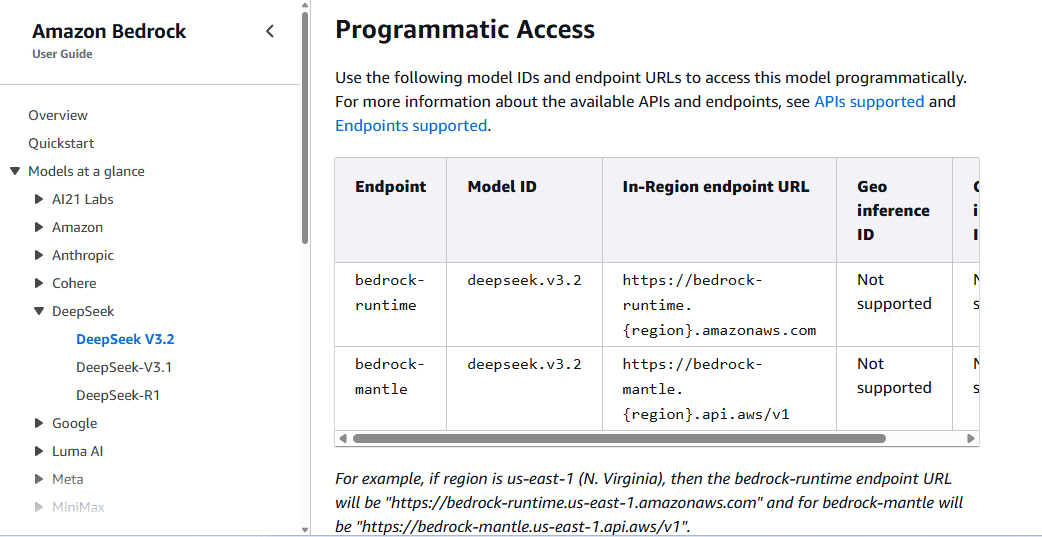
The AWS V3.2 model card lists deepseek.v3.2, supports text input and text output, and documents Bedrock runtime and Bedrock Mantle endpoint options. It also lists service tiers such as Standard, Priority, Flex, and Reserved, depending on the model and endpoint path. DeepSeek V3.2 in Amazon Bedrock
The AWS launch post for DeepSeek-R1 describes several AWS paths: Amazon Bedrock Marketplace for R1, SageMaker JumpStart for R1, Bedrock Custom Model Import for R1-Distill models, and EC2 with Trainium or Inferentia for distilled deployments. It also notes that for Bedrock and SageMaker paths, customer data is not shared with model providers and is not used to improve the models. AWS News Blog: DeepSeek-R1 models on AWS
Current DeepSeek model availability on Azure
Azure’s current DeepSeek catalog is broader than the original “DeepSeek R1 on Azure” launch headline. Use Microsoft’s current model catalog and retirement pages over old launch posts.
| DeepSeek model on Azure | Service path | Capabilities Microsoft lists | Best use case | Caveat |
|---|---|---|---|---|
DeepSeek-V4-Pro | Foundry Models sold by Azure; Microsoft Foundry tutorial. | Text input up to 1,000,000 tokens, text output up to 384,000 tokens, English/Chinese, tool calling, Text and JSON response formats. | Reasoning-heavy and long-context workflows in Microsoft Foundry. | The Microsoft tutorial says it is a reasoning model and shows Foundry deployment and v1 Azure OpenAI APIs; it is not the same endpoint as DeepSeek’s direct API. |
DeepSeek-V4-Flash | Foundry Models sold by Azure. | Text input up to 1,000,000 tokens, text output up to 384,000 tokens, English/Chinese, tool calling, Text and JSON response formats. | Long-context chat-completion workloads through Microsoft Foundry. | Do not assume this is identical to DeepSeek direct API deepseek-flash; verify Azure’s model card and deployment behavior. |
DeepSeek-V4-Flash-0731 | Foundry Models sold by Azure. | Preview model with the same listed context/output structure as the V4 Flash family. | Preview evaluation where your organization accepts preview-model risk. | Preview models require lifecycle and production-risk review. |
DeepSeek-V3.2 | Foundry Models sold by Azure. | Text input/output up to 128,000 tokens, English/Chinese, tool calling, Text and JSON response formats. | Current V3.2 evaluation in Azure’s model catalog. | Check region, deployment type, and lifecycle before production. |
DeepSeek-V3.2-Speciale | Foundry Models sold by Azure. | Text input/output up to 128,000 tokens, English/Chinese, tool calling, Text and JSON response formats. | Speciale/reasoning evaluation where that model is available. | Verify model-specific availability and pricing. |
DeepSeek-R1 | Original Azure AI Foundry and GitHub Models launch path. | Microsoft announced R1 availability in Azure AI Foundry and GitHub Models in January 2025. | Historical R1 workflows or environments that still expose R1. | Microsoft’s current retirement schedule lists DeepSeek-R1 as retired with DeepSeek-V4-Pro as replacement. |
Microsoft’s Foundry Models page says “models sold by Azure” are hosted and operated by Azure as part of the Foundry Models service, billed through an Azure subscription, covered by Azure service-level agreements, and supported by Microsoft. Microsoft Foundry Models sold by Azure
Microsoft’s retirement schedule is also important: it lists several older DeepSeek models as retired, including DeepSeek-R1, DeepSeek-R1-0528, DeepSeek-V3-0324, and DeepSeek-V3.1, while listing DeepSeek-V3.2, DeepSeek-V3.2-Speciale, DeepSeek-V4-Flash, and DeepSeek-V4-Pro as active or GA in that schedule. Microsoft Foundry model retirement schedule
AWS paths for using DeepSeek
Amazon Bedrock model catalog
Use Amazon Bedrock when you want managed model access through AWS APIs, AWS identity and access controls, AWS billing, Bedrock service tiers, CloudWatch-style monitoring, and Bedrock ecosystem integrations.
For example, AWS currently documents DeepSeek V3.2 with deepseek.v3.2 as the model ID, Bedrock runtime and Bedrock Mantle endpoint options, and sample code for OpenAI-compatible Chat Completions, Invoke, and Converse calls. DeepSeek V3.2 in Amazon Bedrock
This is not the same as calling https://api.deepseek.com. You are using AWS’s model access layer, AWS endpoints, AWS credentials, and AWS service behavior.
Amazon Bedrock Marketplace
Use Bedrock Marketplace when the DeepSeek model is exposed as a marketplace foundation model that you discover, subscribe to, and deploy on managed endpoints. AWS’s DeepSeek-R1 launch guide describes this path for R1, including endpoint deployment, security settings, service role permissions, VPC networking, and encryption options. AWS News Blog: DeepSeek-R1 models on AWS
This path is better for teams that want managed deployment but still need to configure endpoint behavior and understand endpoint billing.
Amazon SageMaker JumpStart / SageMaker AI
Use SageMaker when your team wants more control over endpoint deployment, ML operations, VPC configuration, logs, model lifecycle, and infrastructure choices. AWS’s R1 launch post says SageMaker JumpStart is a path for deploying DeepSeek-R1 and making inference requests to a SageMaker endpoint. AWS News Blog: DeepSeek-R1 models on AWS
The operational tradeoff is that endpoints can keep billing while running. Teams should monitor instance usage, endpoint traffic, logs, quotas, and cleanup.
Amazon Bedrock Custom Model Import
Use Custom Model Import when your goal is to import a supported open-weight or distilled DeepSeek model into Bedrock rather than selecting a fully managed first-party catalog model. AWS’s R1 launch post describes Custom Model Import for DeepSeek-R1-Distill models. AWS News Blog: DeepSeek-R1 models on AWS
This is a different model of responsibility. You need to validate the model artifact, storage path, supported format, deployment behavior, licensing, and cost structure.
EC2, Trainium, Inferentia, or EKS
Use self-managed AWS infrastructure when you want maximum control over serving stack, model weights, accelerator selection, networking, observability, scaling, and cost engineering. AWS describes deploying R1-Distill models on Trainium and Inferentia through EC2 and related AWS infrastructure in its launch guidance. AWS News Blog: DeepSeek-R1 models on AWS
The tradeoff is operational burden. You own the serving stack, patching, model server, autoscaling, security hardening, monitoring, uptime, and evaluation.
Azure paths for using DeepSeek
Azure AI Foundry / Microsoft Foundry Models
Use Azure AI Foundry when your team wants model deployment inside Microsoft’s AI application platform, with Azure subscription billing, Microsoft support, and Foundry project workflows.
Microsoft currently lists several DeepSeek models under Foundry Models sold by Azure, including DeepSeek-V4-Pro, DeepSeek-V4-Flash, DeepSeek-V4-Flash-0731, DeepSeek-V3.2, and DeepSeek-V3.2-Speciale. Microsoft Foundry Models sold by Azure
For reasoning workflows, Microsoft’s tutorial uses DeepSeek-V4-Pro to show how to deploy a DeepSeek reasoning model, call it programmatically through the next-generation v1 Azure OpenAI APIs, and parse reasoning output. Microsoft Foundry DeepSeek reasoning tutorial
GitHub Models
Microsoft’s original R1 announcement said DeepSeek R1 was available in Azure AI Foundry and GitHub Models. This path is useful for developer experimentation and quick prototyping, but do not assume it is the same deployment model, pricing model, region coverage, or production governance path as an Azure AI Foundry deployment. Microsoft Azure Blog: DeepSeek R1 in Azure AI Foundry and GitHub
Foundry deployment types and lifecycle
Azure model availability depends on deployment type, region, and lifecycle status. Microsoft’s retirement schedule shows that older DeepSeek models can retire and be replaced. For example, DeepSeek-R1 is listed as retired with DeepSeek-V4-Pro as replacement, while newer DeepSeek models such as V3.2, V3.2-Speciale, V4-Flash, and V4-Pro appear in current schedule entries. Microsoft Foundry model retirement schedule
Before production, verify the model’s deployment type, region, quota, rate limits, retirement date, and whether it is sold directly by Azure or provided through another partner/community route.
When to use the direct DeepSeek API instead
Use the direct DeepSeek API when you need the current DeepSeek API model IDs, DeepSeek’s own pricing model, DeepSeek-specific API features, or direct API lifecycle tracking.
DeepSeek’s current API pricing page lists deepseek-flash and deepseek-v4-pro, with OpenAI-format base URL https://api.deepseek.com and Anthropic-format base URL https://api.deepseek.com/anthropic. It also lists features such as JSON Output, Tool Calls, Responses API, Anthropic API, Chat Prefix Completion, FIM, and Vision support, with Vision supported for deepseek-flash but not deepseek-v4-pro. DeepSeek Models & Pricing
The direct API is often the better starting point if you are building a prototype around DeepSeek’s latest hosted API behavior, experimenting with deepseek-flash, using DeepSeek’s peak/off-peak pricing, testing Vision through deepseek-flash, or integrating with agent tools that DeepSeek documents directly.
When to choose AWS
- You already standardize AI workloads on AWS.
- You want Amazon Bedrock service tiers, Bedrock APIs, Guardrails, Agents, Flows, prompt management, or CloudWatch-style operations where supported.
- You need AWS procurement and billing instead of a direct DeepSeek vendor relationship.
- You want SageMaker endpoint control, VPC configuration, endpoint logs, or ML operations controls.
- You want to import or deploy R1-Distill models with AWS infrastructure.
- You need self-managed deployment on EC2, Trainium, Inferentia, or EKS.
- Your security review prefers AWS identity, networking, logging, and encryption controls.
Choose AWS only after checking which DeepSeek models are currently available in your target AWS region and which service path—Bedrock, Marketplace, SageMaker, Custom Model Import, or EC2—matches your workload.
When to choose Azure
- You already use Microsoft Foundry, Azure AI Foundry, Azure OpenAI-style APIs, or Microsoft Entra ID.
- You want DeepSeek models billed through your Azure subscription and supported by Microsoft where sold directly by Azure.
- You want to deploy DeepSeek models inside a Foundry project and use the Foundry playground, endpoint, and deployment workflow.
- You need Microsoft governance, evaluation, content-safety, model-lifecycle, and enterprise platform review.
- You want to experiment with DeepSeek models in GitHub Models where currently available.
- You want to use
DeepSeek-V4-Proor Azure-listed DeepSeek models such as V4-Flash, V3.2, or V3.2-Speciale where available.
Choose Azure only after checking the exact model, region, deployment type, pricing, quota, and lifecycle. Azure model names and direct DeepSeek API model names may not match one-to-one.
Security, privacy, and governance differences
The strongest reason to use AWS or Azure is often not model quality; it is governance. Enterprise teams may need identity controls, network isolation, private endpoints, audit logs, procurement workflow, content filtering, monitoring, and quota management.
For AWS, the DeepSeek-R1 launch post states that with Amazon Bedrock and SageMaker, customer data is not shared with model providers and is not used to improve the models. It also recommends integrating DeepSeek deployments with Amazon Bedrock Guardrails, while noting that Guardrails use can differ by route. AWS News Blog: DeepSeek-R1 models on AWS
For Azure, Microsoft says models sold by Azure are hosted and operated by Azure, billed through an Azure subscription, covered by Azure service-level agreements, and supported by Microsoft. Microsoft’s R1 launch post also describes Azure AI Foundry security, responsible AI, model evaluation, and content-safety positioning for enterprise deployments. Microsoft Foundry Models sold by Azure Microsoft Azure Blog: DeepSeek R1 in Azure AI Foundry and GitHub
Those controls are useful, but they are not a blanket compliance guarantee. Your team still needs to review data classification, model license, acceptable use, logging, retention, region, cross-border transfer, vendor risk, procurement terms, incident response, and output-risk controls.
Pricing and cost differences
Do not compare direct DeepSeek API pricing with AWS or Azure deployment pricing as if they were the same cost model.
| Path | How costs usually work | What to verify |
|---|---|---|
| Direct DeepSeek API | Token-based billing using DeepSeek’s pricing table, including cache-hit, cache-miss, output, peak, and off-peak rates. | Current model prices, token usage, cache behavior, peak/off-peak hours, balance rules, and concurrency limits. |
| Amazon Bedrock catalog model | Bedrock pricing can be token-based or tied to service tiers, depending on model and endpoint. | Bedrock model pricing page, service tier, region, quotas, and supported endpoint. |
| Bedrock Marketplace | May involve managed endpoint or instance-hour style costs depending on deployment. | Endpoint instance type, deployment duration, marketplace terms, and cleanup. |
| SageMaker endpoint | Often endpoint infrastructure/instance-hour billing plus storage and operational costs. | Instance type, endpoint uptime, autoscaling, logs, and deletion after tests. |
| EC2 / Trainium / Inferentia | Infrastructure cost: instances, storage, networking, serving stack, and operations. | Accelerator cost, throughput, utilization, autoscaling, and ops burden. |
| Azure AI Foundry / Foundry Models | Depends on model, deployment type, region, and Foundry pricing. | Foundry pricing page, deployment type, quota, tokens, provisioning, and lifecycle. |
| GitHub Models | Developer experimentation pricing and limits may differ from production Azure deployment. | GitHub Models availability, rate limits, billing, and production suitability. |
Use exact prices only from the current official pricing page for the chosen path. If a tutorial quotes old R1 or old V4 prices, verify before deployment.
Old DeepSeek R1 tutorials can be incomplete
Many AWS and Azure DeepSeek tutorials from early 2025 focus only on DeepSeek-R1. R1 remains important, but it no longer represents the full current cloud-provider catalog.
On AWS, current Bedrock documentation includes model cards such as DeepSeek V3.2 and V3.1 in addition to R1. On Azure, Microsoft’s current Foundry model pages list V4-Pro, V4-Flash, V3.2, and V3.2-Speciale, while the retirement schedule shows R1 as retired. DeepSeek V3.2 in Amazon Bedrock Microsoft Foundry Models sold by Azure Microsoft Foundry model retirement schedule
Also, do not copy direct DeepSeek API examples such as deepseek-flash into AWS or Azure unless the provider’s own documentation lists that exact model ID. Cloud-provider model IDs are provider-specific.
Implementation checklist
AWS Bedrock checklist
- Confirm the DeepSeek model card exists for your target model.
- Check region availability, service tier, quota, and model lifecycle.
- Confirm whether you are using
bedrock-runtime,bedrock-mantle, Invoke, Converse, or Chat Completions. - Use the AWS model ID, such as
deepseek.v3.2where documented. - Configure IAM permissions and endpoint access.
- Decide whether Bedrock Guardrails apply to your route.
- Monitor token usage, service tier, latency, and cost.
AWS SageMaker checklist
- Find the DeepSeek model in JumpStart / SageMaker AI if available.
- Review model license and terms.
- Select endpoint instance type and scaling plan.
- Deploy the endpoint and run a small test.
- Connect logging, monitoring, and alarms.
- Delete test endpoints when finished to avoid ongoing charges.
Azure AI Foundry checklist
- Find the exact DeepSeek model in the Microsoft Foundry model catalog.
- Check whether it is sold by Azure or provided through another route.
- Confirm region, deployment type, quota, and lifecycle status.
- Create a deployment and note the deployment name and endpoint.
- Use Microsoft’s documented authentication path, such as Microsoft Entra ID where recommended.
- Remember that the
modelparameter may refer to your deployment name, not the base model name. - Monitor token usage, cost, reasoning output, and rate limits.
Which option should you choose?
| Choose this path | When it makes sense |
|---|---|
| Direct DeepSeek API | You want DeepSeek’s current direct model IDs, direct pricing, direct API features, and fast access to DeepSeek-specific updates. |
| AWS Bedrock | You want managed AWS model access, Bedrock APIs, service tiers, Guardrails, Agents, Flows, prompt management, and AWS billing. |
| AWS SageMaker | You want model endpoint control, VPC controls, ML operations, endpoint logs, and infrastructure flexibility. |
| AWS EC2 / Trainium / Inferentia | You want self-managed inference and are ready to operate serving infrastructure. |
| Azure AI Foundry | You want Microsoft Foundry deployment, Azure billing, Microsoft support, Entra ID, Foundry playground, and Azure governance workflows. |
| GitHub Models | You want developer experimentation where DeepSeek is available through GitHub’s model tooling. |
| Local/self-hosted DeepSeek weights | You need maximum control over data and infrastructure and can handle model serving, licensing, security, and operations. |
Frequently asked questions
Can I use DeepSeek on AWS?
Yes. AWS documents DeepSeek models in Amazon Bedrock and has documented DeepSeek-R1 paths through Bedrock Marketplace, SageMaker JumpStart, Custom Model Import, and EC2 / Trainium / Inferentia. Always check the current model card for your target model.
Can I use DeepSeek on Azure?
Yes. Microsoft Foundry currently lists several DeepSeek models sold by Azure, including DeepSeek-V4-Pro, V4-Flash, V3.2, and V3.2-Speciale. Microsoft originally announced DeepSeek R1 in Azure AI Foundry and GitHub Models, but current model availability should be checked in Microsoft’s catalog and retirement schedule.
Is using DeepSeek through AWS or Azure the same as using the direct DeepSeek API?
No. Direct DeepSeek API calls use DeepSeek’s API keys, base URLs, model IDs, pricing, and terms. AWS and Azure routes use their own platform endpoints, credentials, model catalog names, billing, deployment types, and governance controls.
Is deepseek-flash available through AWS or Azure?
Do not assume that. deepseek-flash is the direct DeepSeek API model name for DeepSeek-V4.1-Flash. AWS and Azure use provider-specific model names and deployment names. Check the provider’s current catalog before using that name outside DeepSeek’s own API.
Does AWS or Azure send my data to DeepSeek?
It depends on the route. AWS states for its Bedrock and SageMaker DeepSeek-R1 paths that customer data is not shared with model providers and is not used to improve the models. Microsoft says models sold by Azure are hosted and operated by Azure, billed through Azure, covered by Azure SLAs, and supported by Microsoft. Still, your organization must review the exact service path, terms, region, logs, and data-flow controls before production use.
Which is cheaper: direct DeepSeek API, AWS, or Azure?
There is no universal answer because the cost models differ. Direct DeepSeek API is token-based using DeepSeek’s pricing table. AWS can involve Bedrock token pricing, marketplace endpoints, SageMaker endpoint hours, Custom Model Import billing, or EC2 infrastructure. Azure Foundry pricing depends on model, region, and deployment type. Compare total cost per successful task, not only headline token price.
Should I use Bedrock or SageMaker for DeepSeek?
Use Bedrock when you want managed model access and Bedrock ecosystem features. Use SageMaker when you need endpoint control, infrastructure flexibility, ML operations, VPC configuration, and custom deployment management.
Should I use Azure AI Foundry or GitHub Models for DeepSeek?
Use Azure AI Foundry for production-oriented Azure deployments, governance, billing, and Foundry project workflows. Use GitHub Models for developer experimentation when the target DeepSeek model is available there, but do not assume GitHub Models has the same production behavior as a Foundry deployment.
What do old R1 tutorials get wrong?
Many old tutorials treat DeepSeek-R1 as the only cloud-provider option. Current AWS and Azure catalogs include newer or different DeepSeek models, and Microsoft’s retirement schedule lists some older DeepSeek models as retired. Always check the current AWS or Azure model card before copying an old tutorial.
Bottom line
Using DeepSeek through AWS or Azure is possible, but it is a cloud-provider decision—not just a model-name decision. AWS is strongest when your team wants Bedrock, SageMaker, AWS security controls, marketplace deployment, or self-managed infrastructure. Azure is strongest when your team wants Microsoft Foundry, Azure billing, Entra ID, Foundry deployments, and Microsoft-supported model catalog access.
Use the direct DeepSeek API when you need DeepSeek’s own latest API model names and features, such as deepseek-flash, direct DeepSeek pricing, direct API behavior, and DeepSeek’s own OpenAI-compatible or Anthropic-compatible endpoints.
Before production, verify the exact model, provider path, pricing, region, lifecycle status, data flow, governance controls, and cleanup requirements. The most common mistake is assuming that “DeepSeek on AWS,” “DeepSeek on Azure,” and “DeepSeek API” are the same thing. They are not.
Official sources checked
- AWS DeepSeek model cards
- AWS Bedrock model card: DeepSeek V3.2
- AWS Bedrock model card: DeepSeek-V3.1
- AWS Bedrock model card: DeepSeek-R1
- AWS News Blog: DeepSeek-R1 models now available on AWS
- Microsoft Foundry Models sold by Azure
- Microsoft Foundry DeepSeek reasoning tutorial
- Microsoft Foundry model retirement schedule
- Microsoft Azure Blog: DeepSeek R1 on Azure AI Foundry and GitHub
- DeepSeek Models & Pricing
- DeepSeek V4.1 Flash release note