

Last reviewed: October 9, 2026
DeepSeek Vision is best understood as DeepSeek’s current image-input capability in the API, served through deepseek-flash, also known as DeepSeek-V4.1-Flash. It lets you send images with text prompts so the model can describe pictures, read text from screenshots, analyze charts, inspect UI images, and perform OCR-like extraction. It is not a separate model name you should call directly.
For new API code, use deepseek-flash for image input. DeepSeek’s change log says the older V4 Flash and V4 Flash Vision Exp models are retired, while deepseek-v4-flash and deepseek-v4-flash-vision-exp temporarily route to V4.1 Flash for compatibility. An accepted legacy name does not mean the retired model is still being served.
The current model list also matters: deepseek-flash supports text and image input, while deepseek-v4-pro is listed as text-only. That means deepseek-v4-pro should not be used for Vision requests unless DeepSeek changes the official model table in the future. DeepSeek Lists Models API
This guide covers Base64, external URLs, uploaded image IDs, detail settings, image limits, and billing. It also separates Chat Completions, Responses, and Anthropic-compatible request formats: their message roles and image blocks are not interchangeable.
DeepSeek Vision at a glance
| Question | Current answer |
|---|---|
| What is DeepSeek Vision? | DeepSeek’s hosted image-input capability through deepseek-flash. |
Is there a model called deepseek-vision? | No. Use deepseek-flash for current Vision API work. |
| Which model supports images? | deepseek-flash, listed as DeepSeek-V4.1-Flash. |
Does deepseek-v4-pro support image input? | No, not in the current model table. It is listed as text-only. |
Is deepseek-v4-flash-vision-exp current? | No. It is a legacy compatibility name; new code should use deepseek-flash. |
| Supported image formats | JPEG, PNG, GIF, and WebP. |
| Main image input methods | Base64 data URL, external HTTP(S) URL, or Files API file_id. |
| Can it read screenshots? | Yes, DeepSeek’s Vision docs describe screenshot text reading as a supported use case. |
| Is it the same as DeepSeek-OCR? | No. DeepSeek Vision is hosted API image understanding; DeepSeek-OCR/OCR-2 are local/open-weight OCR model routes. |
What is DeepSeek Vision?
DeepSeek Vision is the practical name developers use for DeepSeek’s image-input API capability. In official docs, the actual model ID to use is deepseek-flash. With this model, you can combine text and images in one request and ask for visual understanding, OCR-like extraction, chart analysis, document triage, UI inspection, and image comparison. DeepSeek Vision guide
Do not confuse “Vision” with a standalone model name. You do not call deepseek-vision. You call deepseek-flash through the DeepSeek API and provide image content in the required request shape. For creating images rather than analyzing them, see whether DeepSeek can generate images.
Which DeepSeek model supports image input?
The current model table lists deepseek-flash as DeepSeek-V4.1-Flash with input modalities of text and image. It lists deepseek-v4-pro with input modality text only. DeepSeek Lists Models API
| Model name | Current status | Image input? | Use it for Vision? |
|---|---|---|---|
deepseek-flash | Current DeepSeek-V4.1-Flash API model. | Yes. | Yes. This is the current default for image-input work. |
deepseek-v4-pro | Current Pro route in the model table. | No, text-only in the current table. | No. |
deepseek-v4-flash-vision-exp | Legacy/retired compatibility name. | Requests are served by the latest Flash model according to DeepSeek’s Vision and V4.1 Flash notes. | No. Use deepseek-flash in new code. |
| DeepSeek-OCR / DeepSeek-OCR-2 | Separate OCR/document model route. | Not the hosted Vision API model name. | Use only when you specifically want local/open-weight OCR workflows. |
What happened to deepseek-v4-flash-vision-exp?
deepseek-v4-flash-vision-exp was an experimental image-input route. The Vision guide and change log say its name is still accepted for compatibility, but requests are served by the newer Flash model. Updating the model ID does not remove the need to use the correct image format for your endpoint.
The practical migration is simple:
| Old tutorial says | Use now | Why |
|---|---|---|
deepseek-v4-flash-vision-exp | deepseek-flash | The old Vision experimental model is retired; deepseek-flash is the current model ID. |
deepseek-v4-flash | deepseek-flash | The old Flash model name is legacy compatibility context. |
deepseek-v4-pro for images | deepseek-flash | The current model table lists V4 Pro as text-only. |
What can DeepSeek Vision do?
DeepSeek Vision is useful when your task needs the model to inspect visual content. Common use cases include:
- Describe a photo or product image.
- Read visible text from a screenshot.
- Extract table text from an image.
- Analyze a chart, graph, or slide.
- Read labels from diagrams or UI screenshots.
- Extract fields from a receipt, invoice, or form.
- Compare two images and list visible differences.
- Ask whether a scanned page is legible enough for data extraction.
For OCR-like tasks, treat the output as model-generated extraction, not a guaranteed transcript. Tables, small text, handwriting, low-contrast scans, rotated pages, dense charts, legal clauses, medical images, and financial records should be reviewed against the source image.
Choose the message role and image format for your API
For a direct image question, user is the consistent starting point across these examples. The surrounding payload must still match the endpoint.
| API | Direct image message | Content format |
|---|---|---|
| Chat Completions | role: "user". Its documented message schema does not include developer. | text plus image_url, or a file block. |
| Responses | user or developer; DeepSeek treats developer as user. | input_text plus input_image. |
| Anthropic-compatible Messages | Use role: "user" for the direct image example. | text plus image with a source object. |
Sources: Chat Completions schema, Responses schema, and Anthropic-format image examples. Changing only role does not convert one API format into another. DeepSeek’s acceptance of developer in Responses does not give it a separate, higher-priority instruction role.
Images returned by tools are a separate path
At this review, DeepSeek’s documentation is not fully consistent: the Vision guide’s Restrictions section says images are supported only in user messages, while the Chat Completions schema also permits image/file content in a tool message with a matching tool_call_id. Keep direct uploads in user; test the documented tool-result path separately rather than asserting that all image-bearing messages must be user messages. Vision restrictions; tool-message schema.
Responses explicitly documents input_image inside function_call_output and supported custom_tool_call_output items. These are tool outputs with call-ID pairing, not a reason to use developer in Chat Completions. See Responses image input.
How to send images with Chat Completions
For client.chat.completions.create(), use https://api.deepseek.com, model="deepseek-flash", and a user message whose content is a list of blocks. Put the image URL inside an image_url object; do not use the flat Responses input_image shape. Chat Completions reference.
Install the OpenAI Python SDK and set a DeepSeek API key in the terminal running your script. The SDK is the client; DeepSeek receives and bills the requests.
python -m pip install openaiOn macOS or Linux:
export DEEPSEEK_API_KEY="YOUR_DEEPSEEK_API_KEY"On Windows PowerShell:
$env:DEEPSEEK_API_KEY = "YOUR_DEEPSEEK_API_KEY"Use a real JPEG named screenshot.jpg for the local examples. Match the MIME type when using another format. The examples disable thinking and use a 2,048-token output budget to keep the first request bounded; these are demonstration settings, not image limits or guarantees of complete extraction. For Chat Completions, the OpenAI Python SDK sends the DeepSeek-specific thinking field through extra_body; the other SDK examples use their own request controls. Request options.
Base64 image example in Python
Use Base64 when the image is local and small enough to fit inside the request body limit.
import base64
import os
from pathlib import Path
from openai import OpenAI

image_path = Path("screenshot.jpg")
image_b64 = base64.b64encode(image_path.read_bytes()).decode("ascii")

with OpenAI(
    api_key=os.environ["DEEPSEEK_API_KEY"],
    base_url="https://api.deepseek.com",
) as client:
    response = client.chat.completions.create(
        model="deepseek-flash",
        messages=[{
            "role": "user",
            "content": [
                {"type": "text", "text": "Read the visible text. Preserve line breaks and mark unreadable text as unclear."},
                {
                    "type": "image_url",
                    "image_url": {
                        "url": f"data:image/jpeg;base64,{image_b64}",
                        "detail": "original",
                    },
                },
            ],
        }],
        max_tokens=2048,
        extra_body={"thinking": {"type": "disabled"}},
    )

if not response.choices:
    raise RuntimeError("No response choice was returned.")
choice = response.choices[0]
if choice.finish_reason != "stop" or not choice.message.content:
    raise RuntimeError("No complete text answer; inspect the finish reason before using it.")
print(choice.message.content)
External image URL example
Use a reachable HTTP(S) URL for an image already approved for external access. DeepSeek documents a maximum URL length of 8,192 characters and a download timeout of 60 seconds. Replace the placeholder below with an actual image URL; example.com/chart.png is not a working sample image. Do not publish confidential images just to make a URL fetch work. External-image requirements.
import os
from openai import OpenAI

image_url = "https://example.com/chart.png"  # Replace with your real image URL.
if image_url == "https://example.com/chart.png":
    raise ValueError("Replace the placeholder with a reachable image URL.")

with OpenAI(
    api_key=os.environ["DEEPSEEK_API_KEY"],
    base_url="https://api.deepseek.com",
) as client:
    response = client.chat.completions.create(
        model="deepseek-flash",
        messages=[{
            "role": "user",
            "content": [
                {"type": "text", "text": "Read the chart title, axes, legend, and labeled values. Do not invent unlabeled values."},
                {"type": "image_url", "image_url": {"url": image_url, "detail": "original"}},
            ],
        }],
        max_tokens=2048,
        extra_body={"thinking": {"type": "disabled"}},
    )

if not response.choices:
    raise RuntimeError("No response choice was returned.")
choice = response.choices[0]
if choice.finish_reason != "stop" or not choice.message.content:
    raise RuntimeError("No complete text answer was returned.")
print(choice.message.content)
Files API file_id example
Use the Files API when the same image will be reused across multiple requests, when an inline Base64 request would exceed the request body limit, or when the image is larger than the inline/external image limit. DeepSeek’s Vision guide says Files API image references can be used through a file content block with a file_id like file-api-.... DeepSeek Files API
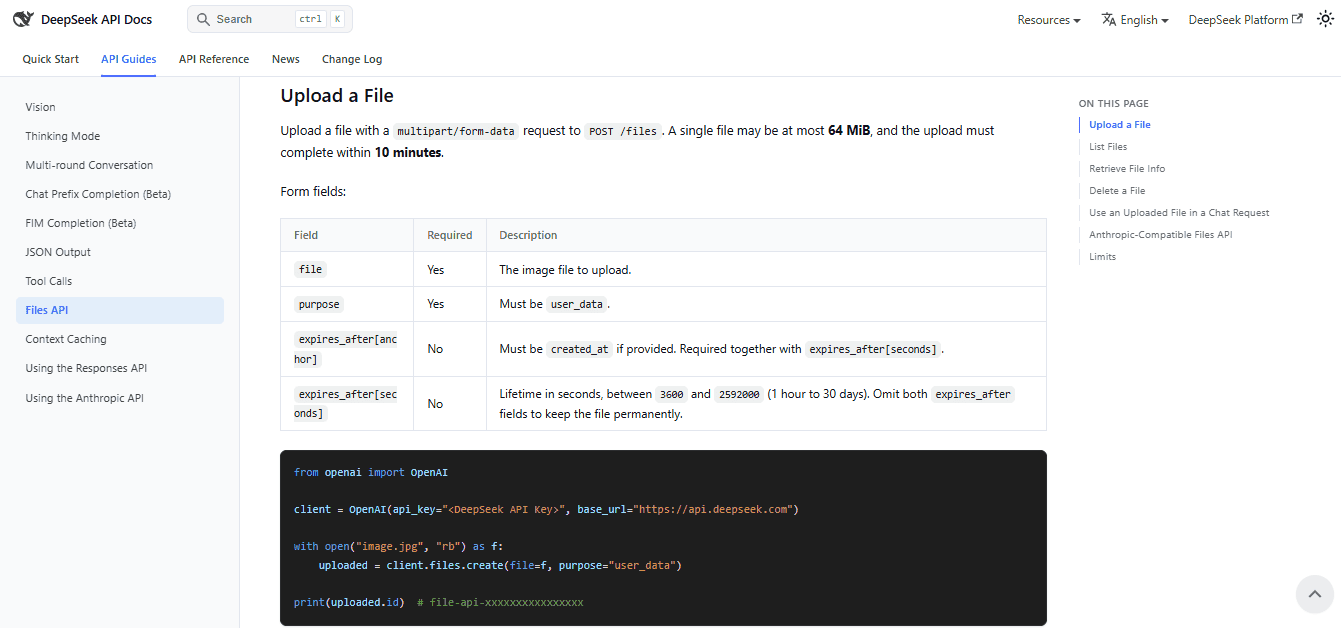
import os
from openai import OpenAI

with OpenAI(
    api_key=os.environ["DEEPSEEK_API_KEY"],
    base_url="https://api.deepseek.com",
) as client:
    with open("screenshot.jpg", "rb") as image:
        uploaded = client.files.create(file=image, purpose="user_data")

    print("Uploaded file ID:", uploaded.id)
    response = client.chat.completions.create(
        model="deepseek-flash",
        messages=[{
            "role": "user",
            "content": [
                {"type": "text", "text": "Describe this image and list the visible text. Mark unreadable text as unclear."},
                {"type": "file", "file_id": uploaded.id},
            ],
        }],
        max_tokens=2048,
        extra_body={"thinking": {"type": "disabled"}},
    )

if not response.choices:
    raise RuntimeError("No response choice was returned.")
choice = response.choices[0]
if choice.finish_reason != "stop" or not choice.message.content:
    raise RuntimeError("No complete text answer was returned.")
print(choice.message.content)
In DeepSeek’s Chat Completions format, file_id is directly inside the file block, as shown. The alternative file_data field contains an inline image data URL; do not combine it with file_id. Uploaded files belong to the API key. The example omits expiration, so the file remains stored until deleted; retain the returned ID for reuse and manage its lifecycle. Files API reference.
After all requests using the file have finished, delete it with client.files.delete(file_id) using an active client and the saved ID, or set a documented expiration at upload. Reusing a stored file avoids repeated uploads; it does not make model inference free.
Image input methods: which one should you use?
| Method | Best for | Limits and cautions |
|---|---|---|
Base64 data URL in image_url | Local files in quick scripts and backend jobs. | Counts toward request body size. Keep files small enough for inline use. |
| External HTTP(S) image URL | Public images already hosted online. | URL must be at most 8192 characters, and the image must be reachable by DeepSeek. |
Files API file_id | Reusing the same image across requests or handling larger images. | Requires an upload step and file lifecycle management. |
file_data | Inline image data inside a file block. | Mutually exclusive with file_id. |
Detail levels: low, high, original, and auto
The detail field controls how image URL inputs are processed. DeepSeek’s Vision docs define these values: low downsamples the image to 512×512 before inference; high and original keep the original image; auto is currently equivalent to original. DeepSeek Vision guide
| Detail value | Behavior | Use it when |
|---|---|---|
low | Downscales the image to 512×512. | You need a broad image description and do not need small text or fine details. |
high | Keeps the original image; provided for compatibility. | You need detail and your code already uses high. |
original | Keeps the original image. | You need OCR-like extraction, chart labels, UI text, forms, receipts, or dense screenshots. |
auto | Currently equivalent to original. | You want the default high-detail behavior while keeping the option for future automatic handling. |
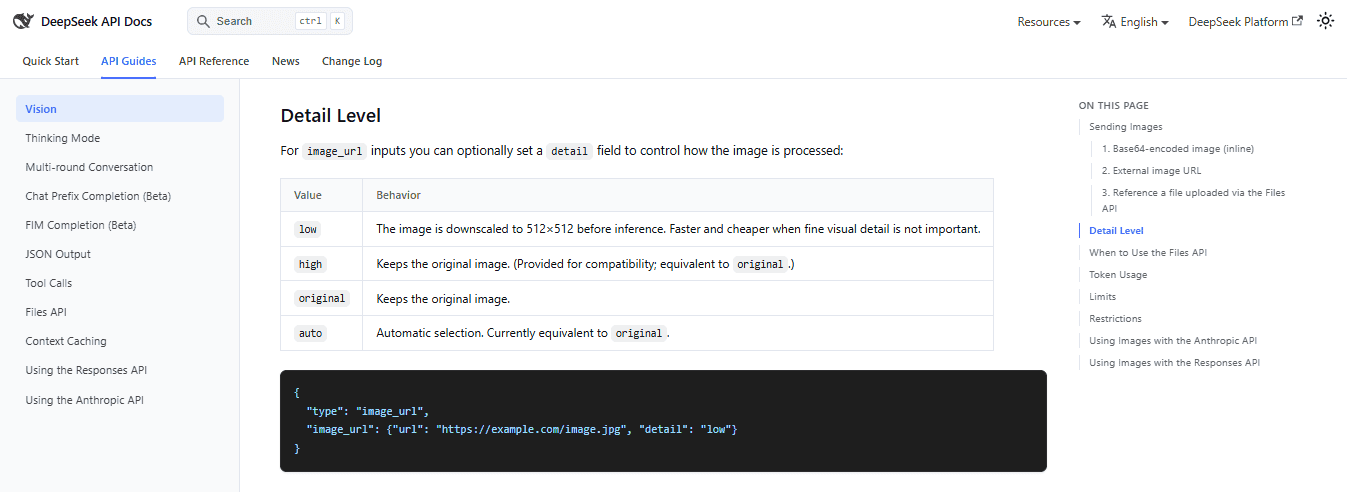
For dense screenshots or chart labels, start with original and check the extracted text. This avoids the specific low downsampling step, but does not bypass the model’s normal pre-inference resizing. For broad scene description, test whether low is adequate instead of assuming more detail is always necessary.
Image limits and token billing
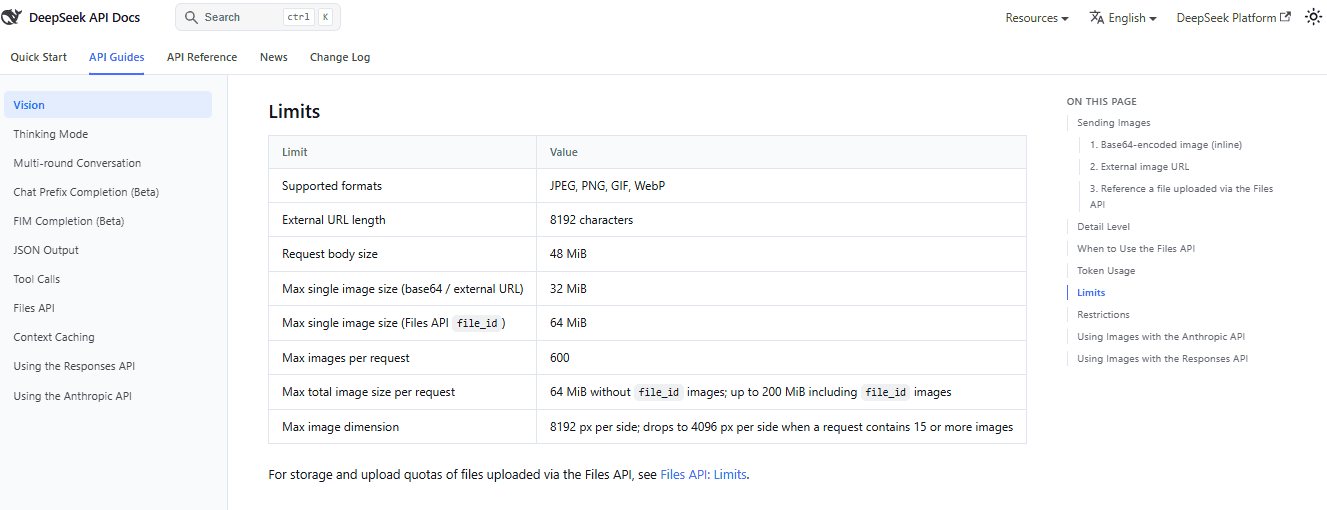
DeepSeek’s Vision docs list shared image limits for Vision requests. These limits matter because many image failures are caused by oversized files, too many images, or sending images in the wrong format. DeepSeek Vision guide
| Limit | Current value |
|---|---|
| Supported formats | JPEG, PNG, GIF, WebP. |
| External URL length | 8192 characters. |
| Request body size | 48 MiB. |
| Max single image size: Base64 / external URL | 32 MiB. |
Max single image size: Files API file_id | 64 MiB. |
| Max images per request | 600. |
| Max total image size per request | 64 MiB without file_id images; up to 200 MiB including file_id images. |
| Max image dimension | 8192 px per side; 4096 px per side when a request contains 15 or more images. |
All applicable limits must be satisfied together. Base64 increases the serialized body size, so the image-byte allowance is not the same as the 48 MiB JSON-body allowance. A file_id avoids embedding the image bytes in that body, but does not remove image-count, dimension, aggregate-size, or context limits. Here, MiB means 1,048,576 bytes.
DeepSeek says images are converted into tokens based on dimensions and billed together with text tokens. The Vision guide also says images are automatically resized before inference and that there is an upper bound of 1024 tokens per image after resizing. Each image in a multi-image request is counted independently. DeepSeek Vision guide
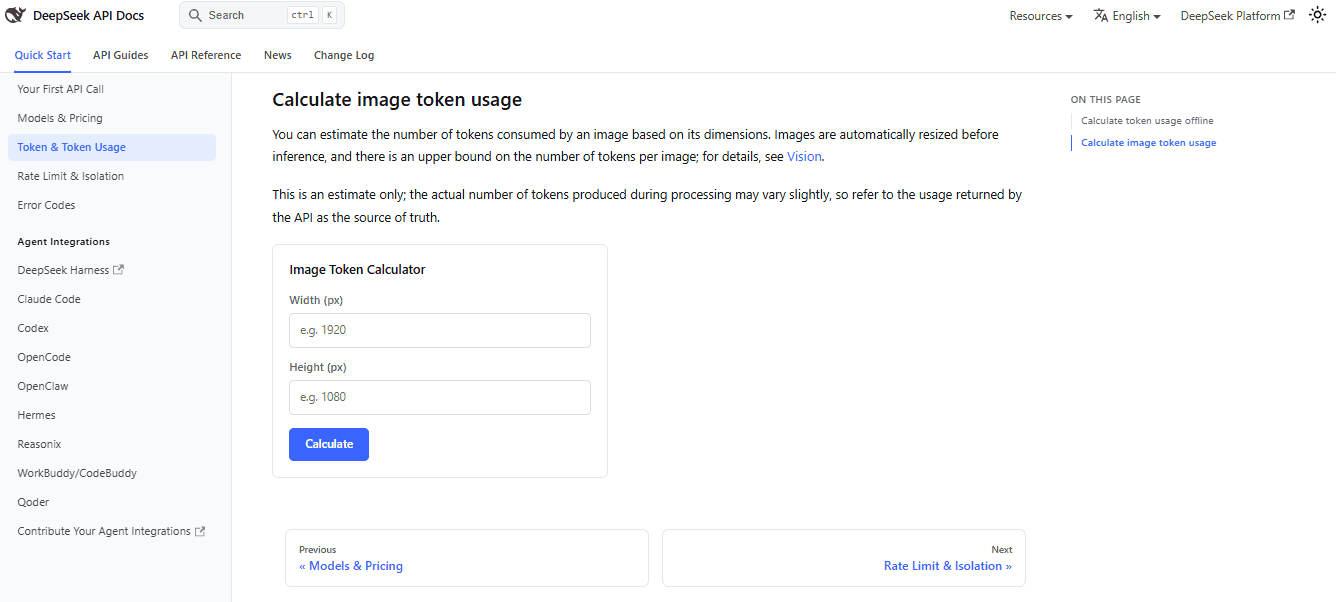
Use the official image token calculator for estimates and response usage for actual billing. Smaller files reduce transfer size, but images already at the same post-resize token cap need not become cheaper merely by reducing their source dimensions. Compare detail settings, image count, and output length, using current model prices.
Using images with the Responses API
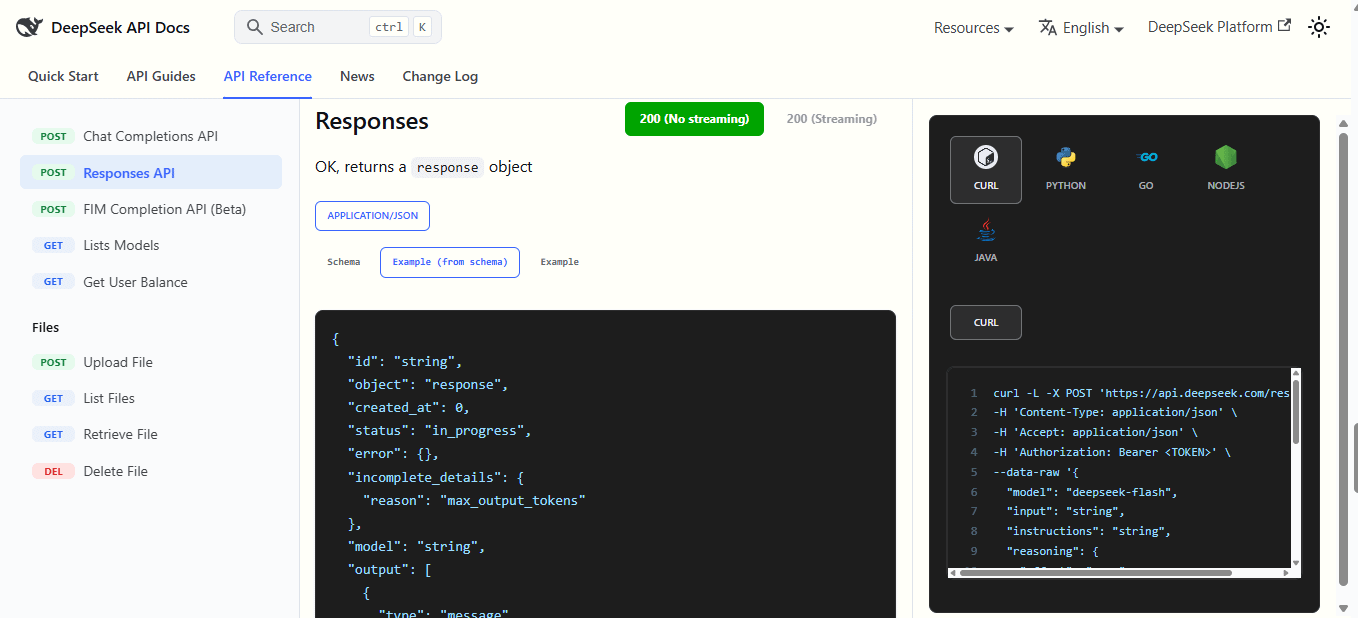
For client.responses.create(), use input_text and input_image. Unlike Chat Completions, the image URL is a string directly on the content part. The example uses user; DeepSeek also accepts developer here and treats it as user. Responses compatibility guide.
import base64
import os
from pathlib import Path
from openai import OpenAI

image_b64 = base64.b64encode(Path("screenshot.jpg").read_bytes()).decode("ascii")

with OpenAI(
    api_key=os.environ["DEEPSEEK_API_KEY"],
    base_url="https://api.deepseek.com",
) as client:
    response = client.responses.create(
        model="deepseek-flash",
        input=[{
            "role": "user",
            "content": [
                {"type": "input_text", "text": "Describe the main visible elements. Do not guess unreadable text."},
                {
                    "type": "input_image",
                    "image_url": f"data:image/jpeg;base64,{image_b64}",
                    "detail": "low",
                },
            ],
        }],
        reasoning={"effort": "none"},
        max_output_tokens=2048,
    )

if response.status != "completed" or not response.output_text:
    raise RuntimeError("The response is incomplete or has no final text; inspect its status.")
print(response.output_text)
Choose exactly one source per input_image: image_url or file_id. DeepSeek documents HTTP 400 when both or neither are supplied, or when an image appears in a system or assistant message. detail is ignored for file_id images. Referenced images are supported; that does not imply support for a generic PDF input_file block. Responses request reference.
Using images with the Anthropic-compatible API
For the Anthropic SDK, use https://api.deepseek.com/anthropic and a user message with an image block containing source. Do not send Chat Completions image_url blocks or Responses input_image blocks to this interface. Official Anthropic-format image example.
Install anthropic with python -m pip install anthropic. This example reuses the same DEEPSEEK_API_KEY and local JPEG. For this SDK’s Base64 image source, data contains only the encoded bytes, not a data:image/... prefix.
import base64
import os
from pathlib import Path
import anthropic

image_b64 = base64.b64encode(Path("screenshot.jpg").read_bytes()).decode("ascii")

with anthropic.Anthropic(
    api_key=os.environ["DEEPSEEK_API_KEY"],
    base_url="https://api.deepseek.com/anthropic",
) as client:
    message = client.messages.create(
        model="deepseek-flash",
        max_tokens=2048,
        thinking={"type": "disabled"},
        messages=[{
            "role": "user",
            "content": [
                {"type": "text", "text": "Describe the main visible elements. Do not guess unreadable text."},
                {
                    "type": "image",
                    "source": {
                        "type": "base64",
                        "media_type": "image/jpeg",
                        "data": image_b64,
                    },
                },
            ],
        }],
    )

if message.stop_reason != "end_turn":
    raise RuntimeError("The response did not finish normally; inspect stop_reason.")
text = "\n".join(block.text for block in message.content if block.type == "text")
if not text:
    raise RuntimeError("No final text was returned.")
print(text)
The documented source.type variants are base64, url, and file. Base64 pairs the encoded string with a MIME type such as image/jpeg. A file source uses file_id and requires anthropic-beta: files-api-2025-04-14; add it through extra_headers when referencing a stored image. Source variants; Files API header requirements.
DeepSeek Vision vs DeepSeek-OCR
DeepSeek Vision and DeepSeek-OCR are related but not the same. DeepSeek Vision through deepseek-flash is a hosted image-understanding API. DeepSeek-OCR and DeepSeek-OCR-2 are separate OCR/document-understanding model routes used for local or self-managed workflows. DeepSeek-OCR GitHub DeepSeek-OCR-2 GitHub
| Use case | Better starting point | Why |
|---|---|---|
| Quick screenshot reading in an API app | DeepSeek Vision via deepseek-flash. | Hosted image input without operating a local inference server. |
| Image description or chart analysis | DeepSeek Vision via deepseek-flash. | Built into the current API route. |
| Private document OCR where images cannot leave your environment | DeepSeek-OCR / DeepSeek-OCR-2 local workflow. | Local/self-managed inference may be preferable after security review. |
| Large document-to-Markdown pipeline | DeepSeek-OCR-2 or a dedicated document-OCR stack. | Better suited to page-level OCR/document workflows. |
| Low-friction hosted OCR-like extraction | DeepSeek Vision. | Good for single images, screenshots, charts, receipts, and simple forms. |
Use careful wording: DeepSeek Vision can perform OCR-like tasks, but it is not the same thing as a dedicated local OCR pipeline. For invoices, contracts, financial statements, medical records, or regulated documents, validate the extracted text against the source image.
Best prompts for screenshots, OCR, charts, and documents
Specify what to extract, how to format it, and how to report missing or unreadable information. These prompt templates are starting points, not accuracy guarantees.
| Task | Prompt | Best output format |
|---|---|---|
| Image description | Describe this image in one paragraph. Mention the main objects, setting, and any visible text. | Plain text. |
| Screenshot OCR | Read visible text. Preserve line breaks, group by screen section, and mark unreadable spans as unclear. | Text grouped by section. |
| Table extraction | Extract the table as Markdown. Preserve row and column labels. If a cell is unreadable, write “unclear”. | Markdown table. |
| Invoice fields | Extract vendor, date, invoice number, subtotal, tax, total, and currency as JSON. Use null for missing or unreadable fields; do not infer a currency. | JSON, validated by your application. |
| Chart analysis | Read the title, axes, legend, labeled values, and visible trend. Separate exact labels from estimates; do not invent precise values. | Structured text. |
| UI audit | List every visible UI element, button, label, menu item, and error message. Keep the order top-to-bottom. | Ordered list. |
| Image comparison | Compare these images and list visible differences. Separate layout, text, color, and object differences. | Markdown sections. |
A prompt asking for JSON is not a schema validator. Parse the response, validate the expected fields and types, and check important values against the image. For API-enforced formatting, follow the options for the chosen endpoint rather than copying parameters between APIs; our DeepSeek JSON Output guide covers that distinction.
Troubleshooting DeepSeek Vision image input
| Problem | Likely cause | Fix |
|---|---|---|
Image request returns 400. | Unsupported role, incorrect image block, or incompatible fields. | Identify the endpoint first. Direct input: Chat Completions uses user + image_url/file; Responses uses user or developer + input_image; Anthropic uses user + image/source. |
deepseek-v4-pro fails with image input. | V4 Pro is text-only in the current model table. | Use deepseek-flash. |
Old tutorial uses deepseek-v4-flash-vision-exp. | Old experimental Vision model name. | Update examples to deepseek-flash. |
| External URL image fails. | Placeholder, unreachable/expired link, excessive length, or failed download. | Supply a reachable, approved image URL within the documented limits, or use Base64/Files API. Do not make confidential content public. |
| Base64 request too large. | Inline image counts toward request body size. | Compress the image or use Files API file_id. |
| Too many images in one request. | Request exceeds image count, total size, or dimension limits. | Split the batch into smaller requests. |
| OCR output misses small text. | Image too compressed, detail too low, or text is too small. | Use detail: "original", improve image resolution, crop relevant area, or use an OCR-specific workflow. |
| Token cost higher than expected. | Multiple images, text context, or output volume. | Inspect usage and the selected detail level. Reducing source resolution does not guarantee lower image tokens after model resizing. |
| Anthropic-compatible request fails. | Wrong block shape, Base64 source, or missing file header. | Use image + source in the direct user example. For source.type="file", include the documented Files API beta header. |
| Responses API request fails. | Wrong content type, source combination, or image role. | Use input_image with exactly one of image_url/file_id in user or developer. Do not put images in system or assistant. |
Inspect the actual error body before retrying. If a text-only request works, add one small image using the schema for that same endpoint. An SDK accepting a dictionary does not prove DeepSeek accepts every role or content type supported by the SDK’s original provider.
Privacy and security when uploading images
DeepSeek Vision is a hosted API workflow. If you send an image to deepseek-flash, that image is sent to DeepSeek’s API. Do not upload sensitive images unless your organization allows it and you understand the data flow.
Sensitive images can include passports, driver’s licenses, government IDs, medical images, legal documents, financial statements, internal dashboards, source-code screenshots, credentials, API keys, client documents, home addresses, or children’s data. DeepSeek’s Privacy Policy says its services may collect prompts, uploaded files, photos, feedback, and chat history, and says the service is not designed to process sensitive personal data. DeepSeek Privacy Policy
For business or regulated workflows, review DeepSeek’s policy and terms, decide whether the image can be sent to a hosted API, and use approved infrastructure. If the image must remain private, evaluate a local OCR or local vision workflow instead of sending it to any hosted model.
Common mistakes from old DeepSeek Vision tutorials
| Mistake | Why it is wrong now | Correct approach |
|---|---|---|
Calling a model named deepseek-vision. | That is not the current official model ID. | Use deepseek-flash. |
Using deepseek-v4-flash-vision-exp in new code. | It is legacy/retired compatibility context. | Use deepseek-flash. |
Sending images to deepseek-v4-pro. | The current model table lists V4 Pro as text-only. | Use deepseek-flash for images. |
Sending a direct image in system or replacing every role with developer. | Image-role rules differ by API; Chat Completions does not document developer. | Use user for direct Chat Completions and Anthropic examples. Responses allows user/developer, with developer treated as user. |
| Using Chat Completions blocks inside the Anthropic endpoint. | The Anthropic-compatible endpoint uses a different image block shape. | Use type: "image" with a source object. |
Using detail: "low" for dense OCR. | It downsamples the image to 512×512. | Use original for small text, tables, and charts. |
| Assuming Vision equals DeepSeek-OCR-2. | They are different workflows. | Use Vision for hosted image understanding; use OCR/OCR-2 for local document OCR workflows. |
| Assuming images can never appear in tool results. | Responses documents image-bearing tool outputs; the Chat Completions schema also lists tool image/file content despite the general Vision restriction. | Keep tool-result handling separate, with proper call IDs and endpoint-specific verification. |
Frequently asked questions
What is DeepSeek Vision?
DeepSeek Vision is DeepSeek’s image-input capability in the API, currently served through deepseek-flash. It lets you send images with text prompts for description, screenshot reading, OCR-like extraction, and chart analysis.
Does DeepSeek support images?
Yes. The current deepseek-flash model supports text and image input according to DeepSeek’s model table.
Which DeepSeek model supports image input?
Use deepseek-flash, the current DeepSeek-V4.1-Flash model ID.
Does deepseek-v4-pro support Vision?
No, not in the current model list. deepseek-v4-pro is listed as text-only.
Is deepseek-v4-flash-vision-exp still current?
No. It is a legacy compatibility name. DeepSeek says the old V4 Flash Vision Exp model is retired and requests are served by the latest Flash model. Use deepseek-flash in new code.
Can DeepSeek Vision read screenshots?
Yes. DeepSeek’s Vision guide lists reading text from screenshots as a supported use case. Use detail: "original" for dense UI screenshots or small text.
Can DeepSeek Vision do OCR?
It can perform OCR-like extraction from images and screenshots, but it should not be treated as a perfect OCR engine. Validate extracted fields against the source image, especially for legal, medical, financial, and compliance workflows.
Can DeepSeek Vision analyze charts?
Yes. DeepSeek’s Vision guide mentions chart analysis. Ask the model to read the title, axis labels, legend, visible values, and main trend, then verify important numbers manually.
What image formats does DeepSeek support?
The Vision docs list JPEG, PNG, GIF, and WebP.
How many images can I send?
DeepSeek’s Vision docs list a maximum of 600 images per request, subject to total size and dimension limits.
What is the image size limit?
The current Vision docs list 32 MiB for a single Base64 or external URL image and 64 MiB for a single Files API file_id image. They also list total request image-size limits and dimension limits.
How are images billed?
DeepSeek says images are converted into tokens based on their dimensions and billed together with text tokens. The Vision guide describes resizing behavior and an upper bound of 1024 tokens per image after resizing.
What does detail=low do?
detail=low downsamples the image to 512×512 before inference. It is faster and cheaper when fine visual detail is not important, but it is not ideal for small text or dense charts.
Should I use Files API or Base64?
Use Base64 for small local images and quick scripts. Use the Files API when the image is reused across requests, when inline request size is too large, or when the image is too large for the Base64/external URL limit.
Is DeepSeek Vision the same as DeepSeek-OCR?
No. DeepSeek Vision is hosted image input through deepseek-flash. DeepSeek-OCR and DeepSeek-OCR-2 are separate OCR/document model routes for local or self-managed workflows.
Is it safe to upload private images?
Do not upload private images unless your policy allows it. Hosted Vision API requests send images to DeepSeek’s API. For sensitive IDs, medical images, financial records, legal documents, internal dashboards, or client materials, use an approved workflow and review DeepSeek’s privacy policy first.
Can I use developer for images in Chat Completions?
Not as a documented DeepSeek Chat Completions role. Use user for direct image input. The accepted developer role belongs to DeepSeek’s Responses format, where it is treated as user.
Can a tool return an image to DeepSeek?
Responses explicitly supports image content in the documented tool-output items. The Chat Completions schema also lists it for tool messages, although the general Vision restriction is narrower. Follow the endpoint-specific schema, preserve the matching call ID, and verify that path separately.
Bottom line
DeepSeek Vision today means image input through deepseek-flash. Use that model for image description, screenshots, OCR-like extraction, chart analysis, and document image tasks. Do not use deepseek-v4-flash-vision-exp as the default for new code, and do not send images to deepseek-v4-pro unless DeepSeek changes its official model table.
Choose the input method that fits the job: Base64 for small local files, external URLs for reachable approved images, and Files API IDs for reused or larger images. Match the endpoint’s role and block format: user with image_url/file for direct Chat Completions, input_image for Responses, and image/source for Anthropic-compatible Messages.
Treat Vision output as model-generated analysis, not a certified transcript. Check completion status and validate important values. Keep private data within approved boundaries, and do not extend Responses-only role support to Chat Completions or confuse tool-returned images with direct user uploads.
Official sources checked
- DeepSeek Vision guide
- DeepSeek Chat Completions reference
- DeepSeek Responses API reference
- DeepSeek Responses compatibility guide
- DeepSeek Files API
- DeepSeek Lists Models
- DeepSeek Token & Token Usage
- DeepSeek Models & Pricing
- DeepSeek change log
- OpenAI Python SDK reference
- DeepSeek Privacy Policy
- DeepSeek-OCR repository
- DeepSeek-OCR-2 repository