

Last reviewed: October 10, 2026
DeepSeek OCR usually refers to DeepSeek’s open-weight OCR and document-understanding models, especially DeepSeek-OCR and the newer DeepSeek-OCR-2. The term is also used more loosely for OCR-like image reading through DeepSeek’s hosted Vision API with deepseek-flash.
These are different workflows. DeepSeek-OCR-2 is a local or self-managed open-weight route for OCR and document-to-Markdown tasks. DeepSeek Vision API is a hosted route: you send an image to DeepSeek’s API, and deepseek-flash reads or analyzes it.
The practical rule is simple: use the DeepSeek Vision API when you need quick hosted image reading and your policy allows the image to leave your environment. Use DeepSeek-OCR-2 when you want local document processing, downloadable weights, PDF workflows, or more control over the data path.
For high-stakes documents, always verify the extracted text against the source. OCR and vision-language models can misread tables, formulas, small fonts, handwriting, stamps, low-contrast scans, multi-column layouts, rotated pages, and merged cells. Do not treat the output as automatically correct for legal, medical, financial, tax, insurance, or compliance use.
DeepSeek OCR at a glance
| Route | What it is | Best for | Main caution |
|---|---|---|---|
| DeepSeek-OCR-2 | Official open-weight OCR and document-understanding model based on Visual Causal Flow. | Local OCR, document-to-Markdown, PDFs, research, and custom pipelines. | Requires a compatible local inference environment. |
| DeepSeek-OCR | The original official OCR model based on Contexts Optical Compression. | Older OCR workflows, research reproduction, and compatibility. | It is not the newest DeepSeek OCR route. |
| DeepSeek Vision API | Hosted image understanding through deepseek-flash. | Screenshots, charts, scanned pages, UI text, and simple extraction. | Requires an API key and sends images to DeepSeek. |
| Third-party demos or quantizations | Community-hosted or optimized derivatives. | Experiments and lower-hardware tests. | Privacy, accuracy, license details, and supported features vary. |
What is DeepSeek OCR?
DeepSeek OCR is not one single product. It usually refers to one of these three routes:
- DeepSeek-OCR-2: the newer official local OCR and document-understanding model.
- DeepSeek-OCR: the original OCR model released before OCR-2.
- DeepSeek Vision API: OCR-like image reading through the hosted
deepseek-flashAPI model.
DeepSeek-OCR-2 is the better current starting point for a local tutorial. The official repository describes it as Visual Causal Flow, while its Hugging Face model card classifies it as an Image-Text-to-Text model, lists 3B parameters and BF16 weights, and displays an Apache-2.0 license. DeepSeek-OCR-2 GitHub DeepSeek-OCR-2 model card

The original DeepSeek-OCR repository describes the first model as Contexts Optical Compression. Its history points users to DeepSeek-OCR-2 as the newer route. DeepSeek-OCR GitHub
DeepSeek-OCR vs DeepSeek-OCR-2 vs DeepSeek Vision API
| Question | DeepSeek-OCR-2 | DeepSeek-OCR | DeepSeek Vision API |
|---|---|---|---|
| Product layer | Open-weight local model. | Earlier open-weight local model. | Hosted API using deepseek-flash. |
| Official source | GitHub and Hugging Face. | GitHub and Hugging Face. | DeepSeek API documentation. |
| Primary use | OCR, document understanding, PDF/image to Markdown. | Original OCR research and older integrations. | Quick OCR-like extraction and image understanding. |
| License shown on model card | Apache-2.0. | MIT. | Hosted API terms and pricing apply. |
| Model size shown on model card | 3B parameters. | 3B parameters. | Uses the hosted deepseek-flash model. |
| API key required? | No for fully local inference. | No for fully local inference. | Yes. |
| Privacy posture | Can remain local if the full pipeline is local. | Can remain local if the full pipeline is local. | The image is sent to DeepSeek’s service. |
Which DeepSeek OCR route should you use?
Use DeepSeek Vision API when you need a quick hosted call for screenshots, charts, labels, receipts, UI images, or single scanned pages and are comfortable sending the content to DeepSeek.
Use DeepSeek-OCR-2 when you want a local or self-managed OCR pipeline, need document-to-Markdown output, want to process PDFs page by page, or cannot upload private documents to a hosted provider.
Use DeepSeek-OCR when reproducing the original Contexts Optical Compression research or maintaining a project built around the first model. For a new local implementation, evaluate OCR-2 first.
Use DeepSeek Vision API for quick OCR-like image reading
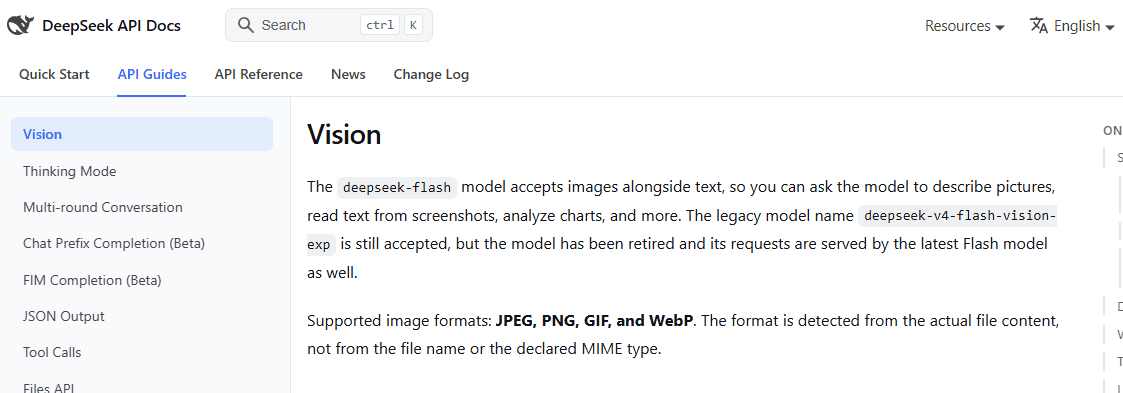
DeepSeek’s Vision documentation says deepseek-flash accepts image input with text prompts, can read visible text from screenshots, and supports JPEG, PNG, GIF, and WebP inputs. DeepSeek Vision documentation
Install the Python SDK and set the API key
python -m pip install --upgrade openaiOn macOS or Linux:
export DEEPSEEK_API_KEY="YOUR_DEEPSEEK_API_KEY"Python example with completion checks
import base64
import mimetypes
import os
from pathlib import Path

from openai import OpenAI

SUPPORTED_MIME_TYPES = {
    "image/jpeg",
    "image/png",
    "image/gif",
    "image/webp",
}

image_path = Path("receipt.jpg").resolve()

if not image_path.is_file():
    raise FileNotFoundError(f"Image not found: {image_path}")

mime_type, _ = mimetypes.guess_type(image_path.name)

if mime_type not in SUPPORTED_MIME_TYPES:
    raise ValueError(
        f"Unsupported image type: {mime_type!r}. "
        "Use JPEG, PNG, GIF, or WebP."
    )

api_key = os.environ.get("DEEPSEEK_API_KEY")

if not api_key:
    raise RuntimeError("Set DEEPSEEK_API_KEY before running the script.")

image_b64 = base64.b64encode(
    image_path.read_bytes()
).decode("ascii")

client = OpenAI(
    api_key=api_key,
    base_url="https://api.deepseek.com",
)

response = client.chat.completions.create(
    model="deepseek-flash",
    messages=[
        {
            "role": "user",
            "content": [
                {
                    "type": "text",
                    "text": (
                        "Extract all visible text from this image. "
                        "Preserve line breaks where possible and "
                        "mark unreadable text as unclear."
                    ),
                },
                {
                    "type": "image_url",
                    "image_url": {
                        "url": f"data:{mime_type};base64,{image_b64}",
                        "detail": "original",
                    },
                },
            ],
        }
    ],
    max_tokens=2048,
    extra_body={
        "thinking": {
            "type": "disabled"
        }
    },
)

if not response.choices:
    raise RuntimeError("DeepSeek returned no response choice.")

choice = response.choices[0]

if choice.finish_reason != "stop":
    raise RuntimeError(
        "The response did not finish normally: "
        f"finish_reason={choice.finish_reason!r}."
    )

text = choice.message.content

if not isinstance(text, str) or not text.strip():
    raise RuntimeError("DeepSeek returned no usable OCR text.")

print(text.strip())
This is a hosted request and can incur API charges. It does not run DeepSeek-OCR-2 locally or keep the image entirely on your machine.
Run DeepSeek-OCR-2 locally with Transformers
The official repository describes a reference environment using Python 3.12.9, CUDA 11.8, PyTorch 2.6.0, Transformers 4.46.3, Tokenizers 0.20.3, and Flash Attention 2.7.3. This is a Linux/NVIDIA-oriented reproduction path, not a guarantee that native Windows, macOS, CPU-only systems, or every CUDA combination will work unchanged. Official installation instructions
| Requirement | Official reference | Why it matters |
|---|---|---|
| Python | 3.12.9 | The official Conda environment uses this version. |
| CUDA | 11.8 | The documented PyTorch installation uses CUDA 11.8 wheels. |
| PyTorch | 2.6.0 | The model is loaded on CUDA and converted to BF16. |
| Transformers | 4.46.3 | Pinned in the repository’s requirements file. |
| Tokenizers | 0.20.3 | Pinned alongside Transformers. |
| Flash Attention | 2.7.3 | The official loading example uses flash_attention_2. |
| Checkpoint | DeepSeek-OCR-2, 3B BF16 | Downloaded from Hugging Face during the first model load. |

Step 1: clone the official repository
git clone https://github.com/deepseek-ai/DeepSeek-OCR-2.git
cd DeepSeek-OCR-2
The GitHub clone provides the project scripts, configuration, requirements file, and examples. It does not download the model’s Hugging Face checkpoint.
Step 2: create and activate the environment
conda create -n deepseek-ocr2 python=3.12.9 -y
conda activate deepseek-ocr2

python -m pip install --upgrade pip setuptools wheel
Step 3: install PyTorch and the required packages
python -m pip install \
  torch==2.6.0 \
  torchvision==0.21.0 \
  torchaudio==2.6.0 \
  --index-url https://download.pytorch.org/whl/cu118

python -m pip install -r requirements.txt

python -m pip install \
  flash-attn==2.7.3 \
  --no-build-isolation
The official requirements.txt installs:
transformers==4.46.3tokenizers==0.20.3- PyMuPDF
- img2pdf
- einops
- easydict
- addict
- Pillow
- NumPy
Step 4: verify CUDA, BF16, and the installed versions
python - <<'PY'
import torch
import transformers
import tokenizers

print("PyTorch:", torch.__version__)
print("Transformers:", transformers.__version__)
print("Tokenizers:", tokenizers.__version__)
print("CUDA available:", torch.cuda.is_available())

if not torch.cuda.is_available():
    raise SystemExit(
        "CUDA is unavailable. This guide follows "
        "DeepSeek's NVIDIA/CUDA reference environment."
    )

print("GPU:", torch.cuda.get_device_name(0))
print("BF16 supported:", torch.cuda.is_bf16_supported())

if not torch.cuda.is_bf16_supported():
    raise SystemExit(
        "The official example uses BF16, but this "
        "GPU reports no BF16 support."
    )
PY
Step 5: prepare the input and output directories
mkdir -p inputs outputs

cp /absolute/path/to/your/document.jpg \
  inputs/document.jpg
Start with one clear JPEG or PNG that you are allowed to process. Confirm that one image works before introducing PDFs, concurrency, multiple pages, or low-quality scans.
How the model weights and custom code are downloaded
AutoTokenizer.from_pretrained() and AutoModel.from_pretrained() contact the Hugging Face model repository during the first run. Transformers downloads and caches the tokenizer, configuration, safetensor weights, and model-specific Python files.
The earlier GitHub clone supplies DeepSeek’s scripts and requirements. The Hugging Face repository supplies the actual model checkpoint and remote modeling implementation.
trust_remote_code=True authorizes Transformers to execute custom Python code provided by the model repository. Review the repository before enabling it. The example below uses revision="main" for readability, but production systems should pin a reviewed commit hash through the revision parameter.
Step 6: run OCR with input and output checks
import os
from pathlib import Path
from typing import Any

import torch
from transformers import AutoModel, AutoTokenizer

os.environ["CUDA_VISIBLE_DEVICES"] = "0"

MODEL_ID = "deepseek-ai/DeepSeek-OCR-2"
MODEL_REVISION = "main"  # Pin a reviewed commit in production.

IMAGE_PATH = Path(
    "inputs/document.jpg"
).resolve()

OUTPUT_DIR = Path(
    "outputs"
).resolve()


def snapshot_files(root: Path) -> dict[Path, int]:
    if not root.exists():
        return {}

    return {
        path.resolve(): path.stat().st_mtime_ns
        for path in root.rglob("*")
        if path.is_file()
    }


def has_meaningful_result(value: Any) -> bool:
    if value is None:
        return False

    if isinstance(value, str):
        return bool(value.strip())

    if isinstance(value, (list, tuple, set, dict)):
        return bool(value)

    return True


if not IMAGE_PATH.is_file():
    raise FileNotFoundError(
        f"Input image not found: {IMAGE_PATH}"
    )

if IMAGE_PATH.suffix.lower() not in {
    ".jpg",
    ".jpeg",
    ".png",
    ".webp",
}:
    raise ValueError(
        "Use a JPEG, PNG, or WebP image "
        "for this local example."
    )

OUTPUT_DIR.mkdir(
    parents=True,
    exist_ok=True,
)

if not torch.cuda.is_available():
    raise RuntimeError(
        "CUDA is unavailable. This example follows "
        "DeepSeek's NVIDIA/CUDA reference setup."
    )

if not torch.cuda.is_bf16_supported():
    raise RuntimeError(
        "The GPU does not report BF16 support "
        "required by this example."
    )

print(
    "Loading tokenizer, custom model code, "
    "and model weights..."
)

try:
    tokenizer = AutoTokenizer.from_pretrained(
        MODEL_ID,
        trust_remote_code=True,
        revision=MODEL_REVISION,
    )

    model = AutoModel.from_pretrained(
        MODEL_ID,
        _attn_implementation="flash_attention_2",
        trust_remote_code=True,
        use_safetensors=True,
        revision=MODEL_REVISION,
    )
except Exception as exc:
    raise RuntimeError(
        "DeepSeek-OCR-2 could not be downloaded "
        "or loaded. Check the environment, network, "
        "disk space, Flash Attention installation, "
        "and model revision."
    ) from exc

model = model.eval().cuda().to(
    torch.bfloat16
)

prompt = (
    "<image>\n"
    "<|grounding|>"
    "Convert the document to markdown. "
)

before = snapshot_files(OUTPUT_DIR)

try:
    result = model.infer(
        tokenizer,
        prompt=prompt,
        image_file=str(IMAGE_PATH),
        output_path=str(OUTPUT_DIR),
        base_size=1024,
        image_size=768,
        crop_mode=True,
        save_results=True,
    )
except Exception as exc:
    raise RuntimeError(
        "DeepSeek-OCR-2 inference failed."
    ) from exc

after = snapshot_files(OUTPUT_DIR)

changed_files = sorted(
    path
    for path, modified_time in after.items()
    if before.get(path) != modified_time
)

if (
    not has_meaningful_result(result)
    and not changed_files
):
    raise RuntimeError(
        "Inference returned no usable value "
        "and created no new or updated files."
    )

print(
    "DeepSeek-OCR-2 inference "
    "completed successfully."
)

if has_meaningful_result(result):
    print("Returned result:")
    print(result)

if changed_files:
    print("New or updated output files:")

    for path in changed_files:
        print(f"- {path}")
What the success check proves
| Observed result | What the script does | What it does not prove |
|---|---|---|
| Nonempty return value | Prints the returned value and accepts that the inference function completed. | It does not prove every extracted character is correct. |
| New or modified output files | Lists the artifacts written during the current run. | It does not validate Markdown layout, tables, dates, or totals. |
| Empty return and no changed files | Raises an error instead of reporting success. | It cannot diagnose every CUDA or model-code failure automatically. |
Use <image>\nFree OCR. for plain text without document-layout grounding. Use <image>\n<|grounding|>Convert the document to markdown. for document structure and Markdown output.
What was actually tested for this guide?
| Check | Status | Scope |
|---|---|---|
| Official installation order and versions | Verified against the official README and requirements file. | Source review. |
| Python syntax | Compiled locally. | No model import or GPU execution. |
| Result-validation logic | Tested with nine synthetic values. | Application logic only. |
| Output-file change detection | Tested in a temporary directory. | Application logic only. |
| Checkpoint download | Not performed. | The 3B weights were not downloaded. |
| Flash Attention build | Not performed. | No compatible NVIDIA/CUDA build environment was used. |
| Live OCR inference | Not performed. | No accuracy, speed, or VRAM claim is made. |
| Hosted Vision API request | Not sent. | No paid or live API response was tested. |
Run DeepSeek-OCR-2 with vLLM
Use the official vLLM scripts when you need streaming image output, concurrent PDF processing, or benchmark batches. Configure the environment and paths before starting the scripts.
Create a separate vLLM environment
conda create \
  -n deepseek-ocr2-vllm \
  python=3.12.9 \
  -y

conda activate deepseek-ocr2-vllm

cd /absolute/path/to/DeepSeek-OCR-2

python -m pip install \
  --upgrade pip setuptools wheel

python -m pip install \
  torch==2.6.0 \
  torchvision==0.21.0 \
  torchaudio==2.6.0 \
  --index-url https://download.pytorch.org/whl/cu118

# Download the vLLM 0.8.5 CUDA 11.8 wheel
# linked from the official DeepSeek README,
# then install the downloaded file.

python -m pip install \
  ./vllm-0.8.5+cu118-cp38-abi3-manylinux1_x86_64.whl

python -m pip install \
  -r requirements.txt

python -m pip install \
  flash-attn==2.7.3 \
  --no-build-isolation
The official README notes a Transformers dependency warning when vLLM and the pinned Transformers version share an environment. Treat that as repository-specific guidance, not permission to ignore unrelated dependency failures.
Configure and run the scripts
Edit DeepSeek-OCR2-master/DeepSeek-OCR2-vllm/config.py and set real input and output paths before running the scripts.
cd DeepSeek-OCR2-master/DeepSeek-OCR2-vllm

python -m py_compile \
  run_dpsk_ocr2_image.py \
  run_dpsk_ocr2_pdf.py \
  run_dpsk_ocr2_eval_batch.py

# Image OCR with streaming output
python run_dpsk_ocr2_image.py

# Concurrent PDF OCR
python run_dpsk_ocr2_pdf.py

# Benchmark batch
python run_dpsk_ocr2_eval_batch.py
Check that output files were created
OUTPUT_DIR="/absolute/path/to/configured/output"

if [ ! -d "$OUTPUT_DIR" ]; then
  echo \
    "Output directory does not exist: $OUTPUT_DIR" \
    >&2

  exit 1
fi

if ! find "$OUTPUT_DIR" \
  -type f \
  -print \
  -quit | grep -q .; then

  echo "No OCR output files were created." >&2
  exit 1
fi

find "$OUTPUT_DIR" \
  -maxdepth 3 \
  -type f \
  -print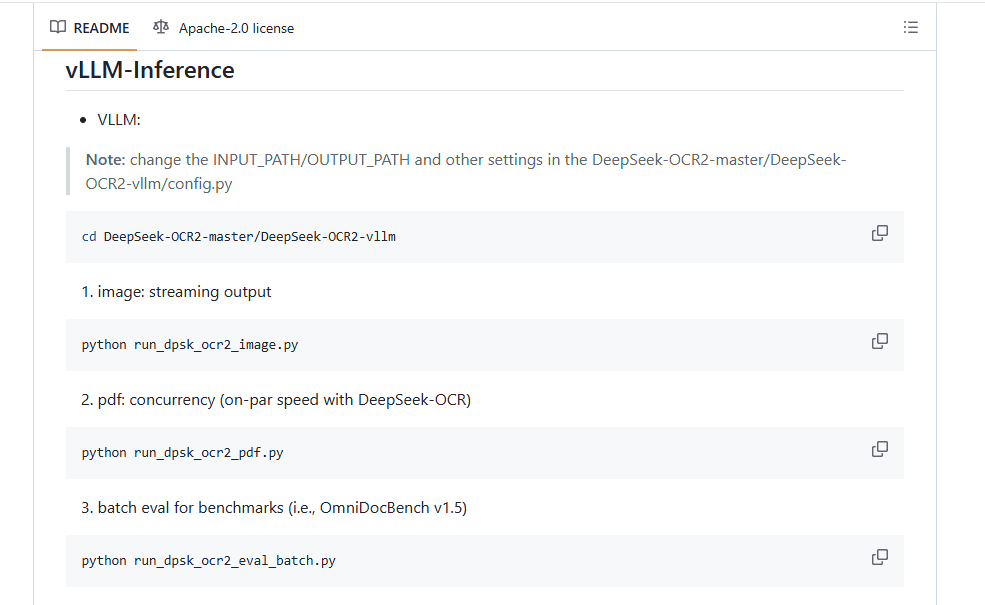
Creating a file proves that the pipeline produced an artifact. It does not establish that the text, page order, tables, totals, or Markdown structure are accurate.
DeepSeek OCR prompt cheat sheet
| Task | Prompt | Expected output | Caution |
|---|---|---|---|
| Plain OCR | <image>\nFree OCR. | Plain extracted text. | Does not preserve complex layout reliably. |
| Document to Markdown | <image>\n<|grounding|>Convert the document to markdown. | Headings, lists, tables, and text in Markdown. | Verify reading order and table structure. |
| Screenshot text | Read all visible UI text and preserve approximate order. | Labels, buttons, menus, and messages. | Icons and very small text may be missed. |
| Table extraction | Extract this table as Markdown. Preserve rows and columns. | A Markdown table. | Check merged cells, totals, and column names. |
| Invoice fields | Extract vendor, date, invoice number, subtotal, tax, total, and currency. | Structured fields. | Verify every value against the image. |
| Figure parsing | Read labels, legend text, axes, and visible values. | Text description and labels. | Do not trust inferred numeric values without review. |
Do not use one generic prompt for every document category. Create separate prompts and validation for invoices, contracts, scientific papers, receipts, tables, slides, forms, and screenshots.
PDF and multi-page document workflow
The official repository includes run_dpsk_ocr2_pdf.py for local PDF processing. A production workflow should preserve page identity rather than returning one untraceable text block.
- Store the original file name and document ID.
- Render or process pages in a controlled order.
- Keep page-level output files before merging them.
- Record failures for individual pages.
- Merge text or Markdown in page order.
- Validate tables, totals, dates, headers, and footers.
- Route uncertain or high-risk pages to human review.
Scanned contracts, statements, handwriting, formulas, tables, and multi-column papers normally require post-processing and review.
Hardware and setup limitations
The official sources provide a reference software environment and identify a 3B BF16 checkpoint, but they do not publish one universal minimum VRAM figure for every resolution, crop mode, batch size, PDF, or serving engine.
- Start with the Linux/NVIDIA/CUDA reference path when reproducibility matters.
- Check CUDA and BF16 before downloading the checkpoint.
- Budget storage for weights, caches, dependencies, inputs, and generated files.
- Do not assume every consumer GPU can run the BF16 and Flash Attention configuration.
- Do not promise CPU, Apple Silicon, native Windows, or laptop performance without testing a documented compatible route.
- Community quantizations may reduce hardware needs but may change accuracy, speed, or features.
- Measure memory, throughput, and error rate on your own documents.
Accuracy, hallucination, and validation risks
DeepSeek OCR output should be treated as extracted model output, not a certified transcript. The model can omit text, reorder content, infer words that are not visible, or produce an incorrect table structure.
- Compare totals, dates, invoice numbers, and account numbers with the source.
- Review legal clauses and defined terms manually.
- Verify medical, insurance, tax, and regulatory codes.
- Mark unreadable handwriting instead of guessing.
- Reject pages that are too blurry, rotated, or low contrast.
- Validate merged cells and wrapped text in tables.
- Keep the page number and source file with every extracted section.
- Route uncertain pages to a human reviewer.
Privacy and security for document OCR
| Workflow | Privacy implication | Best practice |
|---|---|---|
| DeepSeek Vision API | The image is sent to DeepSeek’s hosted API. | Use only for content your policy allows you to send. |
| Local DeepSeek-OCR-2 | Processing can remain local when the complete pipeline is local. | Protect inputs, outputs, logs, caches, and temporary files. |
| Third-party demo | The document is processed by another operator. | Do not upload confidential files without reviewing the service. |
| Hugging Face Space | Data handling depends on the Space owner and deployment. | Treat it as third-party processing unless you control it. |
| RAG or database ingestion | Extracted text may remain searchable after OCR. | Apply access controls, redaction, retention, and audit logging. |
Do not upload passwords, API keys, government IDs, medical records, client documents, financial statements, contracts, or regulated data unless the route is approved and the complete data flow is understood.
Common mistakes in DeepSeek OCR tutorials
| Mistake | Why it matters | Better approach |
|---|---|---|
Treating DeepSeek OCR as only deepseek-flash. | It confuses the hosted Vision API with local OCR models. | Explain OCR-2, the original OCR model, and the API separately. |
| Ignoring DeepSeek-OCR-2. | Older tutorials may cover only the first OCR release. | Evaluate OCR-2 first for a new local workflow. |
| Showing inference before installation. | The reader reaches imports and GPU code without a working environment. | Present prerequisites, installation, and verification first. |
| Saying Git clone downloads the weights. | The GitHub and Hugging Face repositories serve different purposes. | Explain the first-run checkpoint download separately. |
Using trust_remote_code=True without explanation. | It permits custom repository code to execute. | Review and pin a commit revision in production. |
Only printing model.infer(). | An empty return or failed file write can look successful. | Check the return value and output artifacts. |
| Claiming OCR-2 is a hosted DeepSeek API model. | The hosted API route uses deepseek-flash Vision. | Call OCR-2 the local/open-weight route. |
| Inventing a universal VRAM minimum. | Requirements vary by precision, image size, crop mode, and concurrency. | State the reference environment and benchmark the target hardware. |
| Assuming OCR output is perfect. | Errors can remain even when the output looks well formatted. | Validate critical data against the original document. |
DeepSeek OCR vs traditional OCR tools
DeepSeek-OCR-2 is closer to a document-understanding model than a narrow text-recognition engine. It can be prompted to produce Markdown, parse document structure, describe figures, and interpret mixed visual content.
That flexibility can help with complex layouts, but it also adds generative risk. A traditional OCR engine may be more predictable for exact character recognition, while a vision-language model may be more useful for layout understanding and structured conversion. Compare both approaches using your own documents and acceptance rules.
Frequently asked questions
Is DeepSeek-OCR-2 newer than DeepSeek-OCR?
Yes. OCR-2 is the newer official route and is normally the better starting point for a new local tutorial or document-to-Markdown pipeline.
Is DeepSeek-OCR-2 available through the hosted API?
The official hosted Vision documentation uses deepseek-flash. That is OCR-like image understanding, not a claim that the OCR-2 checkpoint itself is served as an API model.
Can I run DeepSeek OCR locally?
Yes. Follow the documented order: clone the repository, create the Python 3.12.9 environment, install CUDA 11.8 PyTorch, install the requirements, install Flash Attention, verify CUDA and BF16, and then load the model.
What does trust_remote_code=True do?
It allows Transformers to download and execute custom Python code from the Hugging Face model repository. Review the code and pin a known commit revision for production use.
Where are the downloaded files stored?
Transformers and Hugging Face Hub normally store downloaded model files in the Hugging Face cache. You can configure the cache location through supported Hugging Face options or environment settings.
What hardware do I need?
The official route uses an NVIDIA CUDA environment and BF16, but it does not publish one universal minimum VRAM number. Requirements depend on the GPU, image resolution, precision, crop mode, batch size, PDF concurrency, and runtime.
How do I know inference succeeded?
Check for a meaningful return value or new and modified output files. Then inspect those files and compare the OCR result against the source. File creation alone does not establish accuracy.
Can DeepSeek OCR convert PDFs to Markdown?
Yes. The official repository includes a PDF workflow and publishes a document-to-Markdown prompt. Validate page order, tables, formulas, headings, and extracted values.
Is DeepSeek OCR free?
The weights are downloadable under the licenses shown on their model cards, but local inference still has hardware, storage, engineering, and operational costs. Hosted Vision API usage is separately billed.
Which route should I use in production?
Use the hosted Vision API for fast extraction when external processing is approved. Use local OCR-2 when data control and document-to-Markdown workflows matter. Add output validation, page tracking, error handling, monitoring, and human review to either route.
Bottom line
DeepSeek-OCR-2 is the current local and open-weight route to evaluate for OCR and document-to-Markdown work. DeepSeek-OCR remains relevant for original research and older integrations. DeepSeek Vision API with deepseek-flash is the fastest hosted route for OCR-like image extraction.
For local OCR-2, do not begin with the inference code. Prepare the documented environment first, understand what trust_remote_code downloads and executes, confirm CUDA and BF16, and require evidence that the current run returned content or created output files. After that, validate the actual OCR result against the source before using it in search, RAG, databases, or business decisions.
Official sources checked
- DeepSeek-OCR-2 GitHub repository
- DeepSeek-OCR-2 requirements.txt
- DeepSeek-OCR-2 Hugging Face model card
- DeepSeek-OCR GitHub repository
- DeepSeek-OCR Hugging Face model card
- DeepSeek Vision API documentation
- DeepSeek Chat Completions API
- Hugging Face Transformers: loading models
- Hugging Face Auto classes, revisions, and cache options