
Last reviewed: October 16, 2026
Yes, you can run DeepSeek locally on Windows and Mac with Ollama. For this walkthrough, use a downloaded model from Ollama’s deepseek-r1 family rather than a DeepSeek hosted API identifier. After installing Ollama and checking the local-only settings below, the simplest command is:
ollama run deepseek-r1That command pulls the default DeepSeek-R1 tag when needed and opens an interactive chat on the selected Ollama server. At the review date, the default points to the 8B model; deepseek-r1:8b makes that size explicit. Try deepseek-r1:1.5b for a lighter first test rather than assuming every laptop can run 8B comfortably. Ollama DeepSeek-R1 model page
A local address is not proof of local inference. Your program can contact Ollama at http://127.0.0.1:11434 while the server forwards a selected cloud model to Ollama’s cloud. This guide pairs a local server with a downloaded R1 model and explains how to disable Ollama Cloud. Local R1 inference needs neither a DeepSeek API key nor an Ollama cloud sign-in. Ollama authentication documentation
This guide covers Windows and Mac installation, model sizes, the first chat, local HTTP requests, Python and JavaScript clients, privacy checks, and troubleshooting. It also separates current hosted API names from Ollama tags so an old deepseek-v4-flash tutorial does not send you down the wrong setup path.
Use the command block for your operating system. Windows examples below are labeled Windows PowerShell. Mac examples are labeled macOS Terminal (zsh/Bash). Ollama CLI commands such as ollama run, ollama pull, and ollama list work in both shells; HTTP request syntax and package-install commands are shown separately where the shell rules differ.
Quick answer: the local DeepSeek setup
| Question | Practical answer |
|---|---|
| Can you run DeepSeek locally? | Yes. This guide uses downloaded models from Ollama’s deepseek-r1 family. |
| Does it work on Windows and Mac? | Yes, on hardware and operating systems supported by the current Ollama release. |
| Do you need a DeepSeek API key? | No, not for these local R1 examples. |
| What is the easiest command? | ollama run deepseek-r1, after verifying the selected server and local-only settings. |
| Which tag should you try first? | Try deepseek-r1:1.5b for a lighter check or deepseek-r1:8b when your available memory supports it. |
| Does localhost mean the model is local? | No. Check the selected model and Ollama’s cloud settings as well. |
| Where is the local chat endpoint? | http://127.0.0.1:11434/api/chat |
| Can you run without an internet connection? | A downloaded local model can run without cloud inference; external tools, updates, and downloads are separate. |
| Should you paste hosted API names into Ollama? | No. Use a documented Ollama tag, not deepseek-flash or a retired library entry. |
What “run DeepSeek locally” actually means
Keep the model’s execution location separate from the application window or URL you use:
| Option | Where model inference runs | Authentication | What to verify |
|---|---|---|---|
| Downloaded Ollama model | On the machine running that Ollama server. | No key for the default local API. | The server is your own computer and the selected tag has local model weights. |
| DeepSeek hosted API | On DeepSeek’s infrastructure. | A DeepSeek API key. | The provider, model, billing, and data-handling terms. |
| Ollama Cloud | On Ollama’s cloud infrastructure. | Sign-in for access through local Ollama; an API key for direct cloud API access. | A cloud model can be requested through a local server or directly through the cloud endpoint. |
This article focuses on the first option: running a DeepSeek model locally with Ollama on your own Windows or Mac computer.
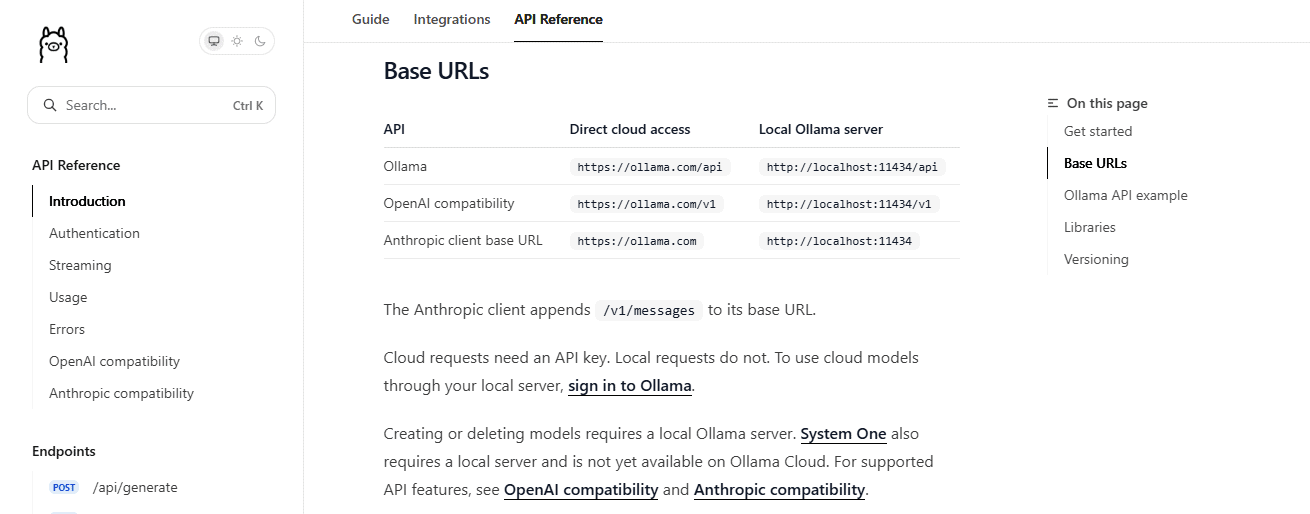
A cloud request can pass through localhost:11434 after Ollama sign-in, without your local request carrying an API key. Therefore, neither a localhost URL nor the absence of a key is enough to establish where inference happens. Ollama authentication documentation
Which DeepSeek model should you run with Ollama?
The Ollama DeepSeek-R1 model page lists 1.5b, 7b, 8b, 14b, 32b, 70b, and 671b tags. Use the published tag rather than guessing a model identifier from its marketing name.
For most readers, do not start with the 671B model. It is a specialist/server-scale model with a very large download size. A normal laptop should start with a smaller distilled model.
| Ollama tag | Ollama-listed size | Best starting use | Practical guidance |
|---|---|---|---|
deepseek-r1:1.5b | 1.1GB | Lightest listed download. | Useful for an initial installation check; evaluate answer quality separately. |
deepseek-r1:7b | 4.7GB | A smaller local experiment than 8B by download size. | Still needs memory beyond the model file itself. |
deepseek-r1:8b | 5.2GB | A practical candidate when your machine has sufficient memory. | The current default is DeepSeek-R1-0528-Qwen3-8B. |
deepseek-r1:14b | 9.0GB | A larger model to evaluate on better-equipped hardware. | Do not assume that larger means better for every task. |
deepseek-r1:32b | 20GB | High-memory desktop or workstation evaluation. | Check available memory, context settings, and acceptable latency. |
deepseek-r1:70b | 43GB | High-memory workstation or server experiments. | Not a normal beginner laptop choice. |
deepseek-r1:671b | 404GB | Specialist, server-scale deployment. | Not a realistic starting point for an ordinary laptop. |
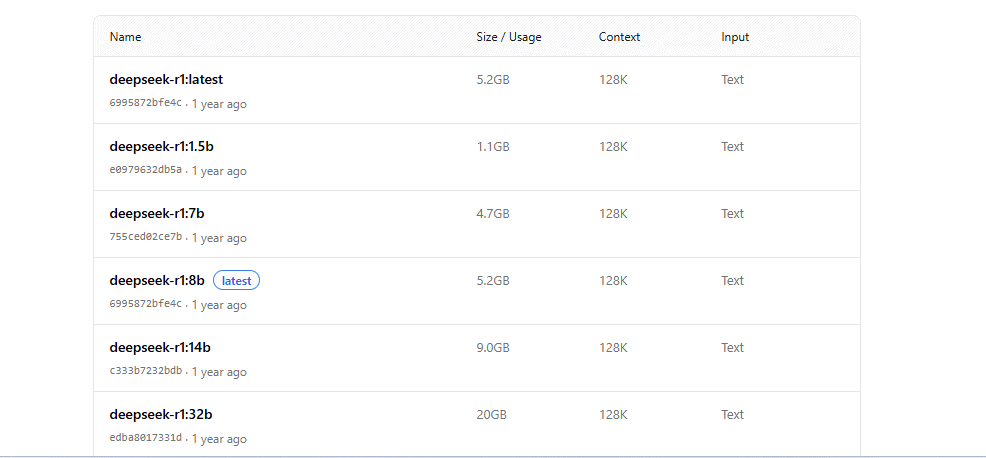
Download size is not the same as exact RAM or VRAM requirement. Larger models need more memory and will usually run slower. Ollama’s Quickstart notes that larger context windows need more memory and that responses may be slower when less VRAM is available. Ollama Quickstart If you are considering another local model family, our DeepSeek vs Mistral guide compares model sizes, licenses, and deployment options.
Install Ollama on Windows
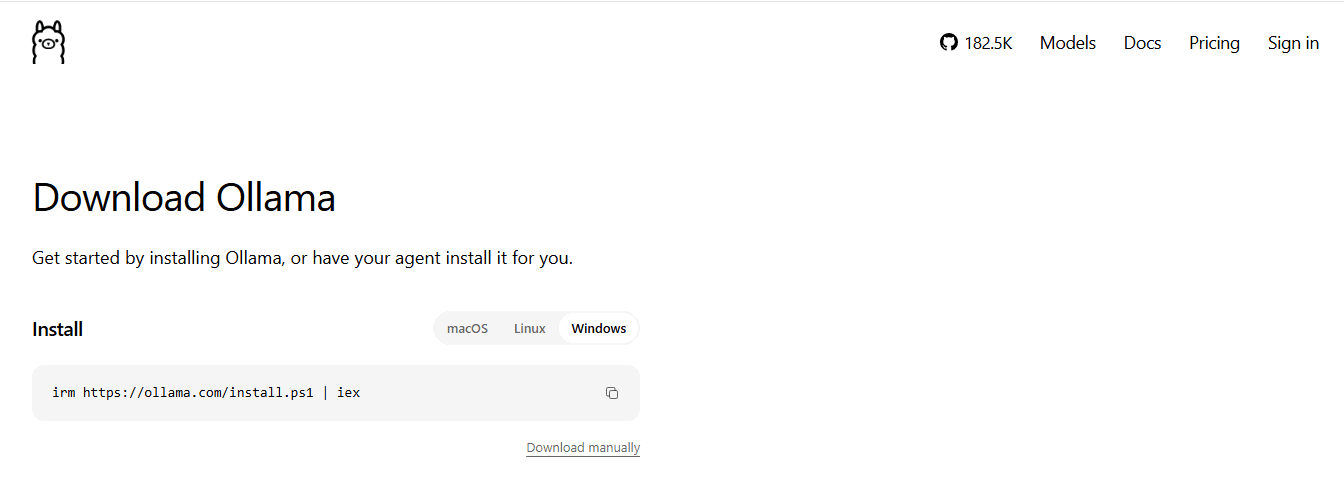
Use the official Windows download or the PowerShell command below. Ollama’s Windows documentation lists Windows 10 22H2 or newer; GPU acceleration also depends on supported hardware and drivers. Open Windows PowerShell or a PowerShell profile in Windows Terminal.
Windows PowerShell: install Ollama
irm https://ollama.com/install.ps1 | iexThe manual installer is an alternative to the command above. A command piped into iex executes the downloaded script immediately; review the script first when your environment requires it. Do not run both installation methods just to complete this guide.
Windows PowerShell: verify the installation
ollama --version
$env:OLLAMA_HOST = "http://127.0.0.1:11434"
ollama list
If ollama is not recognized, reopen PowerShell after installation. Confirm that the Ollama app is running. The host assignment directs CLI commands in this terminal to your own computer; it does not reconfigure an already-running service. The Ollama client source documents the environment-based server selection.
Run DeepSeek on Windows
Before your first prompt, complete the local-only configuration below, then return here. Keep using the PowerShell window where you set OLLAMA_HOST, or repeat that assignment in a new window. These commands target the default local port.
Windows PowerShell: run the default local model
ollama run deepseek-r1To choose the current 8B size explicitly:
ollama run deepseek-r1:8bFor a lighter first test:
ollama run deepseek-r1:1.5bWhen the interactive chat starts, enter a prompt such as:
Explain recursion in one short example.To leave the interactive chat:
/byeInstall Ollama on Mac
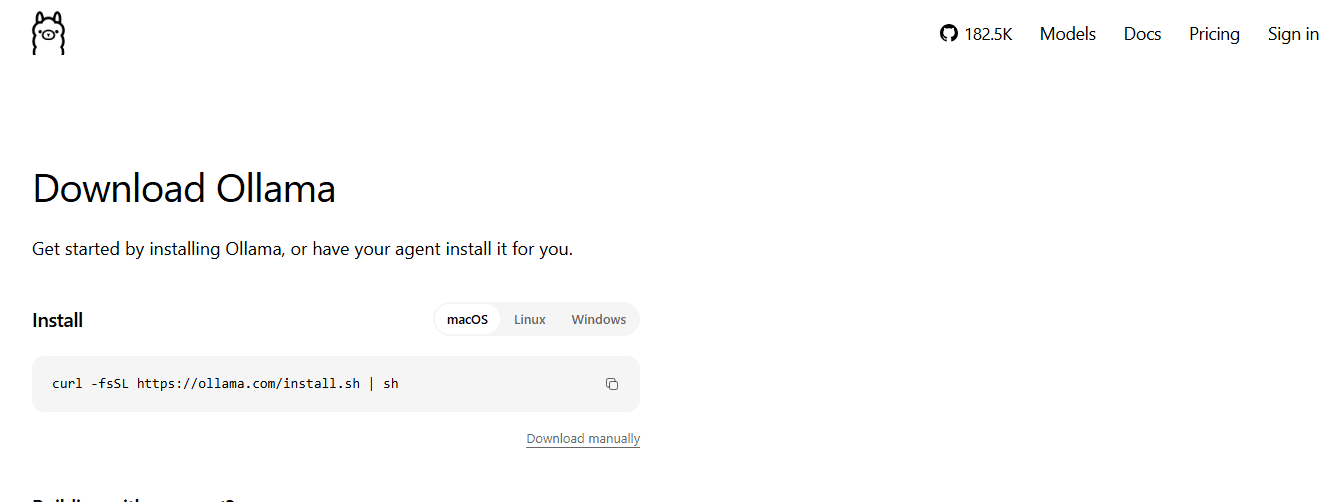
Use the official macOS download or the Terminal command below. The current macOS requirements list macOS Sonoma 14 or newer, with CPU and GPU support on Apple M-series Macs and CPU-only support on Intel Macs.
macOS Terminal (zsh/Bash): install Ollama
curl -fsSL https://ollama.com/install.sh | shThe macOS documentation recommends installing the app from its disk image and placing it in Applications. Open it and allow the CLI link when prompted. The shell command is an alternative; like any download piped into a shell, it executes a remote script. Use one installation route rather than repeating both.
macOS Terminal (zsh/Bash): verify the installation
ollama --version
export OLLAMA_HOST="http://127.0.0.1:11434"
ollama list
If the command is unavailable, reopen Terminal and check the app’s CLI setup. Start Ollama before making local requests. The exported host applies to commands launched from this shell, not to a separately running app’s existing environment.
Run DeepSeek on Mac
Complete the local-only configuration before your first prompt, then use the Terminal window where you exported OLLAMA_HOST. The following CLI commands work in zsh and Bash.
macOS Terminal (zsh/Bash): run the default local model
ollama run deepseek-r1To choose the current 8B size explicitly:
ollama run deepseek-r1:8bIf that is too slow or uses too much memory, try:
ollama run deepseek-r1:1.5bChoose a smaller model when available memory or response speed is inadequate. Supported GPU acceleration and sufficient memory matter more than the MacBook label alone.
Choose a DeepSeek-R1 tag instead of guessing
Choosing a size tag makes your request clearer, but a tag is not an immutable version pin. Record the tag and model ID shown by your installation when reproducibility matters. As a practical starting rule:
- Use deepseek-r1:1.5b for a lower-download-size first test.
- Use
deepseek-r1:7bordeepseek-r1:8bif you want a practical laptop starting point. - Try
deepseek-r1:14bonly after 8B runs comfortably and you have a task on which to compare their results. - Use
deepseek-r1:32bonly on stronger local hardware. - Use
deepseek-r1:70bordeepseek-r1:671bonly if you understand the memory, speed, and storage tradeoffs.
Ollama currently maps the default tag and deepseek-r1:8b to DeepSeek-R1-0528-Qwen3-8B. The full-size model is available under deepseek-r1:671b. An existing installation may still have an older download until you pull an update. Ollama DeepSeek-R1 model page
Verify the local model before connecting another app
Keep the explicit local host setting from the Windows or Mac steps. Run ollama list and confirm the R1 tag you downloaded. A listed cloud reference is not proof that its full model weights are on your computer; use the known local tag in this guide rather than a cloud-tagged substitute.
While the model is loaded, use another terminal with the same local host setting to run:
ollama psCheck the selected model and its CPU/GPU loading information. Together with the local-only startup check below, this is useful diagnostic evidence. A successful answer or a model name on its own is not a complete audit of every connected application. Ollama CLI reference
After completing downloads, an additional practical check is to disconnect external networking and send a harmless prompt using the same local client. Success demonstrates that this specific test did not need cloud inference; failure alone does not identify the cause, and the test does not certify plugins or future configurations.
Use DeepSeek locally through the Ollama API
The native chat endpoint for this walkthrough is http://127.0.0.1:11434/api/chat. Use the downloaded deepseek-r1:8b tag, complete the local-only checks, and keep the client on the same machine as Ollama. A direct API call does not download a missing model for you; pull it first with ollama pull deepseek-r1:8b. Ollama API documentation
Windows PowerShell: call the local Ollama API
Use PowerShell’s native JSON and HTTP commands. This avoids Bash line-continuation and quoting rules.
$body = @{
  model = "deepseek-r1:8b"
  messages = @(
    @{
      role = "user"
      content = "Explain recursion in one paragraph."
    }
  )
  stream = $false
} | ConvertTo-Json -Depth 5

$response = Invoke-RestMethod -Uri "http://127.0.0.1:11434/api/chat" -Method Post -ContentType "application/json" -Body $body

$response.message.content
macOS Terminal (zsh/Bash): call the local Ollama API
curl --noproxy 127.0.0.1 --fail --show-error http://127.0.0.1:11434/api/chat \
  -H "Content-Type: application/json" \
  -d '{
    "model": "deepseek-r1:8b",
    "messages": [
      {
        "role": "user",
        "content": "Explain recursion in one paragraph."
      }
    ],
    "stream": false
  }'
Do not paste the macOS command directly into PowerShell. Use its native Invoke-RestMethod block instead. The cURL examples also use --noproxy 127.0.0.1 to bypass an HTTP proxy for that local address, as documented in the cURL manual. In managed environments, verify any system or application proxy separately; do not remove required organizational controls.
Changing the URL to a provider’s hosted service changes the request route. Keeping the local URL while selecting a cloud model can also move inference off the device. These examples do not configure a cloud fallback; recheck any third-party client’s model and fallback settings before using it.
Use the OpenAI-compatible local endpoint
Ollama exposes an OpenAI-compatible Chat Completions endpoint at http://127.0.0.1:11434/v1/chat/completions. Compatibility covers a subset of the original API and does not turn R1 into a hosted Flash model. These examples are ordinary HTTP requests to Ollama; they do not call OpenAI. Ollama OpenAI compatibility
Windows PowerShell: OpenAI-compatible local request
$body = @{
  model = "deepseek-r1:8b"
  stream = $false
  messages = @(
    @{
      role = "user"
      content = "Give me three practical uses for local DeepSeek."
    }
  )
} | ConvertTo-Json -Depth 5

$response = Invoke-RestMethod -Uri "http://127.0.0.1:11434/v1/chat/completions" -Method Post -ContentType "application/json" -Body $body

$response.choices[0].message.content
macOS Terminal (zsh/Bash): OpenAI-compatible local request
curl --noproxy 127.0.0.1 --fail --show-error http://127.0.0.1:11434/v1/chat/completions \
  -H "Content-Type: application/json" \
  -d '{
    "model": "deepseek-r1:8b",
    "stream": false,
    "messages": [
      {
        "role": "user",
        "content": "Give me three practical uses for local DeepSeek."
      }
    ]
  }'
The Ollama response is read from choices[0].message.content for this OpenAI-compatible endpoint.
Python example with local Ollama
Install the official Ollama Python library in a project virtual environment. The current client source supports an explicit host; omitting it allows OLLAMA_HOST to select the server. This example deliberately does not use the module-level chat() shortcut.
Windows PowerShell: install the Python package
py -m venv .venv
.\.venv\Scripts\python.exe -m pip install --upgrade ollama
Run these commands in a project folder. If the Windows launcher py is unavailable but Python is installed, use python -m venv .venv for the first line. The explicit virtual-environment executable avoids changing PowerShell’s script execution policy just to activate an environment.
macOS Terminal (zsh/Bash): install the Python package
python3 -m venv .venv
.venv/bin/python -m pip install --upgrade ollama
Save the following program as local-deepseek.py. Make sure the R1 tag has already been downloaded to the same local server:
import sys

from ollama import Client, ResponseError

HOST = "http://127.0.0.1:11434"
MODEL = "deepseek-r1:8b"


def main():
    # Explicit host overrides OLLAMA_HOST for this client.
    # These HTTPX options avoid environment proxies and redirects.
    with Client(
        host=HOST,
        trust_env=False,
        follow_redirects=False,
    ) as client:
        response = client.chat(
            model=MODEL,
            messages=[
                {
                    "role": "user",
                    "content": "Explain local inference in one paragraph.",
                }
            ],
            stream=False,
        )

        content = response.message.content
        if not isinstance(content, str) or not content.strip():
            raise RuntimeError("Ollama returned no usable answer text.")

        print(content.strip())


if __name__ == "__main__":
    try:
        main()
    except (ConnectionError, ResponseError, RuntimeError) as exc:
        print(f"Local Ollama request failed: {exc}", file=sys.stderr)
        raise SystemExit(1)
The explicit host fixes the destination for this Python client. trust_env=False disables HTTPX’s environment-based proxy settings; it does not itself override OLLAMA_HOST. follow_redirects=False prevents automatic redirect following. These are client controls, not a way to disable server-side cloud inference. See the Python client source and HTTPX environment-variable documentation.
Windows PowerShell:
.\.venv\Scripts\python.exe local-deepseek.pymacOS Terminal:
.venv/bin/python local-deepseek.pyNo DeepSeek API key is required. Keep Ollama’s cloud features disabled and use the intended local model; this code does not prove the execution location of an arbitrary replacement model.
JavaScript example with local Ollama
Use Node.js with npm for this terminal-side example, not a browser script. Install the official Ollama JavaScript library in your project directory; the package-install command is the same in PowerShell and macOS Terminal.
Windows PowerShell: install the JavaScript package
npm install ollamamacOS Terminal (zsh/Bash): install the JavaScript package
npm install ollamaSave this cross-platform ES module as local-deepseek.mjs. The explicit client host makes the intended connection clear rather than relying on a default client:
import { Ollama } from "ollama";

const client = new Ollama({
  host: "http://127.0.0.1:11434",
});

try {
  const response = await client.chat({
    model: "deepseek-r1:8b",
    messages: [
      {
        role: "user",
        content: "Explain local AI in one paragraph.",
      },
    ],
    stream: false,
  });

  const content = response.message?.content;
  if (typeof content !== "string" || !content.trim()) {
    throw new Error("Ollama returned no usable answer text.");
  }

  console.log(content.trim());
} catch (error) {
  console.error(
    `Local Ollama request failed: ${error?.message ?? String(error)}`,
  );
  process.exitCode = 1;
}
Run the file from the same project directory:
node local-deepseek.mjsAs with Python, a local client address does not prevent the Ollama server from forwarding a cloud model. Keep the selected tag and local-only server configuration unchanged. Review custom network adapters and third-party wrappers separately.
Local DeepSeek vs DeepSeek API vs Ollama Cloud
Use this table when you are deciding which path fits your goal.
| Path | Model example | Client connects to | Authentication | Inference location |
|---|---|---|---|---|
| Local Ollama with downloaded weights | deepseek-r1:8b | http://127.0.0.1:11434 | None for the default local API. | The computer running the local model. |
| Ollama Cloud via local server | A documented cloud-model tag, not the local R1 tag used here. | http://127.0.0.1:11434 | Ollama sign-in authorizes the cloud request. | Ollama Cloud, despite the local client URL. |
| Direct Ollama Cloud API | A model in the current cloud catalog. | https://ollama.com with its documented API path. | Ollama API key. | Ollama Cloud. |
| DeepSeek hosted API | deepseek-flash or deepseek-v4-pro | https://api.deepseek.com | DeepSeek API key. | DeepSeek’s hosted service. |
DeepSeek’s Models & Pricing page lists deepseek-flash as DeepSeek-V4.1-Flash and lists deepseek-v4-pro separately. Those hosted identifiers are not interchangeable with Ollama’s R1 tags. For an intentional hosted setup, use the DeepSeek API guide; for Ollama’s two cloud access routes, see its Ollama authentication documentation.
Important model-name warning
Do not mix DeepSeek hosted API identifiers with Ollama tags. An API name alone does not download or install that model, and the existence of open weights does not establish that a particular Ollama tag is available.
| Name | Where it belongs | Use it for this article? |
|---|---|---|
deepseek-r1 | Ollama local model family | Yes. This is the practical local starting point. |
deepseek-r1:8b | Ollama local tag | Yes, when your computer has sufficient memory. |
deepseek-r1:1.5b | Ollama local tag | Yes. Good quick test on weaker machines. |
deepseek-flash | DeepSeek hosted API model name | No, not as an Ollama local tag. |
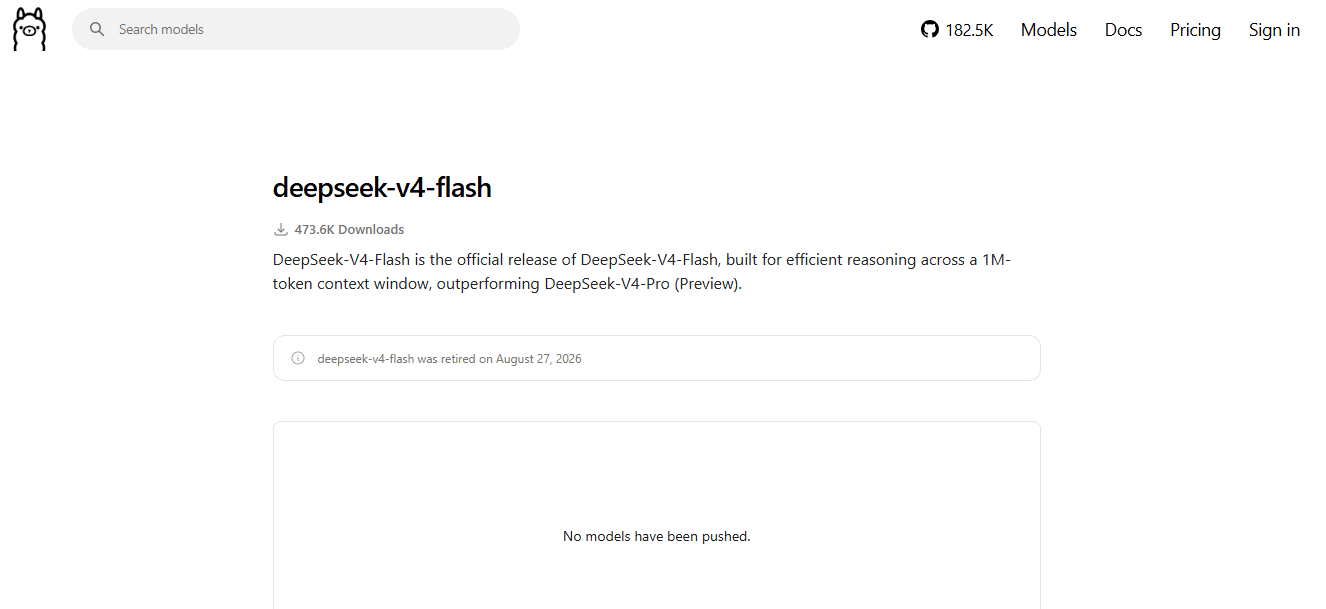
deepseek-v4-flash | Old/retired Ollama library page and legacy DeepSeek API name context | No. Ollama says it was retired and no models have been pushed. |
deepseek-reasoner | Old R1-era DeepSeek API examples | No. Do not use it for local Ollama setup. |
Ollama’s deepseek-v4-flash page says that model was retired on September 25, 2026 and that no models have been pushed. DeepSeek’s own API docs say the old deepseek-v4-flash API name is a legacy compatibility name served by V4.1 Flash, not a recommended local Ollama path. Ollama deepseek-v4-flash page DeepSeek Models & Pricing
What DeepSeek-R1 is, and why it is the local starting point
The original DeepSeek-R1 model card describes R1-Zero, R1, and six distilled dense models based on Llama and Qwen. It lists the original full R1 checkpoint as 671B total parameters and 37B activated parameters. These figures do not describe the memory needed for every later Ollama tag.
For local use, most people should focus on the distilled versions first. The full 671B model is not a normal laptop target. Ollama makes the smaller tags easier to pull and run, which is why deepseek-r1:1.5b, 7b, 8b, and 14b matter for practical Windows and Mac users.
The DeepSeek-R1-0528-Qwen3-8B model card covers the later Qwen3-based 8B distillation. Use the identity and configuration for your exact tag; do not assume the original R1 release, every older 8B download, and R1-0528-Qwen3-8B are identical.
Privacy: is running DeepSeek locally private?
A downloaded model running on your own machine keeps that model’s inference local. A local Ollama window, local API address, or successful answer is not the same guarantee. Review the server, model, and any connected tools as separate parts of the workflow.
However, local does not automatically mean risk-free. Your prompts, files, shell history, local app logs, third-party GUIs, plugins, agents, and connected tools can still create privacy or security risks. Do not expose the Ollama local server to the public internet. Do not paste regulated, client-confidential, password, private-key, medical, legal, or financial data into any workflow unless you understand every app and tool connected to the model.
For a broader comparison of local and hosted risks, see our DeepSeek safety and privacy guide. No setting in this tutorial certifies regulatory compliance or every third-party application connected to the model.
Disable Ollama Cloud for a local-only setup
After installing Ollama, back up any existing ~/.ollama/server.json, then add or update this property. On Windows, the user-home equivalent is $HOME\.ollama\server.json. Preserve other settings and do not duplicate the key. Create the folder or file only if it does not exist.
{
  "disable_ollama_cloud": true
}
Restart Ollama after saving. The alternative is OLLAMA_NO_CLOUD=1 in the server process’s environment, followed by a restart. Setting it only in a Python terminal does not change a separately running server. These options disable Ollama’s cloud models and web search; they are not an operating-system firewall. Ollama FAQ
Confirm the setting on the server you actually use
Check the current startup log for Ollama cloud disabled: true. For the standard desktop installation, the latest server log is ~/.ollama/logs/server.log on Mac or %LOCALAPPDATA%\Ollama\server.log on Windows. A server started manually writes to its terminal. Ollama log locations
Use a fresh startup entry, not an old match from another instance. Then return to the Windows or Mac run steps and the local model verification. If the setting cannot be confirmed, stop before entering sensitive data. Never publish a complete log merely to demonstrate this one setting.
Downloads and software updates can still need internet access. A separate client, search plugin, telemetry component, or provider fallback needs its own review; disabling Ollama Cloud is not a promise that every process on your computer is offline.
Troubleshooting common problems
| Problem | Likely cause | What to check |
|---|---|---|
ollama command not found | Installation or PATH setup is incomplete, or the terminal has not been reopened. | Use the official installer, reopen the terminal, and verify ollama --version. |
| Connection refused on port 11434 | Ollama is not running, or it is listening on a different address or port. | Open the app and verify its local bind settings before changing the client. Do not switch to a cloud service just to hide the error. |
| Model not found through the API | The exact tag is not installed on the server receiving the request. | With the local host selected, run ollama pull deepseek-r1:8b, then check the same server with ollama list. |
| Model download is slow | The file is large or the network is slow. | Try the 1.5B tag first. Confirm free disk space and allow the download to finish. |
| Very slow output or an out-of-memory error | The model, context, or concurrent workload exceeds practical hardware capacity. | Choose a smaller tag, shorten context, and inspect local memory use; do not infer a universal RAM minimum from download size. |
deepseek-v4-flash does not run | The Ollama library page is retired and lists no pushed models. | Use an available deepseek-r1 tag for this guide. |
| Python reaches an unexpected server | A default client used an existing OLLAMA_HOST value, or another wrapper selected a server. | Use the explicit Client(host="http://127.0.0.1:11434", ...) example. Verify the destination in the actual process. |
| A localhost request uses cloud inference | The selected model is a cloud reference, or another application has a hosted fallback. | Check the model, server cloud-disable setting, fresh startup log, and client fallbacks. Localhost alone is not a sufficient check. |
| Local-only setting seems ineffective | The wrong file, OS account, or server instance was edited, or the server was not restarted. | Check the account running Ollama, reload the correct instance, and verify its current startup log. |
| Local HTTP requests fail in a managed network | A client or system proxy is affecting the route. | Review proxy bypass for loopback with your administrator. Use the Python example’s explicit HTTPX settings where appropriate. |
| Bash cURL example fails in PowerShell | Shell syntax or the curl executable/alias differs. | Use the PowerShell Invoke-RestMethod block rather than copying Bash continuations. |
| JavaScript reports an import syntax error | The example was run as the wrong module type or outside its npm project. | Save it as local-deepseek.mjs, install ollama in that project, and launch it with Node.js. |
Useful Ollama commands for local DeepSeek
Run these CLI commands in a terminal already directed to the local server, as shown in the Windows and Mac setup steps. In a new terminal, repeat the appropriate OLLAMA_HOST assignment first. The Ollama CLI reference documents the command families.
| Task | Command |
|---|---|
| Run the default DeepSeek-R1 model | ollama run deepseek-r1 |
| Run the 8B tag | ollama run deepseek-r1:8b |
| Run the 1.5B tag | ollama run deepseek-r1:1.5b |
| Update the default DeepSeek-R1 model | ollama pull deepseek-r1 |
| List model entries on the selected server | ollama list |
| Remove a model | ollama rm deepseek-r1:7b |
| Exit interactive chat | /bye |
| List models currently loaded | ollama ps |
| Unload the 8B model from memory | ollama stop deepseek-r1:8b |
When local DeepSeek is a good fit
- You want to test AI locally without a DeepSeek API key.
- You want a local chatbot for low-sensitivity study, drafting, coding help, or experiments.
- You want to call a model from a local script through
localhost:11434. - You want to compare small and large R1 variants on your own hardware.
- You want to avoid sending every prompt to a hosted API.
- You are comfortable with local model limitations, slower speed, and hardware constraints.
When local DeepSeek is not the right fit
- You need fast production-scale inference without managing hardware.
- You need DeepSeek’s current hosted API model such as
deepseek-flash. - You need a server-grade model but only have a low-memory laptop.
- You need guaranteed uptime, monitoring, concurrency, and support.
- You need a model with current hosted API features that are not exposed through your local setup.
- You cannot review privacy and security risks from connected apps, plugins, or local agents.
Frequently asked questions
Can I run DeepSeek locally?
Yes. Install Ollama, direct the client to your own local server, and select a downloaded deepseek-r1 tag. The default currently points to the 8B version; use deepseek-r1:1.5b for a lighter test.
Can I run DeepSeek locally on Windows?
Yes, on a supported Windows installation. Install Ollama, complete the local-only checks, then run ollama run deepseek-r1:8b in PowerShell with the local server selected.
Can I run DeepSeek locally on Mac?
Yes, on a supported Mac. Install and open Ollama, complete the local-only checks, then run an R1 tag from Terminal. Choose the size based on available memory rather than assuming every MacBook can run the same model.
What is the easiest command to run DeepSeek with Ollama?
The easiest command is ollama run deepseek-r1. To control the model size, use a tag such as ollama run deepseek-r1:8b.
Which DeepSeek model should I use in Ollama?
Start with deepseek-r1:8b, deepseek-r1:7b, or deepseek-r1:1.5b. Move up to 14b, 32b, or larger only if your hardware can handle it.
Is deepseek-r1 still the right Ollama model?
Yes, for local Ollama use. Ollama’s current deepseek-r1 page lists the model family and shows ollama run deepseek-r1 as the default command.
Is DeepSeek R1 the same as DeepSeek V4.1 Flash?
No. DeepSeek R1 is a reasoning model family commonly used for local Ollama setups. DeepSeek V4.1 Flash is the current hosted DeepSeek API Flash route called with the API model name deepseek-flash.
Can I run deepseek-flash locally with Ollama?
Do not treat deepseek-flash as an Ollama local tag. It is the DeepSeek hosted API model name for DeepSeek-V4.1-Flash in DeepSeek’s official API table.
Why does deepseek-v4-flash not work in Ollama?
Ollama’s deepseek-v4-flash page says it was retired and that no models have been pushed. Use deepseek-r1 for local Ollama setup instead.
Do I need a DeepSeek API key to run DeepSeek locally?
No DeepSeek key is needed for downloaded local Ollama models. However, absence of a key in a localhost request does not prove local execution: a signed-in Ollama server can authenticate a cloud-model request itself. Ollama authentication documentation
Does Ollama run fully offline?
A downloaded local model can run without cloud inference once installation and model downloads are complete. Disable Ollama Cloud for a local-only setup, then check any external tools, updates, and application fallbacks separately. Localhost by itself is not an offline guarantee.
Is running DeepSeek locally private?
Local inference reduces exposure to a remote model provider, but only when the selected model actually runs locally. Privacy still depends on clients, plugins, agents, logs, files, network configuration, and the people with access to the device.
What hardware do I need?
Requirements depend on the exact model, quantization, context, runtime, and other applications. Download sizes are storage figures, not minimum RAM or VRAM. Start with a smaller tag and check real memory use and response speed before moving up.
Why is DeepSeek slow in Ollama?
The model may be too large for your hardware, the prompt may be too long, or the context window may be too large. Try a smaller tag, reduce prompt length, and close other memory-heavy apps.
How do I call the local API from Windows PowerShell or macOS Terminal?
Use the PowerShell Invoke-RestMethod block on Windows or the cURL block on Mac. Both address http://127.0.0.1:11434/api/chat and request deepseek-r1:8b; download the tag and verify local-only settings first.
Why can a Bash curl command fail in Windows PowerShell?
Bash and PowerShell use different line-continuation and quoting rules. In some Windows environments, curl may also resolve differently from the standalone curl executable. Use the PowerShell-native Invoke-RestMethod example, or explicitly use curl.exe with Windows-appropriate quoting.
Bottom line
A practical way to run DeepSeek locally on Windows or Mac is to install Ollama and choose a downloaded deepseek-r1 tag. Start with 1.5B for a lighter check, or evaluate 8B when your available memory supports it. Use the separate shell examples for installation and HTTP calls.
Verify the client destination, the model’s execution location, and the server’s cloud setting. Keep the explicit local host in code and CLI sessions, confirm Ollama’s cloud-disabled startup state, and review connected apps separately. Hosted DeepSeek API identifiers and Ollama Cloud are different routes—not substitutes for a verified local R1 setup.
Official sources checked
- Ollama Windows download; Ollama macOS download; Windows system requirements; macOS system requirements
- DeepSeek-R1 tags and download sizes; Ollama Quickstart
- Ollama API base URLs; Local API and cloud authentication; Ollama OpenAI-compatible endpoints
- Ollama cloud-disable settings and server configuration; Ollama logs and troubleshooting; Ollama CLI reference
- Official Ollama Python library; Ollama Python client implementation; Official Ollama JavaScript library; HTTPX environment settings
- Retired Ollama deepseek-v4-flash listing
- Original DeepSeek-R1 model card; R1-0528-Qwen3-8B model card
- DeepSeek hosted models and pricing